


LuMags
Inspiring
July 8, 2020
Answered

The "Video is VR" checkbox no longer available

  • July 8, 2020
  • 1 reply
  • 964 views

Hello world, 

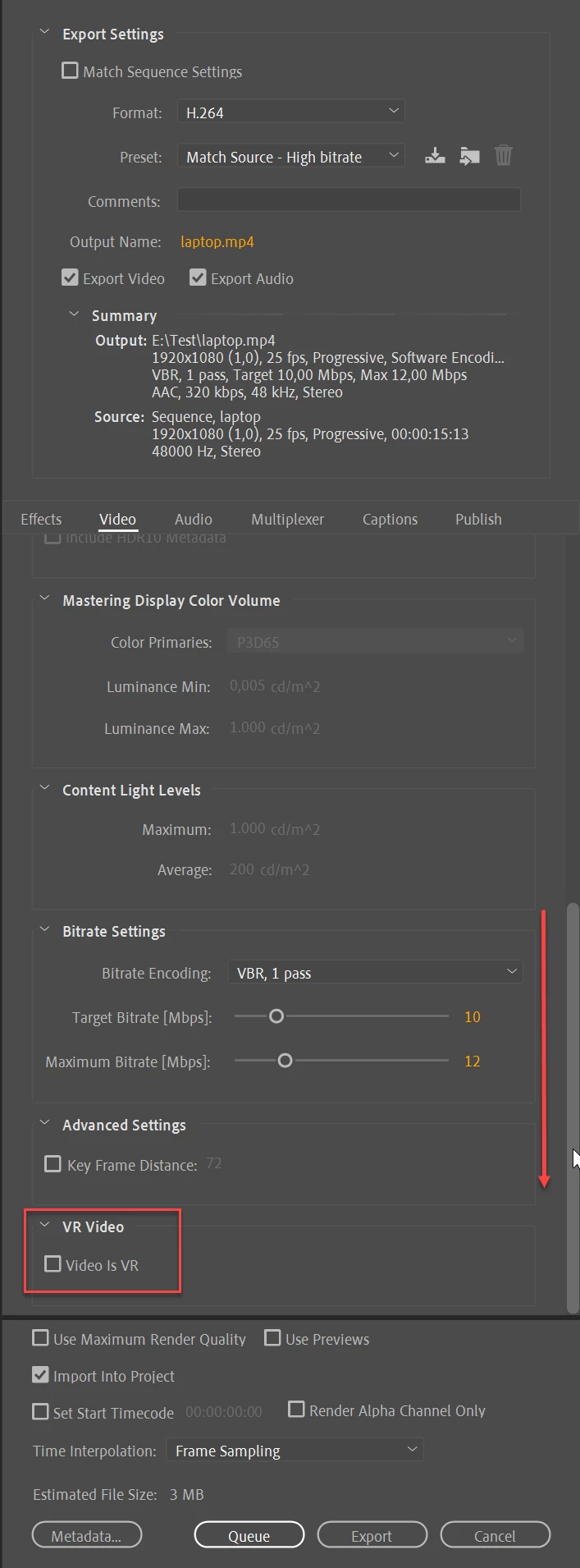
Since the latest CC update I don't appear to have the "Video is VR" checkbox available when exporting video. 

I have a 360 video, have stitched it, imported it. You can pano around with it on Premier via preview button. Export can be 360 but only when you click the 360 icon. Previously it'd automatically go into 360 mode.

In YouTube it's not detecting as a 360 video. 

Has the workflow changed and where can I relearn it for 360 videos please? 

Many thanks,

Lu
This topic has been closed for replies.
Correct answer Ann Bens

1 reply

Ann Bens
Community Expert
Community Expert
July 8, 2020

Did you scroll all the way down in the export settings?

LuMags
LuMagsAuthor
Inspiring
July 8, 2020

Hi, I'm quite certain I went through all the tabs & drop downs on there. Even though I've got a massive screen I still have to scroll something chronic throughout Premier for a lot of features and settings. 

Where does it show on your system please? 

Ann Bens
Community Expert
Ann BensCommunity ExpertCorrect answer
Community Expert
July 8, 2020