


Participating Frequently
September 25, 2018
Answered

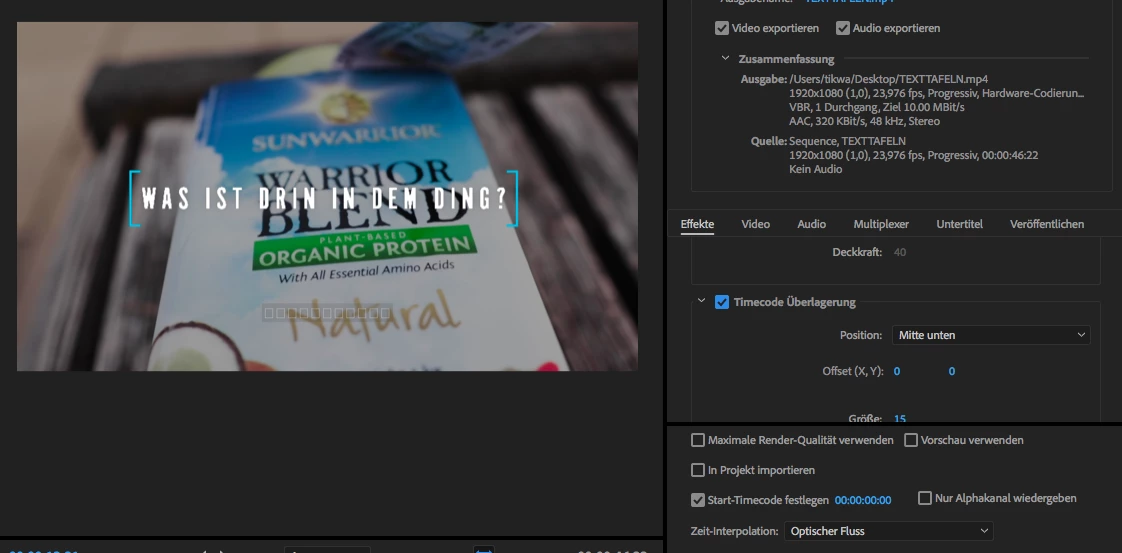
Timecode - Instead of numbers only squares appear.

  • September 25, 2018
  • 3 replies
  • 7094 views

Hi, maybe you can help me. My timecode in Premiere does not work. Instead of numbers, only squares appear. I have several versions of Premiere CC installed, but all versions have the same error. I'm using Premiere on a Macbook Pro 2017. What can I do?
    This topic has been closed for replies.
    Correct answer Jcalpayne

    Unfortunately not. Only boxes instead of numbers. I've read that Premiere uses for the timecode Arial.TTF as font. But this font is installed in my system.


    If you have a mac, I went to the Font book and checked Arial Font. On the bottom right it said I had multiple fonts for Ariel and I clicked Automatically resolve and it deleted the duplicates. It fixed the square issue.

    3 replies

    Bobby Boson
    Inspiring
    January 5, 2022

    I'm having the same problem. Seems like it didn't start happening until I installed Premiere 2022 on my mac. I've tried all the solutions listed here and nothing has worked. Any other ideas?


    Adobe Expert
    January 6, 2022

    Have you tried opening fontbook (a mac program that's installed by defualt) and selecting all your fonts and going file: validate fonts and seing if there are any issues...

    Bobby Boson
    Inspiring
    January 6, 2022

    I did this and it didn't work. The strange thing is that other text based effects work fine, such as clip name and simple text. I assume they all use the same Arial font, right? Arial and all its variations also work fine in the essential graphics panel. 


    New Participant
    July 6, 2020

    I know this is an old topic but I just ran into the same problem. The way I fixed it was rather simple so I wanted to post it in case someone else needs another option:


    -- This worked on my Mac and I haven't used a Windows machine recently enough to know if a similar solution exists --

    • I deleted the ARIAL font files from Font Book (I only moved them to the desktop, in case I needed them later)

         This made it so that adding the TimeCode effect in Premiere didn't display anything except the fields icon

         After adding that .ttf file for ARIAL back into the Font Book the squares came back so I figured it was a corrupt file

    •I was going to download a new .ttf ARIAL file from the internet, but I ended up having the idea to just copy the one from my laptop over to the iMac having the problem. I installed the .ttf file back into the iMac's Font Book and VOILA


    I followed the same process for the remaining ARIAL family .ttf files

    I hope this helps someone!

    Adobe Expert
    September 25, 2018

    Are you talking about the UI timecode display or some sort of burnt-in to the video timecode?

    Participating Frequently
    September 25, 2018

    Hi, i talk from the timecode you can add in the videos with effects/videoeffects/video/timecode. Thank you.

    Jcalpayne
    JcalpayneCorrect answer
    New Participant
    October 10, 2018

    Unfortunately not. Only boxes instead of numbers. I've read that Premiere uses for the timecode Arial.TTF as font. But this font is installed in my system.


    If you have a mac, I went to the Font book and checked Arial Font. On the bottom right it said I had multiple fonts for Ariel and I clicked Automatically resolve and it deleted the duplicates. It fixed the square issue.