Exit
  • Global community
    • Language:
      • Deutsch
      • English
      • Español
      • Français
      • Português
  • 日本語コミュニティ
  • 한국 커뮤니티
0

Timeline 'marker' doesn't move after updating to 24.5

Community Beginner ,
Jun 19, 2024 Jun 19, 2024

After updating when I play the timeline this marker doesn't move with it until I pause the playback
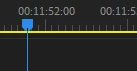
Fiona30833879qdkg_0-1718837442111.png

Is there any way to change this or is it a bug?

TOPICS
Editing , Error or problem , User interface or workspaces
969
Translate
Report
Community guidelines
Be kind and respectful, give credit to the original source of content, and search for duplicates before posting. Learn more
community guidelines
Community Expert ,
Jun 19, 2024 Jun 19, 2024

You'll need to provide way more info, than 'it doesn't work'.


You can be sure there would be many more posts than just one, if the time indicator wasn't moving in a version. So, it's something going on there, but without more info, we can't even hazard a guess.

Translate
Report
Community guidelines
Be kind and respectful, give credit to the original source of content, and search for duplicates before posting. Learn more
community guidelines
Community Expert ,
Jun 19, 2024 Jun 19, 2024
Translate
Report
Community guidelines
Be kind and respectful, give credit to the original source of content, and search for duplicates before posting. Learn more
community guidelines
Explorer ,
Jun 21, 2024 Jun 21, 2024

The same thing started happening to me today. No changes made to my system, worked fine Monday. The video plays correctly on the Program window, yet the timeline indicator does not move, and the seconds/frames counter does not advance.

When I stop the video, the timeline indicator will jump ahead to where I stopped it; the counter shows the correct seconds/frames. 

If I hold down the right arrow, the indicator will move and the counter will advance. This happens no matter which project I open.  

Translate
Report
Community guidelines
Be kind and respectful, give credit to the original source of content, and search for duplicates before posting. Learn more
community guidelines
Community Expert ,
Jun 21, 2024 Jun 21, 2024

Hey @BobGale57 

So, this is happening to more than a few now, so, glad you reported it. There's a thread around here where I believe a team member posted, so they are aware. If I find that thread, I'll let you know.


Translate
Report
Community guidelines
Be kind and respectful, give credit to the original source of content, and search for duplicates before posting. Learn more
community guidelines
Explorer ,
Jul 03, 2024 Jul 03, 2024
LATEST

Any more info on this? 

I can confirm, for me anyway, that video clips play as they should in the Source window, but as of this morning still the same issue with the Program window.  Doesn't seem to matter how I set the quality of the playback. I typically run the Program window at 1/2; I've tried 1/4 but that didn't fix it. 

On the other hand, the Source window plays as it should at all qualities. I run it at Full with no issues. Of course that doesn't help when editing. 

Thanks.

Translate
Report
Community guidelines
Be kind and respectful, give credit to the original source of content, and search for duplicates before posting. Learn more
community guidelines