


Inspiring
June 24, 2019
Question

Tint mask in Source view

  • June 24, 2019
  • 2 replies
  • 1041 views

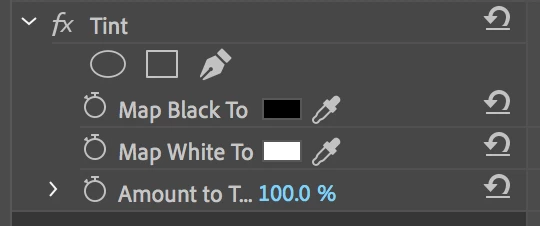
When I select a clip in a sequence (Program view) and add the tint effect, it shows masking options:
However, when I select the same clip in source view it does not:
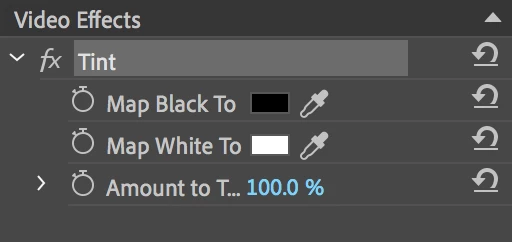
It that correct behaviour? Using 2019 on a mac. Thanks

This topic has been closed for replies.

2 replies

Inspiring
June 24, 2019

Why would you have to paste dozens of times? It sounds like you have one instance of the effect and mask. Can you just select all of your clips and batch paste? When I need to do stuff like this, especially if I might be changing the effect, I'll move all those clips into their own track so I can very easily select them to paste the updated effect. You could also put these clips on the bottom-most track with a single adjustment layer above them. This will let you have one effect and mask that applies to all your cuts. The rest of the clips can sit above the adjustment layer.

Inspiring
June 24, 2019

Yes that is what I am having to do, but the clips are in multiple sequences, and anytime I wanted to make a slight adjustment I would have to repeat this process (as well as remove all the existing instances)

So I was just after confirmation that it's behaving normally really

Inspiring
June 24, 2019

Gotcha. When I had to do similar things in the past, before Master Clip effects were a thing, I would start by nesting my clip and editing that in, that way I could avoid exactly this problem. It's not the most elegant solution, and it's certainly difficult, if not too painful, to retroactively implement, so I feel your pain.

Brainiac
June 24, 2019

I wouldn't expect any kind of effects to be added to a clip unless it's in a sequence.

Inspiring
June 24, 2019

Why, is it bad practice? I have a sequence with multiple cuts that already have the tint effect on, so it's easier to add it on the source than each individual cut

Inspiring
June 24, 2019

Thanks, but assuming it's 45 minute clip of a subject that wasn't changing position (eg: a lamppost) and there was an existing edit of multiple cuts spread out on different tracks and nested between various other footage that would be too difficult to nest, it would make sense to apply a master effect


For sure, but that's a very uncommon situation. Everything takes development time, so something as uncommon as needing masks on Master Clip effects wouldn't have been prioritized. If you don't want to, or cant, nest the cuts, can you copy the effect with the mask and paste? I feel like I've copied masks before.