



keithleyson
Known Participant
July 27, 2017
질문

Titles look anti-aliased or "fuzzy" in high-quality, 100% preview and exported video.

  • July 27, 2017
  • 4 답변들
  • 7425 조회

Hi guys,

Need help as I don't know what else to do with my Title inside my video.
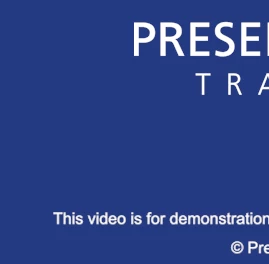
The image is a screenshot of the preview pane (high-quality, 100% scale) on Premier CC 2017. The text above (PRESE, TRA) is a PNG image and the one below (This video is for demonstration) is a regular title (Arial, regular, #fffff, 16px). As you can see, the title looks like I am using a bold font as well as a little "fuzzy" or anti-aliased or feathered - with edges not as defined and sharp as the text on the image on the top.

Here is another screenshot:

If there a way to make title texts clear, sharp, defined in premier?

Thank you!

이 주제는 답변이 닫혔습니다.

4 답변

keithleyson
keithleyson작성자
Known Participant
August 2, 2017

Just for those who are still looking at this post, I have since abandoned looking for a solution to this since it is still giving me fuzzy titles

Solutions tried:

-upping bitrate to 20Mbps did not solve the fuzziness in the titles - it only increased the output file size

-the preview is still the same. I don't really care about the preview window and this video is supposed to be viewed at a fixed 1280x720 area on the browser - not scalable, not resizable, fixed! So in the preview pane, it should not be viewed in fit but 100%.

Jeff Bugbee
Community Expert
Community Expert
August 2, 2017

I just did some testing, what is your sequence resolution set to? If I set it low and export, it comes out fuzzy at 720. Can you try it at 1080, adjust your titles, then export at 720?

keithleyson
keithleyson작성자
Known Participant
August 2, 2017

Just tried and it resized all the titles but the imported video (video captured sent to me) remains the same size. Resizing it distorts the whole Excel presentation.

Jeff Bugbee
Community Expert
Community Expert
July 27, 2017

What format are you exporting to and what is the bitrate?

keithleyson
keithleyson작성자
Known Participant
July 28, 2017

MP4

720p

Target 2.5Mbps

Maximum 3Mpbs

Jeff Bugbee
Community Expert
Community Expert
July 28, 2017

Can you do a test export at a higher bitrate, say 20Mbps, and see if the titles are still fuzzy?

Legend
July 27, 2017

The Essential Graphics titles are a whole new ballgame using newly written code.  I don't know if this applies to such titles.  But with the older titles, PP did apply anti-aliasing with no way to turn that off.  Users could create their titles in Photoshop or AE which had user controls for anti-aliasing.

keithleyson
keithleyson작성자
Known Participant
July 28, 2017

Yes creating custom titles using AE or even Photoshop does work great. Unfortunately, it would be very difficult in this case since I am doing about 200 small videos in about using Excel. using a Closed Caption would have been easier but alas I need to follow a "design". Demo here https://www.fitforbanking.com/html5/video.php (a lot of issues in this project I know)

Ann Bens
Community Expert
Community Expert
July 28, 2017

Up your bitrate as said in previous post and set Preview window to FIT.

Participant
July 27, 2017

Keith,

I have had this issue since the new update with Essential Graphics, although it appears blurry in the preview pane, mine always export very crisp. Have you tried exporting it and checking it?

keithleyson
keithleyson작성자
Known Participant
July 28, 2017

It is blurry in the final MP4 export as well.