


Track Matte Key applied to video not equal to sequence settings
I have an unusual problem that I can't figure out. We're putting together a show where we need to edit vertical versions of a 16x9 timeline.
My timeline is 1080x1920 (Vertical video) - we want to have multiple "windows" in the 9x16 version.
I've made a track matte with alpha in Photoshop that I'd like to apply to a video layer, so that I can scale up and down the original video to fit the vertical frame (essentially creating a split screen)
However, no matter how many ways I try, the track matte changes shapes and the original video scales in unusual ways.
This works perfectly fine with the same assets in After Effects, but will not work in any version of Premiere with any video.
The reason this appears to happen is because the original video needs to be the same size as the sequence in order for the track matte to work (it works if we nest the sequence, but this defeats the purpose since we're already cropping and downscaling the source video)
Has anyone working with digital media encountered this problem? Its very specific but it's also counter intuitive to the way I think Track Matte's should work.
Tried in both Premiere Pro 2019/2020 and on different systems. It's a software problem, not a hardware one. (I've also turned off METAL and OPEN CL to do just Software rendering with the same issue.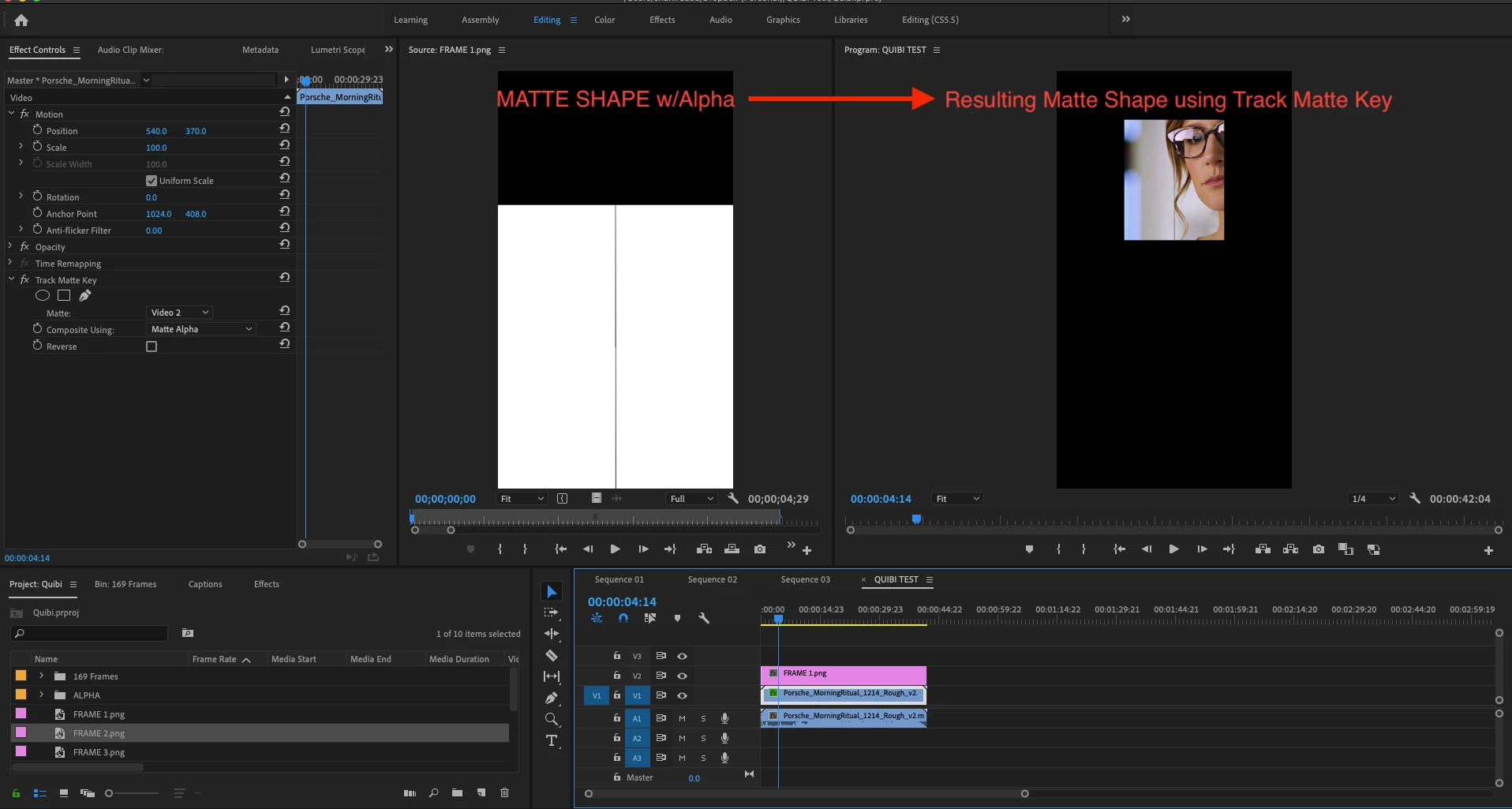
 AdChoices