- Home
- Premiere Pro
- Discussions
- Track matte key in Premiere Pro 2022 not working
- Track matte key in Premiere Pro 2022 not working

Copy link to clipboard
Copied
I created a lovely track matte key animation as part of a transition in Adobe Premiere Pro 2021, now that I've updated to 2022 it's stopped working. Please can you fix this ASAP.
I've had to re-create this in After Effects but it just does not look the same and I can't revert my project back to Premiere Pro 2021 too which is also really annoying.


 2 Correct answers


Found the issue:
Track matte works just fine but cannot handle scaling and different resolutions.
Have to go now. Send you the project later this day.


Global FX Mute by any chance checked?
 47
Replies
47
47
Replies
47


Copy link to clipboard
Copied
Make a copy of your backup project.
Open 2022. Import the copy of the 2021 project into it.
Does the animation work now?

Copy link to clipboard
Copied
Bumped into the same issue with the 2022 update. When can we get a fix for this Trak Matte problem? I have had to export separate layers and recreate in 2019 to add the track Matte Key. Help

Copy link to clipboard
Copied
I have no troubles with the Track Matte effect in projects created in the 2022 version. So ... this would seem to be an issue from project migration. So, some troubleshooting questions seem useful.
- If you create a project in 2022, and add the Track Matte effect, does it work properly?
- When migrating the project, did you create a new project in 2022, then from MediaBrowser, select the old project file and Import the assets to the new project file? This is by far the safest, most reliable way to migrate. "Opening" an old version project in a new version is prone to issues.
- When opening the project in 2022, did you first delete all cache files? That's another area that is rife with troubles.
Neil

Copy link to clipboard
Copied
Having the same issue. Track matte key with a black and white alpha mask on it does not work anymore, this is really annoying.
Copy link to clipboard
Copied
Works fine here:
what exactly does not work.
Post screenshot matte, effect controls and timeline.

Copy link to clipboard
Copied
I am having this same issue with the Set Matte. I am trying to use the matte on a background video clip. The matte works, but no longer plays. I tried all of Neil's suggestions: creating a new project in 2022 and deleting all cached files, but still having the issue.
I am so frustrated with the frequency with which I run into bugs lately in Adobe's software. I would just use earlier versions of the software if my clients and coworkers weren't also working off the latest updates.
Please help!!

Copy link to clipboard
Copied
Much agreed... Adobe has really fallen off the wagon with the functionality of their apps. It doesn't help when so many of the Community professionals are never having these issues. Not very reassurring.
Copy link to clipboard
Copied
The reason so many of the ACPs aren't having these issues illustrates the HUGE frustration for so many issues in Premeire right now. Perfectly.
Which is ... the variability of performance. Most users aren't having any of the weird issues that some are. But there are so many users using them, that even if a relative few users have them, that's still in total numbers rather a large group. Even if it's say less than 1%.
And I've been on the short end myself of course ... most of us have. So total sympathy about having this crud hit you. And the others reading this. It's frustrating to me that I can't replicate things that others face.
So keep posting here, and especially keep posting buggy behavior data on their UserVoice system, as that is the actual input portal for both the engineer's system and the all-importan M&E people above the teams who make the overall decisions.
I've noted that BM's Resolve is also trying to be a Swiss-Army knife app, one size for everything/everyone/every workflow ... and from working with it, and following/participating on both the LGG and BM forums, they've having more of the bugs and variablity between user things also.
I think it may be endemic with the be-all-for-everyone approach.
Neil

Copy link to clipboard
Copied
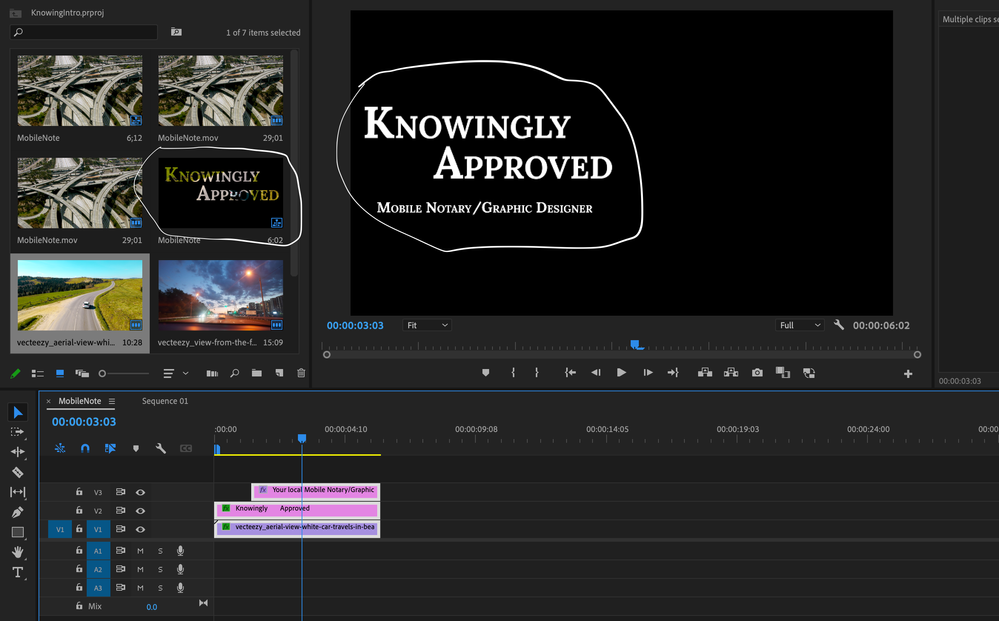
Your screenshot shows a timeline that needs to be rendered.
I too currently have a project where I'm utilizing Track Mattes without issue.
As happy as a clam in butter sauce!
Copy link to clipboard
Copied
I am having this same issue with the Set Matte. I am trying to use the matte on a background video clip (animated logo). The matte works, but the video clip (animated logo) no longer plays. I tried all of Neil's suggestions: creating a new project in 2022 and deleting all cached files, but still having the issue.
I am so frustrated with the frequency with which I run into bugs lately in Adobe's software. I would just use earlier versions of the software if my clients and coworkers weren't also working off the latest updates.
Please help!!
Sorry for the multiple replies; I'm not seeing how to delete or edit my previous ones.
Copy link to clipboard
Copied
Sorry for the multiple replies; I'm not seeing how to delete or edit my previous ones.
By @dariusfarraye

Fixed.
Copy link to clipboard
Copied
I've noticed you have V2 visibility turned off ... could that be the problem perchance?
Neil

Copy link to clipboard
Copied
Well, Neil isn't having issues. So we are clearly making it all up.
Copy link to clipboard
Copied
NO freaking clue what that comment was about ... jeez louise ... basic troubleshooting requires checking for what potential causes might be involved. So comparing the gear/media/effects between those having and not having something is an essential part of solving the problem.
And never ever did I question that anyone was having this problem ... so, what the ?
I'm simply trying to sort out what might be causing the problem by asking questions to learn things that might be useful in coming up with a solution ...
Neil
Copy link to clipboard
Copied
R Neil Haugen, perhaps AShraderjr is responding sarcastically to all the Adobe Community Professionals who seem to find it necessary to emphasize that the issue is clearly not occurring on their end... which indirectly, communicates to all of us here who (ironically) are having the same issue and therefore found this post, that the problem is clearly on our end and not Adobe's. Maybe if the Community Professionals would just proceed to ask questions in pursuit of assisting the customers with whatever issue they are having instead of starting off by communicating in a way that seems like they are trying to save face for Adobe, these support posts wouldn't always feel so condescending. I'm not trying to target you or even come across rude, myself. I'm just saying that the last thing a frustrated customer wants to hear from tech support is "well, there's nothing wrong on my end." Maybe it's just an issue of “bedside manner."

Copy link to clipboard
Copied
Copy link to clipboard
Copied
This is mine, in the preview is the way I want it to look but in the work area it is not transparent
Copy link to clipboard
Copied
Global FX Mute by any chance checked?
Copy link to clipboard
Copied
It worked, thank you 🙂
Copy link to clipboard
Copied
Set Matte is an obselete effect
The Set Matte effect was originally developed for After Effects. It is included in Premiere Pro only to provide compatibility with projects created in earlier versions of After Effects that use the Set Matte effect.
V2 visibility is turned off.
If the logo reveal clip has a alpha channel you do not need to use a matte effect.

Copy link to clipboard
Copied
Ok It is an obsolete effect but what can we use instead? Im adding grafics over my edit and using a matching alfa to mask the clip. but the track mat is not matching in speed. it first go to slow then to fast.
I need this editable so I can run it past the color grade and also the client can change their mind. I now spent 3h trying to figure this out and a workaround. As I'm handing this over to another person tomorrow morning (9h from now) I need to get this fixed. I can't run it past AE. This is so simple you have a rendered-out matt that you need to mask a footage. The track mat works just not correctly.
Copy link to clipboard
Copied
Not quite following your workflow (Set matte is obsolete, track matte is not).
The workflow would be to nest the clip on V1 and add the track matte to that nest.
Inside the nest, you can animate the clip.
The image on V2 used as a mat can be animated as well.
Both matte and clip will move independently of each other.
You can also use the Ess. Graphics.
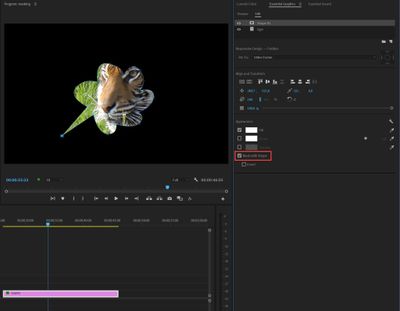
Both mask and image can be animated independently.
Copy link to clipboard
Copied
I was and are tired as I'm at delivery.
Clarification only using Track Matte Key effect
Here I'm showing the same alfa used thru-out. the only difference is I have the track matte key effect enabled.
As you can see it lags behind then speeds up again when I'm using the track matte key effect. I even switch the effect on and of at the end and the output vs input don't match.
Copy link to clipboard
Copied
Hard to say what is going on.
Can you upload a project with just the matte?

-
- 1
- 2

Get ready! An upgraded Adobe Community experience is coming in January.
Learn more
 AdChoices