Well, in Premiere whether you render from the Sequence menu or choose Render and Replace, you're encoding a separate video file, so even those options are somewhat similar. That is where I'm saying you may as well just export it straight from After Effects, because in every scenario you are choosing a codec and letting a software encode a video. And if you're doing Render and Replace then you have to replace with original every time you make an update in AE and then do Render and Replace again, (so you might even save a step by just rendering a preview in Premiere).
In Premiere you can right click on a piece of media and choose Replace Footage (just like in AE):
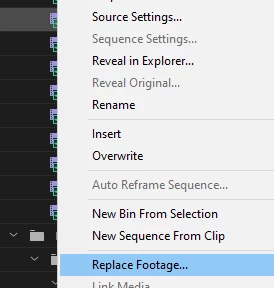
So if you go the method of iterating when you export from AE:
Shot_01_VFX_01
Shot_01_VFX_02
Shot_01_VFX_[...]
You just replace the file in Premiere with the new one you just exported from AE and it will update the replaced shot in your sequence(s). To me that's roughly the same amount of work as what you're doing already - but without any of the entanglements that come with Dynamic Link.
And the other option was simply to overwrite the file when you export from AE and use the same name. When you go back to Premiere the file should update (although I recommend not having your playhead over the clip you're about to replace in Premiere because you can get a glitched frame there until you restart Premiere).
I don't have a video, but hopefully that was illustrative - or maybe I just repeated myself 😞
I know it may not be what you're looking for - it's a slight adjustment to what you're doing. But in my experience and from what I've seen working in various agencies and production companies, this is a far more stable way to go. Personally, I don't maintain a dynamic link unless it's a very simple and temporary personal project (although I will almost always use it to send clips or sequences to AE.) It may not help you that much on your current project (maybe the specific shot), but just something to think about for future reference. Again - I know it's frustrating. You want it to work. It won't be the last time this or another software doesn't work exactly how you want it. You just gotta adapt to what does work and hopefully not office space your computer in the process 😉




 AdChoices