

Inspiring
September 23, 2022
Answered

Transcribe Sequence greyed out

  • September 23, 2022
  • 5 replies
  • 43750 views

Running the latest version but Transcribe Sequence is greyed out when i try to transcribe in order to create closed captions. What gives?

Correct answer OJ1234567

Could you share your OS and OS version? Let us know what you see in the Transcript tab and check if the Re-transcribe sequence option is available. 
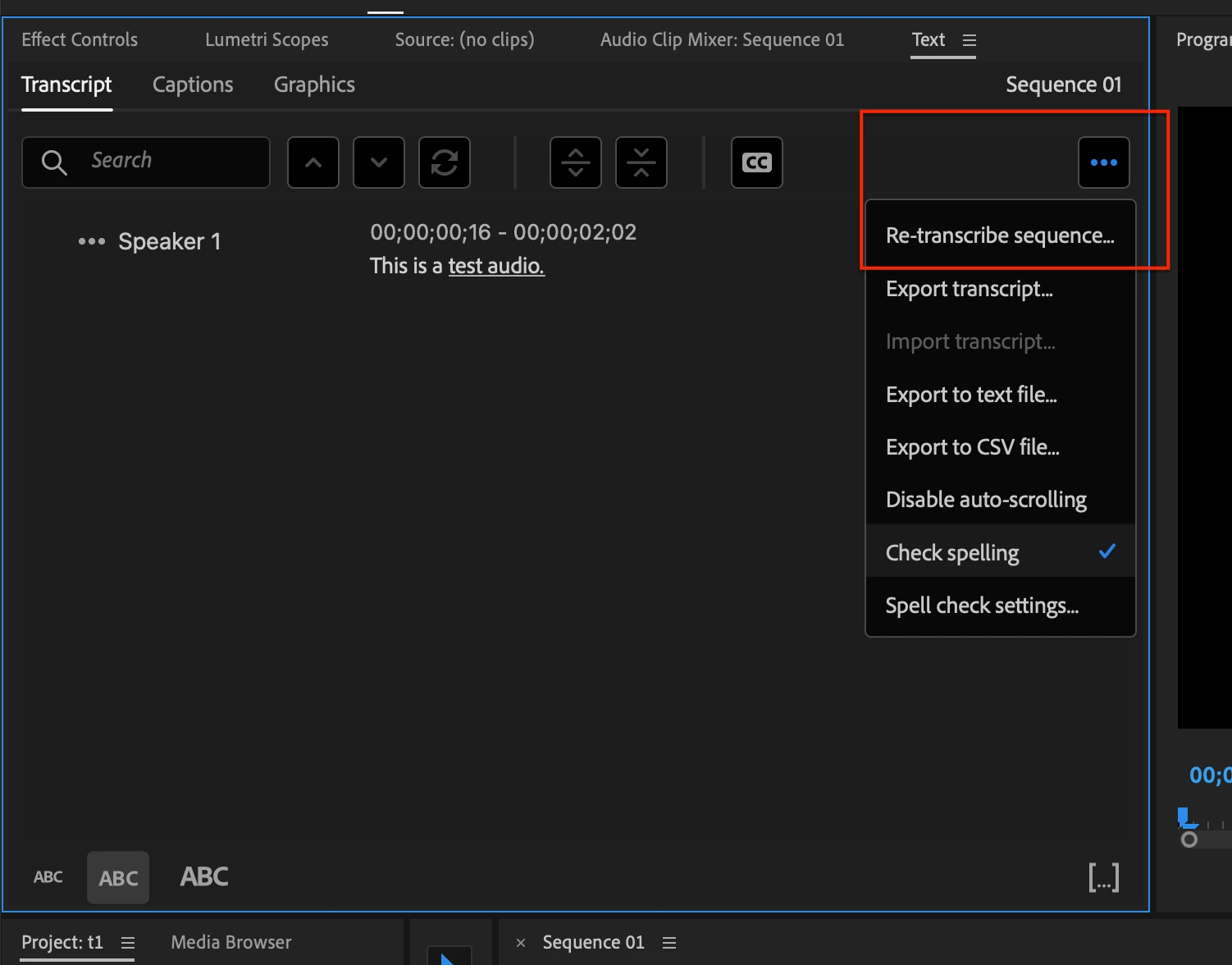


Sorry. I've been out of state on a shoot the last few days. Problem solved. When i clicked on "Transcript" in the captions window– there were already some transcriptions in there even though it wasn't complete and I do not remember ever asking for it. At any rate I clicked on the three little dots and hit "re-transcribe". From that point Premier Pro worked as expected. I guess another case of operator error? Thanks for the help everyone.


5 replies

Participating Frequently
November 19, 2024

Helllo friends.  I solved my issue by rendering and replacing my audio in the sequence I wanted to transcribe. I was workring with proxies so I think the the transcribe part of Prem was seeing my media as 'offline'

Participant
February 6, 2024

I was having the same issue and I think it's happening with the addition of text-based editing! What I did was hit "create static transcript" so it Won't change when you edit the video but if you have a final cut that should be fine. It'll re-transcribe the sequence and re-transcribe will be clickable, in case you need to do it again. 

Participant
August 6, 2023

I'm having the same problem.  Re-transcribe is greyed out.

Stan Jones
Community Expert
Community Expert
August 6, 2023

Andrea,


Thanks for the screenshot; very helpful. This thread started in an older version of PR, and, as discussed above, the workflow has changed (with 23.4 and newer) to add a Source Media transcription in addition to the Sequence (Static) Transcription. There is a learning curve.


You are in the "sequence" view of the transcript tab. We know this for two reasons: 1) in the bottom left where you have "Active monitor" checked, it has Sequence showing and 2) in the 3 dot drop-down menu, you have the option for "static transcript."


You have a transcript, so that transcript must be from the transcripts of one or more Source Media. What is greyed out is "re-transcribe." It is greyed out for the Sequence view because you can only "re-transcribe" the original Source media clips.


Whether you need to a) re-transcribe one or more source media transcripts or b) create a static transcript of the sequence depends on your workflow.


Stan


Participant
August 6, 2023
Thanks, Stan. Yes, I'm editing a multicam sequence. I'd like a
transcription of all speaker tracks in the sequence and ideally not a
static transcript so that I can continue text-based editing. Is that
possible?
Ishan Y
Community Manager
Community Manager
September 23, 2022

Hey,


Sorry about the issue. Which version of Premiere Pro are you currently working on? Please refer to this link and let us know if that helps.


Thanks,

Ishan

OJ1234567Author
Inspiring
September 23, 2022

version 22.6.2 (build 2)

i've done the things in the link to no avail

Ishan Y
Community Manager
Community Manager
September 26, 2022

Could you share your OS and OS version? Let us know what you see in the Transcript tab and check if the Re-transcribe sequence option is available. 


Stan Jones
Community Expert
Community Expert
September 23, 2022

Please post some screenshots. It is working normally for me.


Stan


OJ1234567Author
Inspiring
September 23, 2022

thanks for troubleshooting this for me. Screen shot attached.

Stan Jones
Community Expert
Community Expert
September 24, 2022

The screenshot shows the Caption tab in the Text panel, with "Transcribe Sequence" greyed out, and "Create new caption track" and "Import captions from file" active. Probably not your issue, but you will see that if you have already transcribed the sequence but have not created captions. Switch to the Transcript tab. If you do not see the result of a transcription, is the "Transcribe sequence" button there greyed out?


One user with this problem reported being helped by support, but we never did learn how they fixed it. @Ishan Y, do we have any more info about the best way to get help once the troubleshooting steps have been followed?


Stan