


Participant
July 22, 2019
Answered

Transform boxes do not appear in Program window
  • July 22, 2019
  • 4 replies
  • 3527 views

Hello everyone!

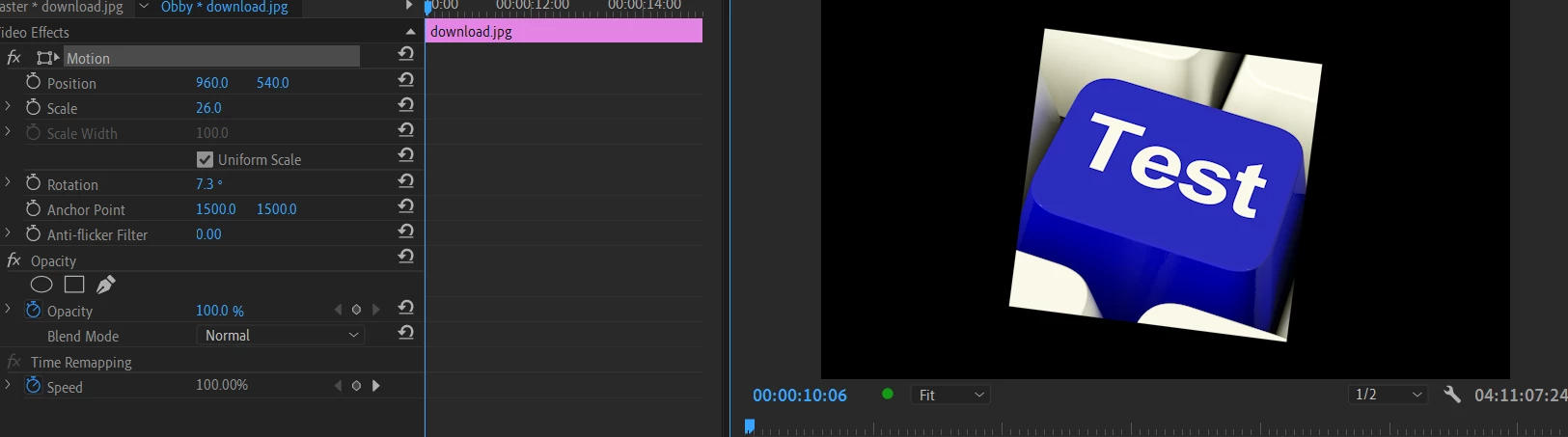
A constant issue on my Premiere 2019 is that when I use any transforming tool(ex: Motion) in the Program window, the blue box does not not show up. My cursor does change to the different tools and I am still able to use the transform, but it is as if the box is invisible. I can still work with it but it causes unneeded confusion. The boxes also do not appear when editing text, too.

Many thanks,

Zane

    This topic has been closed for replies.
    Correct answer Ann Bens

    Make sure scaling in windows OS is set to 100 or 150%.

    It sometimes help to resize the Program Window manually.

    4 replies

    Legend
    July 22, 2019

    I've seen folks report this when the Program Monitor is too small due to insufficient screen size/resolution.

    Make sure you're using a 24" 1080 screen at a minimum.  (Yes, that means Laptops are not suitable for this kind of work.)

    Ann Bens
    Community Expert
    Ann BensCommunity ExpertCorrect answer
    Community Expert
    July 22, 2019

    Make sure scaling in windows OS is set to 100 or 150%.

    It sometimes help to resize the Program Window manually.

    Participant
    July 23, 2019

    Thanks so much! Turning my Display Setting Scaling from 125% to those percents worked, and I could even turn it back to 125% after I open Premiere first!

    Stan Jones
    Community Expert
    Community Expert
    July 23, 2019

    nevinm71254871  wrote

    ...I could even turn it back to 125% after I open Premiere first!

    Changing windows advanced scaling requires signing out/back in to windows. Let us know if you find a way to make this work. Resizing the program monitor may result in finding a sweet spot that shows the box, but this "fix" does not last.

    Inspiring
    July 22, 2019

    Do the transform options appear if you click the 'transform icon' (the little square next to the word 'motion') in the effects panel.

    Otherwise, do you have more than one monitor? It might be a similar issue to the following: No transform controls

    Inspiring
    September 13, 2019

    How do you get the transform icon to appear? I don't seem to have one!

    Legend
    July 22, 2019

    You wouldn't be looking at the Reference Monitor instead of the Program Monitor, by any chance, would you? If not, it's likely a bug.