


Participating Frequently
January 17, 2018
Answered

Transparency or Opacity control no longer viewed in the sequence only in effect controls?

  • January 17, 2018
  • 3 replies
  • 6815 views

Hello!

Why in Premiere Pro CC2018 do I not see the Transparency or Opacity control in the sequence but only in effect controls? It makes it very hard to see what layers are switched on or off.  Am I missing something? Just like you can adjust the audio levels by seeing the horizontal lines in any particular audio track and by clicking on the lines and making a dot and then raising the levels of the audio thereby raising the level of the entire track - why has this feature disappeared from the sequence for Video?

Please help!

Vidur
    This topic has been closed for replies.
    Correct answer Ann Bens

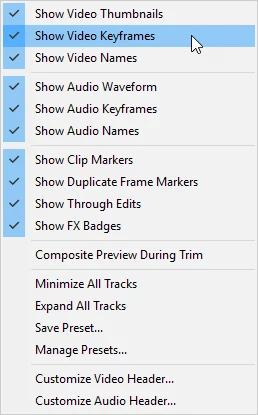
    Under the wrench in the timeline:

    3 replies

    WorkingTitleVP
    New Participant
    December 8, 2019

    YOU'RE A SAINT!!

    Ann Bens
    Ann BensCorrect answer
    Community Expert
    January 17, 2018

    Under the wrench in the timeline:

    Participating Frequently
    January 17, 2018

    Thank you Ann!

    You are so correct, I did not know about this toggle and I wonder why it defaults to off! It was very scary to upgrade to CC2018 and find this feature not working properly because I have a complex timeline with a lot manually created fades so really needed to view the opacity by simply glancing at the timeline.  But I suppose if you dont do manual fades and have a simple timeline that perhaps defaulting to off is not so bad cos you might change the opacity by mistake..

    Thanks much!

    Regards,

    Vidur

    Ann Bens
    Community Expert
    January 18, 2018

    Glad you have got it working.

    I do manually fades sometimes but after I am done I turn off the feature.

    I don't find the yellow line very appealing during editing.

    Inspiring
    January 17, 2018

    Are your track heights high enough to display the Opacity Line?

    MtD

    Participating Frequently
    January 17, 2018

    Thanks Meg - no matter how big the track was made the line did not appear - like Ann said you have to toggle that item on. Cheers!

    Vidur