


- Home
- Premiere Pro
- Discussions
- Trying to export in premiere and its giving me err...
- Trying to export in premiere and its giving me err...
Trying to export in premiere and its giving me error codes.

Copy link to clipboard
Copied
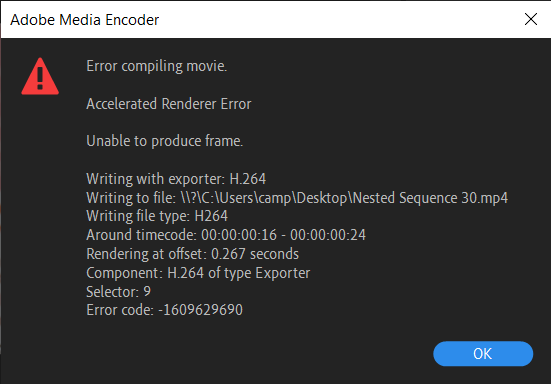
Im trying to export a 24 second premiere pro file and its giving me this error code: 1609629690. i searched the error code up, it told me to try rendering with software, didnt work i also tried media encoder which didnt either work. Can someone help me?


 11
Replies
11
11
Replies
11



Copy link to clipboard
Copied
Are you exporting in H.264?
If so, go to Preferences/Media and uncheck "Enable hardware encoding/decoding ... "
Neil
Copy link to clipboard
Copied
I am exporting in h264 and ive tried that, didnt work
Copy link to clipboard
Copied
Darn.
Neil


Copy link to clipboard
Copied
You have to fix what ever is on the timeline at the given time in the error message.
Delete from project, rename, reimport and do it again.
Copy link to clipboard
Copied
I can try. What do you mean by rename?
Copy link to clipboard
Copied
Rename clip or whatever you are deleting from project on the hard drive.
Copy link to clipboard
Copied
I tried nesting the clip. Ill try deleting the clip and moving it to a different place and importing it again.
Copy link to clipboard
Copied
I exported every single file in that 16-24 seconds separetly and they all exported fine... is the problem exporting them together?
Copy link to clipboard
Copied
I just tried to nest everything between 16-24 seconds separately from the first 16 seconds and it did work. So my question is what is triggering the error. Because the error doesnt happen when i just export those 16-24 seconds
Copy link to clipboard
Copied
Tried exporting just the first 16 seconds im getting the error... But the error says "around timecode: 00:00:00:16 - 00:00:00:24 but there isnt any timecode 16-24.

Copy link to clipboard
Copied
I was getting same errors in premier pro and media encoder while exporting.
Here's what worked for me :
Open run box and search %temp%
Delete everything that can be deleted from it, skip the ones that aren't getting deleted.
Come back to premier pro, export.
It should get exported without errors.
Turns out I have to delete files from temp folder from run box everytime am going to export something.
Hope it helps


Get ready! An upgraded Adobe Community experience is coming in January.
Learn more
 AdChoices