


Inspiring
March 5, 2018
Answered

Unable to create audio renderer

  • March 5, 2018
  • 7 replies
  • 33362 views

Run through all the fixes, read all the forums.  Still can't seem to conquer this one:
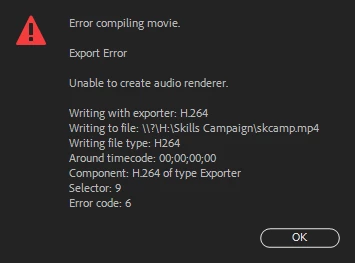
Have tried the following:  cleaning all caches, renaming the common folder, re-installing the software, changing the audio files from wav to several others, copied the project and did it from multiple locations, right clicked the audio to render & replace...nada...

Anyone have a better grasp on what to do with this one?

Many Thanks!

    Correct answer exile1972

    Just one from Illustrator, the others were just standard assets downloaded from eLearning brothers.


    open the mp4's in VLC and convert. Open the wav's in audacity and convert. open those converted files in Premiere.

    7 replies

    New Participant
    May 31, 2025

    This problem happened to me as I was exporting a project that had been created and finished on a PC initially. When I tried to export on a Mac (which I've done before succesfully), I got the error. Opening the file and exporting on a PC fixed it for me.

    New Participant
    August 1, 2023

    Manually Delete the Audio and video previews for the project. If it won't let you create a folder called trash next to the project and drag them in there. This has worked 100% of the time for me.

    New Participant
    December 5, 2023

    What does this even mean? Can you elaborate?

    New Participant
    February 7, 2024

    Go to the folder where you saved the file, you shuld see the Audio Preview folder and the video preview folder.

    Delete them....Problem solved!

    New Participant
    April 4, 2023

    I have this issue intermittenly. I do not know what causes the issue. All my assets are stored locally. The only solution I have found is to export video without audio and recreate/audio match in a new premiere file. Which is big time bummer no fun. 


    Running 2022 version of premiere on Macbook Pro. 

    Hcmason27Author
    Inspiring
    March 12, 2018

    As a follow up, I was able to find a permanent fix to the problem.  turns out it was a setting that our Network Operations department had set up.  The short and skinny is that in the Adobe Creative Cloud suite, some of the softwares talk back to Adobe.com.  My company classified this as outside document storage which it prohibits, once they put the proper controls in place, everything was back to normal.  No need for work arounds, everything is as it should be.

    Best of luck!!!

    W__Dan_Tanner
    New Participant
    October 30, 2018

    Hey, I'm having similar problems here at my organization. Storing project files on a network drive is giving me all kinds of grief. Are you able to provide more details about what your IT people did to address this?

    I'm at the point of abandoning network storage in favor of doing everything locally.

    EDIT: I moved one project and all associated files to a local drive and my various audio problems magically went away.

    Brainiac
    October 31, 2018

    Take a look at Steps 3G and H below.

    Unofficial Premiere Pro Troubleshooting Guide

    Inspiring
    March 7, 2018

    do you get the same error message in Media Encoder?

    Hcmason27Author
    Inspiring
    March 7, 2018

    Morning Exile,

    Nope..M.E. is just as angry....  In premiere, if I remove all audio, we are good.  Buuuuuuutttt...any audio, no matter the type makes it all sorts of upset.

    Ann Bens
    Community Expert
    March 7, 2018

    Hi Ann,

    No go, already gave that a try several times.  Each time, changing the type of audio I used as well as the name/location of the project.  Nothing seems to lend a clue as to whats up.


    Can you export just the audio tracks to wave?

    Brainiac
    March 6, 2018

    That's a new one.  Maybe try some troubleshooting.

    Unofficial Premiere Pro Troubleshooting Guide

    Inspiring
    March 5, 2018

    transcode it.

    Hcmason27Author
    Inspiring
    March 6, 2018

    Sorry Exile, project manager error: