Participant
Jun 14, 2021 12:14 AM UTC
Answered

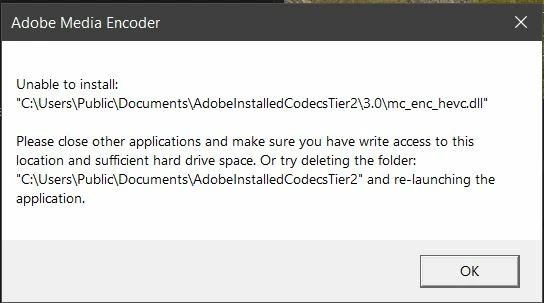
Unable to install mc_enc_hevc.dll
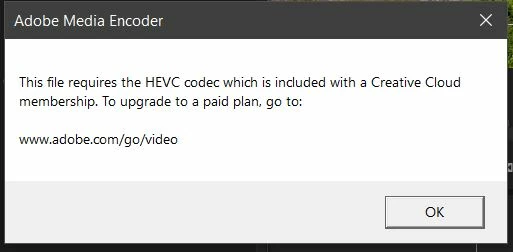
I have tried all solutions found through google and used the adobe cleaner to do a fresh install of premiere, nothing seems to get this DLL to load properly. I do have an active Adobe CC subscription as well.


  1. OS: Windows 10

  2. Version: Adobe Premiere Pro Version 15.2.0 (Build 35)

  3. System: 1700x 32gb RAM RTX 3070rakc

  4. Footage form Canon R5: H.265 4:2:2 10-bit UHD 4k @ 59.94fps

marcelov96479431Correct answer
Participant
Nov 2, 2022 6:46 PM UTC
Logré reparar el problema. Se soluciona creando otro usuario administrador
en windows. Al activar el nuevo uso de Adobe premiere termina funcionando.

65 replies

Participating Frequently
Nov 2, 2022 6:12 PM UTC

Of all the software packages that I have, Adobe CreativeCloud is the most disappointing, and I've been using Photoshop since version 1.0   I also have this problem and truthfully, IT ISN'T MY PROBLEM TO SOLVE.   If Adobe made automobiles, they would be in the repair shop 100% of the time.   This isn't the Adobe that I used to know.  This is some monstrosity now.  It does not work.


This specifically includes Premiere Pro, Photoshop, and Illustrator.  They all suck now. Thanks Adobe.


Translate
marcelov96479431Correct answer
Participant
Nov 2, 2022 6:46 PM UTC
Logré reparar el problema. Se soluciona creando otro usuario administrador
en windows. Al activar el nuevo uso de Adobe premiere termina funcionando.
Translate
Participating Frequently
Nov 2, 2022 9:13 PM UTC

Gracias Marcelo. La solución funcionó para mí también. Algo está terriblemente mal con este software si uno tiene que crear un nuevo usuario para solucionar un problema. Adobe debería dejar de actuar como si esto no fuera un ERROR, porque lo es.

Translate
Participant
Apr 1, 2022 4:28 AM UTC

After a long chat and about an hour of troubleshooting, the Adobe Support person and I solved the issue. It appeared that the "AdobeInstalledCodecsTier2" folder had permissions that were not staying set (we checked the boxes, but they became unchecked on their own). It tells you what the issue is: "make sure you have write access to this location..." The support guy used Command Prompt and the "net user" command to create another administrator user. After that, I could swap to the other Administrator account and launch Premiere Pro. I checked the "AdobeInstalledCodecsTier2" folder for the "mc_enc_hevc.dll" file, and it appeared twice. After this, I transferred back to my primary account, and the files were still there. I launched Premiere and everything worked. Hope this helps. 

Translate
Kevin J. Monahan Jr.
Legend
Apr 1, 2022 9:25 PM UTC

Thanks for sharing your solution, Kyle!

Kevin

Translate
Kevin Monahan - Sr. Community and Engagement Strategist – Adobe Pro Video and Audio
Participant
Apr 8, 2025 1:56 PM UTC

this solution does not work kevin, why is it always something new with adobe software all the time? we pay way too much money for all of this hassle and inconsistency

Translate
Participant
Mar 26, 2022 8:28 AM UTC

same issue try another 10 time just —


Mod note: Profanity removed. Kindly avoid in the future. Thx.


Translate
Participant
Mar 23, 2022 11:29 PM UTC

I am completely stuck with this, Solution, please. 

Any adobe help, couldn't export video.

Translate
Participating Frequently
Feb 8, 2022 10:24 PM UTC

I have the same issue. Any solution?

Translate
Participating Frequently
Feb 8, 2022 10:28 PM UTC

Yep if you have Microsoft family restrictions. It won't let you install it into the folder. You have to do it on a side that has admin.

Translate
Participating Frequently
Jan 30, 2022 8:54 AM UTC

Anyone find the solution?


Translate
Participating Frequently
Jan 30, 2022 8:38 AM UTC

Im still looking an answer for this problem. Can't find it! 😞 

Translate
Participating Frequently
Jan 15, 2022 12:46 PM UTC

Any fix?

Translate
Participating Frequently
Jan 30, 2022 8:38 AM UTC

Still looking for this fix. Adobe cant solve it?


Translate
Participating Frequently
Oct 20, 2021 2:56 AM UTC

Any update on this?


Translate
rackermanAuthor
Participant
Oct 20, 2021 11:58 AM UTC

I have since updated to the latest version of premiere and did some
hardware changes to my PC and the issue has been resolved. Wish I had
better advice to give. --
Robert Ackerman
[personal info deleted by mod]

Translate
Participating Frequently
Oct 23, 2021 2:20 AM UTC

Darn this sucks i cant render my project or anything. 

Translate
Participant
Aug 28, 2021 7:51 PM UTC

Conseguiste solucionarlo?


Translate