


danielpz227
Inspiring
August 24, 2020
Answered

Unable to Open Adobe Premeire Pro CC after rolling back a Windows Update

  • August 24, 2020
  • 2 replies
  • 366 views

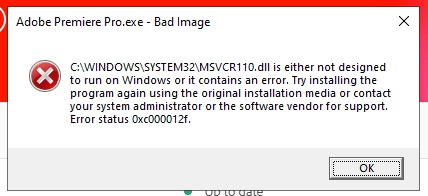
Ive been rolling back the most recent Windows update because it keeps breaking my Windows OS.  However; this time after rolling back I started getting an error everythime and Adobe program open, in the case of Premiere Pro, it doesnt open at all.  I saw that this issue is caused by Visual C++ Redist 2015 - 2019 and a reinstall could resolve however it did not resolve my issue at all.  Here is the error code I'm getting when attempting to open Premeire.  Any suggestions would be appreciated!
 

This topic has been closed for replies.
Correct answer danielpz227

UPDATE*: I was able to resolve the issue by unisntalling every Microsoft Visual C++ 2005 - 2019 and then reinstalled each of them individually.

2 replies

danielpz227
danielpz227AuthorCorrect answer
Inspiring
August 25, 2020

UPDATE*: I was able to resolve the issue by unisntalling every Microsoft Visual C++ 2005 - 2019 and then reinstalled each of them individually.

Community Expert
August 24, 2020

you're not telling us what version of premiere you're using and you're not telling us what version of windows you were using and what you rolled back to...  you might try using an earlier version of premiere.  multiple versions of 2020 and one version of 2019 are available from within the creative cloud app.

danielpz227
Inspiring
August 24, 2020

Im on Windows v10.0.18363 build 18363 and Premeire v14.3.2