


Participant
January 2, 2024
Answered

Unable to set a keyboard shortcut to Ctrl + J

  • January 2, 2024
  • 2 replies
  • 880 views

Hi,


It looks like setting a shortcut to Ctrl + J in PrPro 2024 does not work
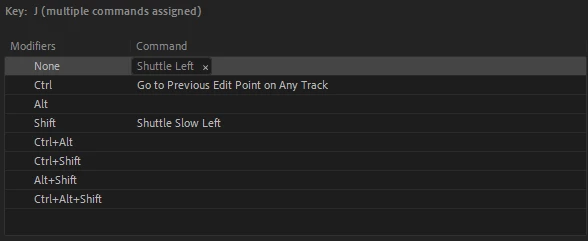
After some digging it looks like it's being held up by "cmd.titler.menu.templates" - though that's not visible in the keyboard shortcut window.

Deleting this entry in the .kys file fixes it but wanted to submit a post to see if there's something I'm missing here!


<virtualkey>2147483722</virtualkey>
<modifier.ctrl>true</modifier.ctrl>
<modifier.alt>false</modifier.alt>
<modifier.shift>false</modifier.shift>
<coxmmandname>cmd.titler.menu.templates</commandname>


Thanks!


Sean

This topic has been closed for replies.
Correct answer MyerPj

Oh interesting. I was initially trying to map them to Application -> Trim Backward/Trim Forward, but I'm unable to map it to any action it looks like. I tried to map it in both my custom preset but I've also tried in the default as well - just incase my manual file manipulation had something to do with it. I am using Ctrl + Alt + J/L for now as a workaround.


I'm able to apply them both to ctrl+shift and ctrl+alt +J

Win11 22H2; PP 24.1


2 replies

mattchristensen
Community Manager
Community Manager
August 31, 2024

With the latest Premiere Pro (Beta) v25.0 you now can set Command (Mac) or Control (Win) + J to a command of your choosing and have it work. Thanks for reporting this!

mattchristensen
Community Manager
Community Manager
January 2, 2024

@seanm74661412 Thank you for sharing this – it looks like a vestige of the Legacy Titler keyboard shortcut commands. I've got this logged so we can get a fix into a future version of Premiere Pro. For now, deleting that entry from your .kys file is a valid workaround.

Participant
January 3, 2024

Just to add - it looks like I'm also unable to bind anything to Ctrl + Shift + J or Ctrl + Shift + L. These are not fixable in the .kys file unfortunately. Not sure if it's related to the legacy title binding as well.

Thanks!

mattchristensen
Community Manager
Community Manager
January 3, 2024

@seanm74661412 I'm able to map Control+Shift+J just fine on my Windows system. Could you share what you're trying to map to that?