


Participant
January 2, 2024
Answered

Unable to set a keyboard shortcut to Ctrl + J

  • January 2, 2024
  • 2 replies
  • 880 views

Hi,


It looks like setting a shortcut to Ctrl + J in PrPro 2024 does not work
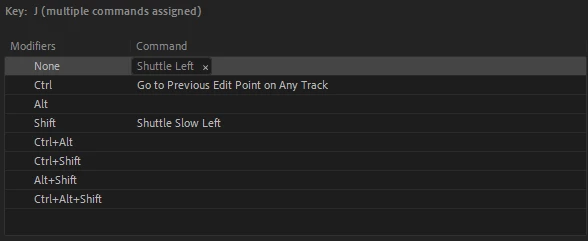
After some digging it looks like it's being held up by "cmd.titler.menu.templates" - though that's not visible in the keyboard shortcut window.

Deleting this entry in the .kys file fixes it but wanted to submit a post to see if there's something I'm missing here!


<virtualkey>2147483722</virtualkey>
<modifier.ctrl>true</modifier.ctrl>
<modifier.alt>false</modifier.alt>
<modifier.shift>false</modifier.shift>
<coxmmandname>cmd.titler.menu.templates</commandname>


Thanks!


Sean

This topic has been closed for replies.
Correct answer MyerPj

Oh interesting. I was initially trying to map them to Application -> Trim Backward/Trim Forward, but I'm unable to map it to any action it looks like. I tried to map it in both my custom preset but I've also tried in the default as well - just incase my manual file manipulation had something to do with it. I am using Ctrl + Alt + J/L for now as a workaround.


I'm able to apply them both to ctrl+shift and ctrl+alt +J

Win11 22H2; PP 24.1


2 replies

mattchristensen
Community Manager
Community Manager
August 31, 2024

With the latest Premiere Pro (Beta) v25.0 you now can set Command (Mac) or Control (Win) + J to a command of your choosing and have it work. Thanks for reporting this!

mattchristensen
Community Manager
Community Manager
January 2, 2024

@seanm74661412 Thank you for sharing this – it looks like a vestige of the Legacy Titler keyboard shortcut commands. I've got this logged so we can get a fix into a future version of Premiere Pro. For now, deleting that entry from your .kys file is a valid workaround.

Participant
January 3, 2024

Just to add - it looks like I'm also unable to bind anything to Ctrl + Shift + J or Ctrl + Shift + L. These are not fixable in the .kys file unfortunately. Not sure if it's related to the legacy title binding as well.

Thanks!

MyerPj
Community Expert
MyerPjCommunity ExpertCorrect answer
Community Expert
January 4, 2024

Oh interesting. I was initially trying to map them to Application -> Trim Backward/Trim Forward, but I'm unable to map it to any action it looks like. I tried to map it in both my custom preset but I've also tried in the default as well - just incase my manual file manipulation had something to do with it. I am using Ctrl + Alt + J/L for now as a workaround.


I'm able to apply them both to ctrl+shift and ctrl+alt +J

Win11 22H2; PP 24.1