


nickf60304738
Participant
March 29, 2018
Question

Unable to Start Adobe Premiere Pro CC - Directory Access Error

  • March 29, 2018
  • 4 replies
  • 7845 views

Hello,

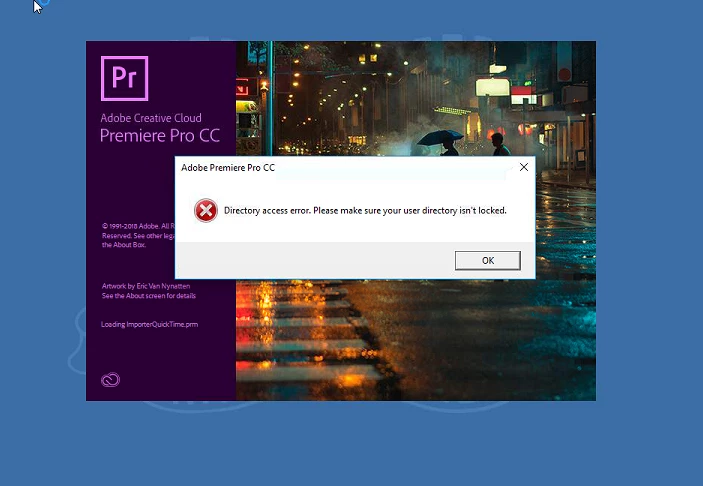
Adobe Premiere Pro CC 2018 will not start correctly. It says 'Directory Access Error. Please make sure your user directory isn't locked'
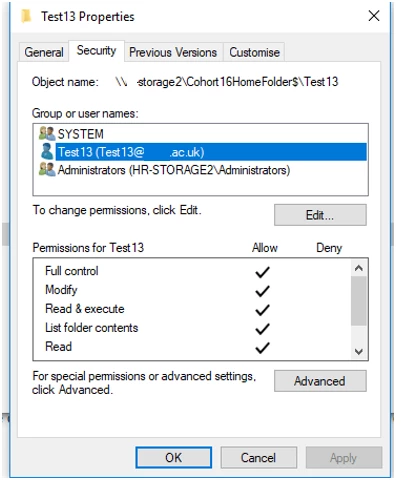
The college gives students and staff a network storage drive which is redirected to My Docs, Desktop, Downloads etc and only that user has full access to their own user folder (admins of course can access)
The can still all use Photoshop and InDesign etc but not Premiere Pro

The College has Win10 64-bit enterprise, and the Art Dept has 8GB Ram, 128SSD and Intel i5s

Any suggestions ? I haven't tried uninstalling and reinstalling the software, SCCM manages the install. But would a fresh install of Win10 help? It works for me (domain admin) which suggests the software only runs with Admin Permission. UAC problem ?

We have our own Windows images which we deploy via WDS with the basic software then deploy software depending on department / location via SCCM (or GP)

Cheers,

Nick

This topic has been closed for replies.

4 replies

Participant
May 20, 2020

I had the same problem with one of our network users. 

Workaround: Have them login, Disconnect the network, Open Premiere Pro, it can't connect to the network so it creates a temp folder on the Public user. C:\users\public\documents\adobe .Reconnect network, Copy the newly created Adobe folder to the network drive location. Log back into Premiere Pro. Works. I found that even though they have full access to their network drives, it can't seem to recreate all the subfolders and data that it can with public folder.

Legend
April 18, 2018

Yes, you need to run PP on an Admin level account.

I also recommend Steps 3G and H below for best performance.

Unofficial Premiere Pro Troubleshooting Guide

nickf60304738
Participant
April 19, 2018

Hi Jim,

Is this something recommended by Adobe, do run as admin?

I have tried with Local Admin Accounts but still the problem exists, but it only stops when I 'Run As' my domain admin account. This is strange as the students/normal staff all have Full Control of their user directory (which is redirected).

Any other suggestions, or do that have to put up with it?

Vinay Dwivedi
Adobe Employee
Adobe Employee
April 19, 2018

Hi Nick,

I need some specific information here.

1. What is location of the documents folder? (Domain or local user account)

2. Are you able to access C:\Users\Public\Documents and does it contains Adobe folder?

3. Have you tried removing the network cable and then launch Premiere Pro?

4. What is the location of installed application i.e. OS drive or any other secondary drive?

//Vinay

Kanikas
Community Manager
Community Manager
March 29, 2018

Moving to Premiere Pro CC

nickf60304738
Participant
April 18, 2018

Would you be able to offer any suggestions ?

kglad
Community Expert
Community Expert
March 29, 2018
nickf60304738
Participant
April 18, 2018

No Such Luck