


Inspiring
February 28, 2020
Answered

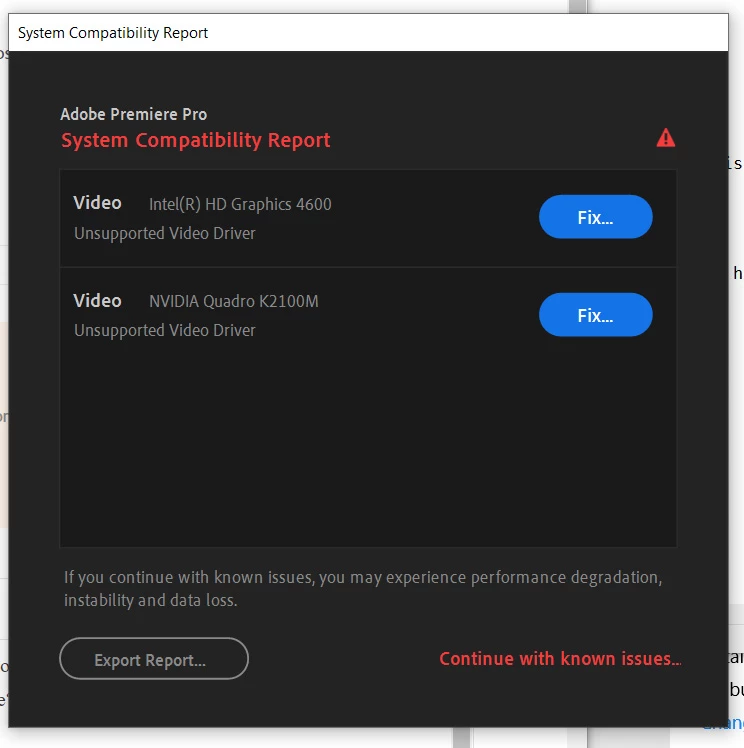
Unsupported Video Driver, NVIDIA Quadro K2100M

  • February 28, 2020
  • 1 reply
  • 12539 views

I have tried rolling back to the suggested drivers with no change.

Is there fix for this or a suggested video card(s) upgrade?

Thanks for your help!!


HP ZBook 15 G2

Intel Core i7-4810MQ CPU @ 2.80GHz

16.0 GB RAM

Windows 10 Pro 64-bit, Ver. 1903


----------------------------------------------------------------------------

Video Intel(R) HD Graphics 4600 v.20.19.15.5063
1. The current version of your Intel display driver may cause performance and stability issues. It is strongly recommended that you update to driver version 100.6286 or later. Drivers are provided by Intel or your computer's manufacturer.
URL: https://helpx.adobe.com/premiere-pro/kb/drivers-video-win-intel.html

----------------------------------------------------------------------------

Video NVIDIA Quadro K2100M v.25.21.14.2632
1. NVIDIA has identified a bug which causes random crashes in your Adobe application and has provided a fix in driver version 430.86. This driver update is strongly recommended.
URL: https://helpx.adobe.com/premiere-pro/kb/drivers-video-win-nvidia.html
 

This topic has been closed for replies.
Correct answer RjL190365

Since the 2019 version, the minimum hardware requirements have officially changed. Your hardware is, according to Adobe, officially too old and obsolete. You see, both Intel and NVIDIA have ended mainstream support of both of your GPUs. At the present time, both the HD 4600 and the K2100m are currently in "legacy" support status, with no more compatibility fixes ever for these GPUs while only critical security patches will continue for the next few months. The NVIDIA support for Kepler mobile GPUs such as yours will officially end completely, outside of archived driver releases, this coming April. Intel's support for the iGPUs of the 4th- and 5th-Generation CPUs will completely end in the near future.


Therefore, since in most laptops the GPU cannot be upgraded at all by the user, the only solution is a completely new laptop.


Randall

1 reply

RjL190365Correct answer
Legend
February 28, 2020

Since the 2019 version, the minimum hardware requirements have officially changed. Your hardware is, according to Adobe, officially too old and obsolete. You see, both Intel and NVIDIA have ended mainstream support of both of your GPUs. At the present time, both the HD 4600 and the K2100m are currently in "legacy" support status, with no more compatibility fixes ever for these GPUs while only critical security patches will continue for the next few months. The NVIDIA support for Kepler mobile GPUs such as yours will officially end completely, outside of archived driver releases, this coming April. Intel's support for the iGPUs of the 4th- and 5th-Generation CPUs will completely end in the near future.


Therefore, since in most laptops the GPU cannot be upgraded at all by the user, the only solution is a completely new laptop.


Randall

Inspiring
February 28, 2020

Thank you Randall!


I guess my next step will be to look for suggested laptops.


Thanks again!

Tim

Participating Frequently
January 14, 2022

If you know how to replace the GPU (and yes, the GPU in the HP ZBook 17 G2 is replaceable, using an MXM 3.0b form factor), you might be able to replace that Quadro K5100M with a Quadro P4000 Mobile or P5000 Mobile. Anything better than the Quadro P5000 Mobile may require more space inside the cavity of your laptop's case to accommodate a larger GPU PCB even though the slots are compatible (this includes almost all GeForce GTX 10 series GPUs and GeForce RTX 20-series GPUs).


And even with the GPU upgrade, your hardware GPU accelerated performance might still be limited by the CPU, since all ZBook 17 G2 laptops use 4th-Gen (Haswell-generation) quad-core mobile i7 CPUs with hyperthreading which are now fully eight years old.


Many thanks again. Will look at a P4000.