


Deaf_Guy
Inspiring
April 7, 2023
Question

Using luma key for video transition

  • April 7, 2023
  • 2 replies
  • 3267 views

I downloaded a free transition from Stock. It starts off with black and then colored shapes fly around and then back to black. So I used the luma key to key out ther black to make the transition. See below screen shot.


It looks clean overall but there's an ever so slight black edge around the colored shapes, so I just wanted to make sure this is best way to get rid of black or is there a better way to do this? Any advice is appreciated. Thank you.
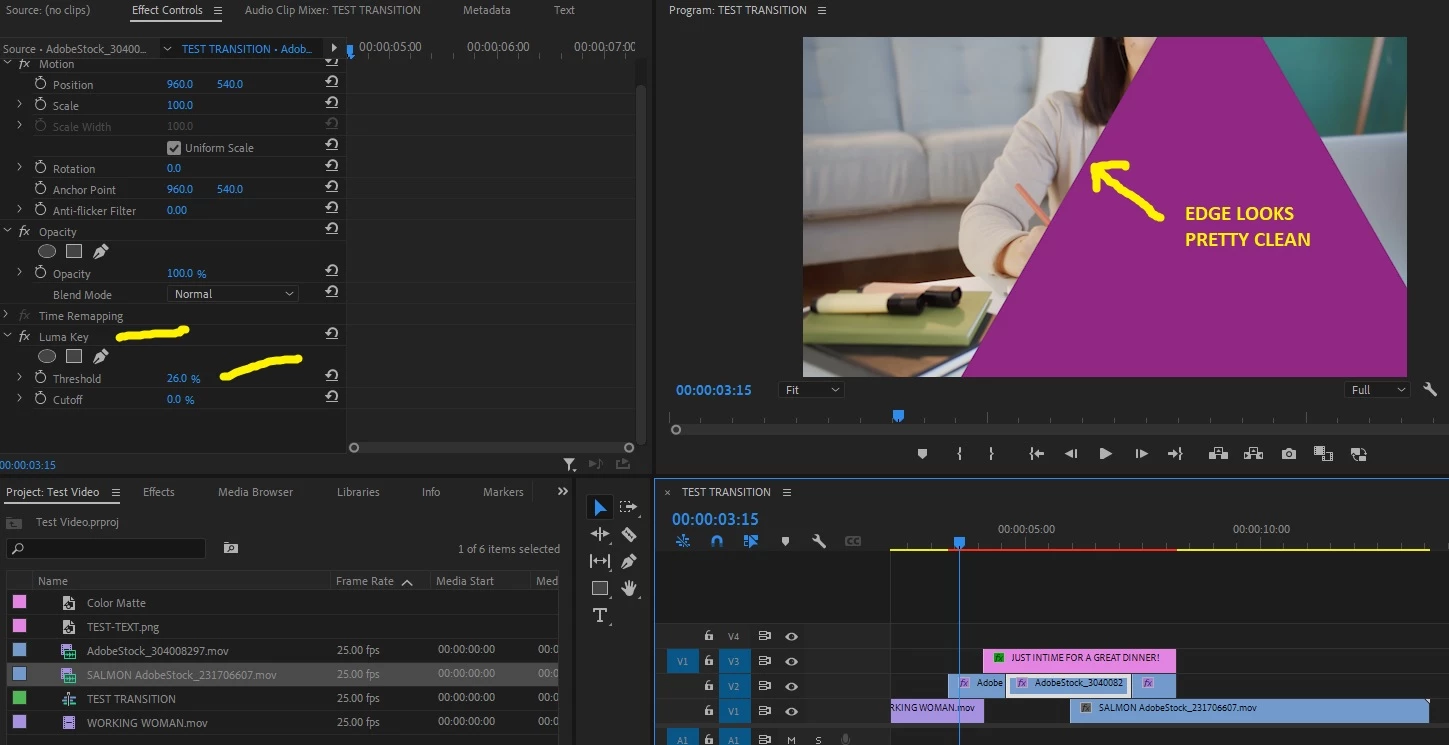
 

This topic has been closed for replies.

2 replies

Peru Bob
Community Expert
Community Expert
April 8, 2023

If there is black, and not transparency, then either Premiere Pro is not recognizing transparency in that clip, or it is a badly created file.

Deaf_Guy
Deaf_GuyAuthor
Inspiring
April 8, 2023

Maybe when the person who made it exported it as MOV they didn't select the alpha option during export?

Peru Bob
Community Expert
Community Expert
April 8, 2023

It's a possibility.

Peru Bob
Community Expert
Community Expert
April 7, 2023

Are you sure it is actually black?  I would expect it to have an alpha channel with transparency.

Does it look different if you render the timeline?

Deaf_Guy
Deaf_GuyAuthor
Inspiring
April 8, 2023

Hi - thanks for your reply. When you put the clip, which is a MOV file, on timeline it's black. Here is the transition clip:


https://stock.adobe.com/video/dynamic-black-and-white-transition-vertical-animation-with-v-shapes-covering-the-screen-and-then-inverting-to-reveal-a-perfect-loop-great-for-keying-masking-and-overlays/304008297?prev_url=detail


I'm guessing the black really is black but I may not be familiar with alpha. If it alpha let me know a better way to do this. Thank you for your help.

Peru Bob
Community Expert
Community Expert
April 8, 2023

Hi - I did export it from the timeline. Below you can see it. The first sample is with the luma key keying out the black from the clip and revealing the deaf people. Shortly after that is the exact same clip only with the luma key turned off. You'll see how the black covers up the deaf people.


You can see it here:


https://drive.google.com/file/d/1ZpJyp_zgck3OoT2_6jwsJi-S8ErgQTO-/view?usp=share_link


When I said "render the timeline" I meant press enter to create preview files, not export.