


Participant
November 21, 2020
Answered

Using pen tool to adjust audio track volume in Premiere is creating a curve automatically

  • November 21, 2020
  • 2 replies
  • 6850 views

Hello all, I hope you are having a good day!


While working on an edit yesterday, I noticed an issue with the Pen Tool fading out my audio tracks. To make quick fades in my timeline, I use the pen tool to click a clip and drag keyframes to the volume levels I'd like. Normally, this would create a linear change, but as you can see in the attached video, dragging keyframes now automatically creates a curve between them. The interpolation of the keyframes is still set to "linear," so I can't think of a reason why this might be happening.


For reference, I am using Premiere v14.6.0 on a Core i5 MacBook running MacOS Catalina.


And some photos as well,

-Here's what a fade with the pen tool normally looks like:
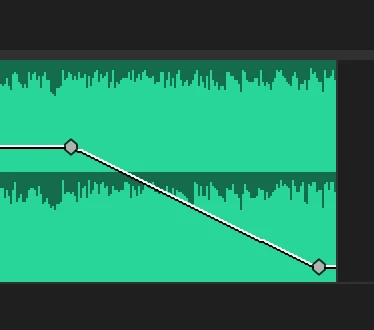
-And here's what Premiere, for some reason, just started doing:
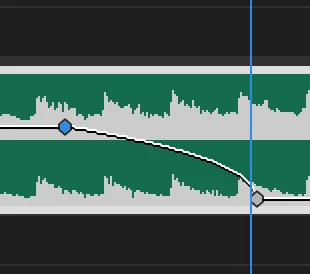
 

If there is any solution to this or setting that needs to be fixed, I would really appreciate it! Thank you for your time!

-Jay

This topic has been closed for replies.
Correct answer Ann Bens

Confirmed bug.

WORKAROUND (thanks to Matt Stegner) : Save, Close and Reopen.

2 replies

Ann Bens
Community Expert
Ann BensCommunity ExpertCorrect answer
Community Expert
November 23, 2020

Confirmed bug.

WORKAROUND (thanks to Matt Stegner) : Save, Close and Reopen.

Jay Q.Author
Participant
November 24, 2020

This works, thank you so much!

Community Expert
November 21, 2020

I'm wondering if the fade is still linear but the scaling of the graphic on the timeline is now some sort of log.

Jay Q.Author
Participant
November 21, 2020

Thank you for the input! After some tests, any fade I make right now doesn't seem to be linear, despite saying it is. That's what's confusing me.


Also, as for the photos I provided, the two clips shown are different audio files. The top one was an audio file I edited before the problem started occuring, and the bottom one was an audio file I edited today. That's why the waveforms look different. I'm not sure if that was what you were asking about, but I'm sorry if there was any confusion there!

Participating Frequently
November 22, 2020

I have the same problem. If I close and open the project, the fade is shown linear. Is it the same for you?