Exit
  • Global community
    • Language:
      • Deutsch
      • English
      • Español
      • Français
      • Português
  • 日本語コミュニティ
  • 한국 커뮤니티
0

Variable Frame rate detected?

Community Beginner ,
May 25, 2021 May 25, 2021

Hi, I'm sure I'm being thick but can anyone see from the following exactly how...


I am importing files from Riverside FM (group webcam recording software for podcasting).


When I watch the file in Quicktime player, it is fine, everything is synched. 


When I import the file into a timeline in Premiere, there is very severe audio drift. 


This is the file I am importing:
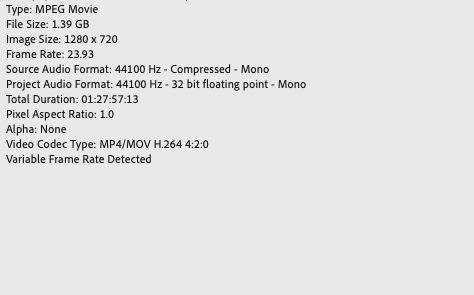
Screenshot 2021-05-25 at 12.53.19.png


And this is how the timeline is set up:
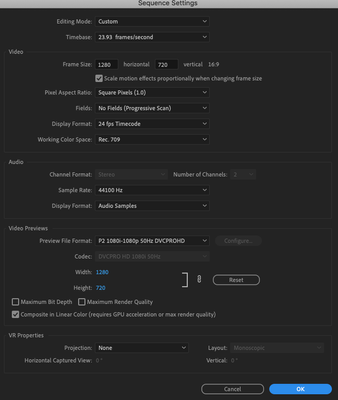
 

Screenshot 2021-05-25 at 12.52.44.png

Another strange thing that is happening is that the waveform is not representing the audio correctly. When I zoom out the wave form reads differently to when I zoom in:


Playhead at 05:11 zoomed out:
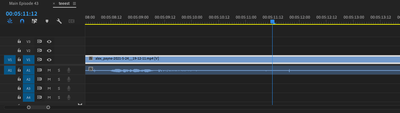
Screenshot 2021-05-25 at 12.52.15.png

Playhead at 05:11 Zoomed in:

Screenshot 2021-05-25 at 12.52.25.png

Can anyone see where I am going wrong ? 


Thanks in advance 

Dan 

 

TOPICS
Audio , Editing , Formats , Import , User interface or workspaces
2.1K
Translate
Report
Community guidelines
Be kind and respectful, give credit to the original source of content, and search for duplicates before posting. Learn more
community guidelines

correct answers 1 Correct answer

Community Expert , May 25, 2021 May 25, 2021

Phone, webcam etc. footage is known to give issues.

The footage is variable framerate, convert to constant framerate with Handbrake before bringing into Premiere.

Then setup  you sequence.

Converting videos with Handbrake - YouTube

Translate
Community Expert ,
May 25, 2021 May 25, 2021
LATEST

Phone, webcam etc. footage is known to give issues.

The footage is variable framerate, convert to constant framerate with Handbrake before bringing into Premiere.

Then setup  you sequence.

Converting videos with Handbrake - YouTube

Translate
Report
Community guidelines
Be kind and respectful, give credit to the original source of content, and search for duplicates before posting. Learn more
community guidelines
