
scotty321
Participant
October 10, 2015
Answered

Video and audio tracks unlinking on their own?

  • October 10, 2015
  • 15 replies
  • 42452 views

Has anybody experienced this very bizarre problem with Premiere Pro CC 2015.0.2? (I'm using Mac OS X 10.10.5.)

Several times per day while working with Premiere Pro, the "linked selection" option randomly stops working. The only solution that I have found for this is to completely quit & relaunch Premiere Pro... but then the problem comes back a little while later.

The problem is this: Even though the "Linked Selection" option is selected for my timeline, if I click on a video clip, the linked audio clip DOES NOT automatically select with it! If I click on an audio clip, the linked video clip DOES NOT automatically select with it! Even if I hold down the option key, the video & audio clips will not select together. This happens for ALL THE CLIPS IN THE ENTIRE SEQUENCE! I am forced to quit & relaunch Premiere Pro, and then the problem is fixed... for a little while.

Please see the 2 screenshots below.

The 1st screenshot shows WHAT SHOULD HAPPEN when I select either a linked video clip or a linked audio clip in the timeline -- the 2 clips (audio + video) are selected together.

The 2nd screenshot shows WHAT OFTEN HAPPENS RANDOMLY ON ITS OWN. Premiere Pro will just randomly decide to select the clip that I click on -- without also selecting the linked audio or video clip! Once this starts happening, it happens for ALL THE CLIPS IN THE ENTIRE SEQUENCE! Then, I am forced to quit & relaunch Premiere Pro -- and the problem fixes itself.
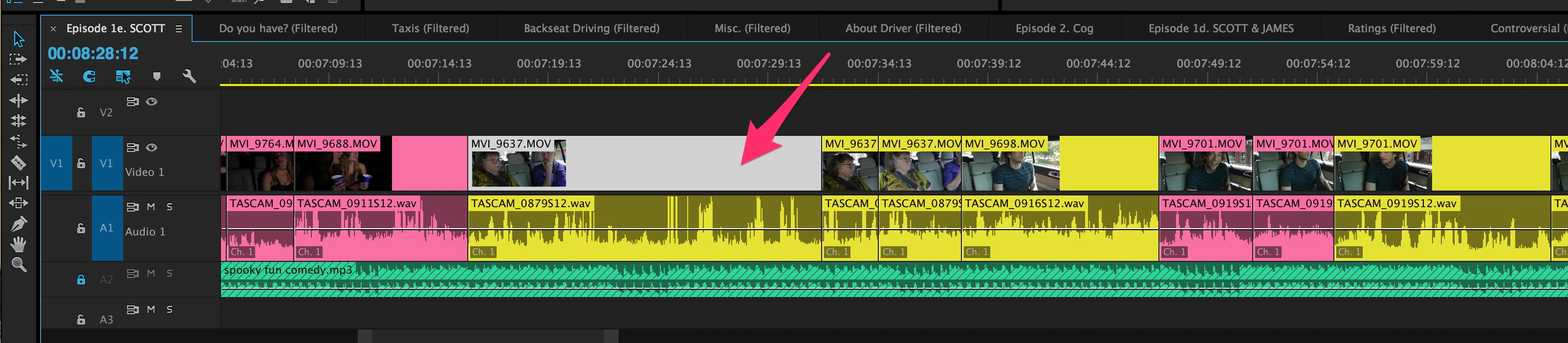
Thoughts on how to prevent this problem from happening?

    Correct answer Mike_Abbott

    An old thread - but I've also experienced this with CC 2017...

    My feeling is it is related somehow to the Ctrl-K (windows) shortcut for making a razorblade cut, as mentioned above.

    This is a bug that needs to be squished...  heading over to the bug report form.

    15 replies

    Kaxmerkhoff
    Participating Frequently
    November 8, 2024

    this wrongly says SOLVED at the top, which it isnt. needs to be upvoted. have had this happening with no fix on a project in 23.4., intel i7 mac, and now again premiere production 24.5., m1 max, in both cases footage is on network attached storage via 10gbe (once fibre channel to server, the other thunderbolt 10gbe to QNAP nas). INCREDIBLY FRUSTRATING BUG


    FunFürFelix
    Inspiring
    May 2, 2024

    THIS IS HORRIBLE!!!!

    This bug occurred to me on multiple occasions in the past two months on timelines with as many as eight different cameras. The absolute worst part is that I have absolutely no idea why this keeps happening and when it has happened. This bug needs to be addressed ASAP! Relinking an entire 20-minute project is not an option. Working without linked clips is the biggest pain.

    Suggested solution:

    1. FIX THE DAMN BUG
    2. Add a warning box to Premiere, that can be deactivated or customized to a custom number, that warns you about the unlinking of clips. Example: X amount of clips have just been unlinked. Do you really want to unlink X amount of clips?
    eowyn723
    Participating Frequently
    May 2, 2024

    A warning would be nice! I don't know if you'd be able to undo it anyway, but you never know when it happened so it's usually too far back in the history to undo to, even if it were possible. I can't believe this is still a bug. The first post on this issue was from 2015! I think nearly a decade should be enough time to fix the bug.

    Inspiring
    January 22, 2024

    Just flagging this as I hit this issue quite regualraly in CC24 - Jan 2024 and still happening. Some timelines are 4 hours long for me as I begin to make assembly selections for a large documentary edit. Big problem at times! TIme consuming to remedy it

    Participating Frequently
    March 28, 2024

    Wanted to back this up, this is a problem I've encountered in the March 2024 build of Premiere, with no warning it unlinks all audio tracks. And clearly this is a bug, because it does it gradually - one half of the timeline will still have linked audio tracks, the other side all the tracks have become separated, and then as you click around it spreads until all the tracks are unlinked! Really really really irritating. 

    Participating Frequently
    March 28, 2024

    After manually relinking the audio tracks, copying and pasting video clips will cause some of the audio tracks you've just relinked to unlink again. A cruel and unusual torture 

    Participant
    July 30, 2023

    I'm having the same issues still in 2023 with CC 2023, it's definitely linked to the razor tool, and when I have 7 video tracks, 15 audio tracks that I cut at once, it's multiplying my editing time by 3 with how much I have to fix everything manually or reimport audios with matched frame or whatever. This is a very annoying bug and has been for years.

    And there's no solution on the internet...

    We need a "Reimport all audio" or "Relink All" feature or something to help prevent this, or just need to find the origin or the issue please Adobe.

    Inspiring
    January 22, 2024

    Just flagging this as I hit this issue quite regualraly in CC24 - Jan 2024 and still happening. Some timelines are 4 hours long for me as I begin to make assembly selections for a large documentary edit. Big problem at times! TIme consuming to remedy it

    Participant
    January 24, 2024

    SAME PROBLEM!!!!
    Any touch of file on the timeline crashes link for whole sequence.

    Participant
    March 6, 2023

    SOLVED: Click on the link icon between the magnet and spanner top left of the timeline (left middle of screen). This solved it for me immediately. 

    Participating Frequently
    September 16, 2023

    Yes, to make it more clear, attached is a screenshot. Doesn't seem like this is a bug but a feature. You can link and unlink by turning on and off the icon / button.

    maxbuzin
    Participant
    January 17, 2022

    17/JAN/2021

    Had today the same issue... 


    To fix it I've made a cut (not with the razor one). then the audio/video became unlinked.

    • Then selected both video and audio > right click > link. Obviously to link them.
    • After that, clicked to toggle OFF then ON the "Linked Selection"

    • Then clicked to toogle OFF then ON the "Toggle the track targeting fot this track" for both video and audio...

    • After that I closed the Premiere and relaunched it.


    It's working now... maybe some bug...

    Participant
    February 23, 2023

    Hello everyone, 

    Im having this issue in 2023. Version 23.2

    I updated thinknig that was the issue, i tried every one of the fixes in this thread. But it still randomly unlinks. My theory is that its linked to Command S (whenever I save it seems to be an issue) also no denying that i use the razor tool (Command C) a ton for my workflow. 


    I have so many clips and for this to be an issue on a 20min project file is unbelievable. 

    nate.schief
    Participant
    July 21, 2023

    Having the same problem but I narrowed my problem down to every time I ripple delete everything unlinks. 

    Participant
    June 18, 2021

    ITS BEEN YEARS AND THIS STILL HAPPENS BUT I FOUND A FIX!!!

    So this "V1" track , where my clip was, was unselected. I was using ctrl+k for clipping, but it would only cut the audio, and would automatically unlink the clip. But once I selected it, it would cut both.

    So! Make sure whatever you are clipping, that the track is selected (targeted), and it will work.

    mriurbn
    Participant
    September 26, 2020

    Hi there, I have the same problem. But I tried duplicating my timeline and all the clips relinked in the new timeline. Fingers crossed this helps!

    Participant
    April 3, 2020

    I am still having this issue today I've tried everything and my linked selection is on and it still will not work.

    Participant
    January 24, 2018

    I'm not sure this will be the "perfect" fix, but it did seem to clear up most of the linking issues I've been having:

    from: New features in Adobe Premiere Pro CC

    "Linked Selection toggle button available from Timeline


    Premiere Pro provides a Linked Selection command that can be applied to all open sequences in the Timeline panels. You can use the Linked Selection command as a toggle that you can turn on and off. Linked Selection is turned on by default. 

    The Linked Selection command is available as a button from the Timeline, and from the Sequence menu. You can also assign a keyboard shortcut to this feature.

    When Linked Selection is turned on, clicking a linked clip in the Timeline automatically selects all the associated tracks. For example, if you click the video part of a linked A/V clip, the audio is automatically selected.

    When Linked Selection is turned off, only the single track item that you click is selected, and not all the associated tracks.

    You can temporarily override a toggle state by pressing Alt (Win) or Opt (Mac) while selecting the track. For example, if Linked Selection is turned on, and you press Alt (Win) or Opt (Mac) while selecting a linked clip, only the single track that you click is selected."

    adumi
    Participant
    December 29, 2019

    Same problem of unlinking video and audio while using ctrl-k to cut in Premiere v.12 windows 10 64bit regardless of linking toggle turned on.