
scotty321
Participant
October 10, 2015
Answered

Video and audio tracks unlinking on their own?

  • October 10, 2015
  • 15 replies
  • 42452 views

Has anybody experienced this very bizarre problem with Premiere Pro CC 2015.0.2? (I'm using Mac OS X 10.10.5.)

Several times per day while working with Premiere Pro, the "linked selection" option randomly stops working. The only solution that I have found for this is to completely quit & relaunch Premiere Pro... but then the problem comes back a little while later.

The problem is this: Even though the "Linked Selection" option is selected for my timeline, if I click on a video clip, the linked audio clip DOES NOT automatically select with it! If I click on an audio clip, the linked video clip DOES NOT automatically select with it! Even if I hold down the option key, the video & audio clips will not select together. This happens for ALL THE CLIPS IN THE ENTIRE SEQUENCE! I am forced to quit & relaunch Premiere Pro, and then the problem is fixed... for a little while.

Please see the 2 screenshots below.

The 1st screenshot shows WHAT SHOULD HAPPEN when I select either a linked video clip or a linked audio clip in the timeline -- the 2 clips (audio + video) are selected together.

The 2nd screenshot shows WHAT OFTEN HAPPENS RANDOMLY ON ITS OWN. Premiere Pro will just randomly decide to select the clip that I click on -- without also selecting the linked audio or video clip! Once this starts happening, it happens for ALL THE CLIPS IN THE ENTIRE SEQUENCE! Then, I am forced to quit & relaunch Premiere Pro -- and the problem fixes itself.
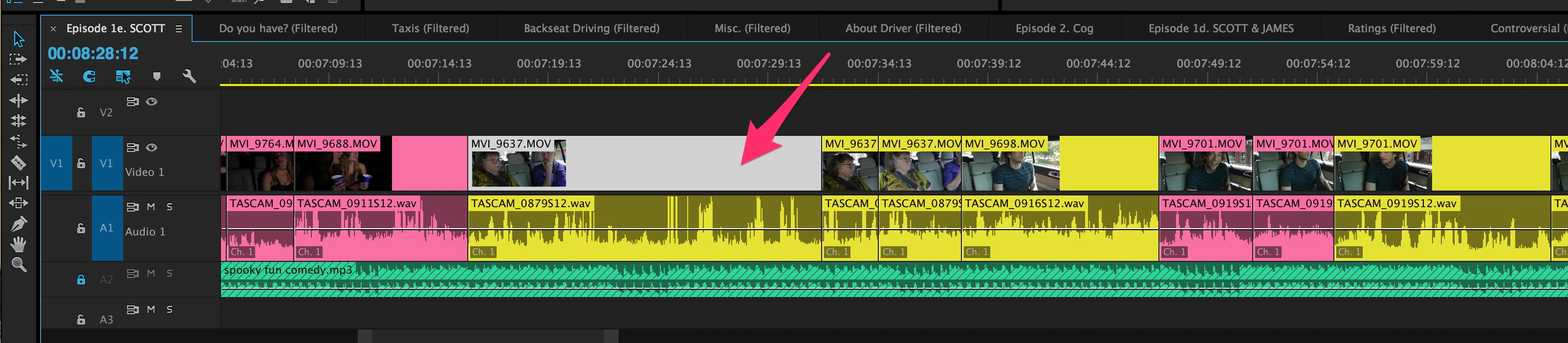
Thoughts on how to prevent this problem from happening?

    Correct answer Mike_Abbott

    An old thread - but I've also experienced this with CC 2017...

    My feeling is it is related somehow to the Ctrl-K (windows) shortcut for making a razorblade cut, as mentioned above.

    This is a bug that needs to be squished...  heading over to the bug report form.

    15 replies

    Participant
    August 17, 2017

    I'm have the same issue with Premiere 2017 Windows 10.  When I drag a clip into the timeline, and without manually unlinking, the audio and video move independently. NOT Ideal! It's helpful when I don't want the clips linked, but I generally work with audio and video in sync.

    bumpeboy
    Participant
    August 9, 2017

    Am having the same problem.

    Premiere 2017 Windows 10 all my videos and audios are unlinked by default and worse is that I cannot, link them manually. If i select a video and an audio then righ click select 'link' they dont link.

    melissad49097869
    Participant
    July 18, 2017

    also having this same issue in CC2017 on Win 10 pro 64-bit.

    Just opened a project I hadn't worked on in a few weeks and in one sequence *all* the video clips are unlinked from their audio component without me having done anything.


    And the worst part is, there's no option to select all and then hit re-link. You have to go back and do each clip individually.

    Kevin-Monahan
    Community Manager
    Community Manager
    July 19, 2017

    Hi MelissaD,

    Sorry about the pain. We have a similar bug filed but I would like more info, if you don't mind. What kind of footage is this with? Which camera was the footage shot on? Was this a new project or an updated one? Let us know.

    Thanks,
    Kevin

    Kevin Monahan - Sr. Community and Engagement Strategist – Adobe Pro Video and Audio
    Kombi Life
    Inspiring
    July 30, 2017

    Kevin, I'm having the same issue with footage randomly unlinking on the timeline.  Also copy and paste linked media from a different sequence is pasting as unlinked.  Footage is AVCHD, project is a new one.  Hope that helps

    Ben

    Mike_Abbott
    Mike_AbbottCorrect answer
    Legend
    March 3, 2017

    An old thread - but I've also experienced this with CC 2017...

    My feeling is it is related somehow to the Ctrl-K (windows) shortcut for making a razorblade cut, as mentioned above.

    This is a bug that needs to be squished...  heading over to the bug report form.

    stefan_gru
    Inspiring
    March 3, 2017

    Others on this thread to log this same bug to help the product team weigh its importance: Feature Request/Bug Report Form

    Participating Frequently
    May 2, 2017

    I see this thread's last response was in March. Just updated premiere last night and am now encountering same problem. Most of my sequences in my current project have linked clips but the one I am working on now has all clips unlinked which is a total hassle. Guess that bug still needs to be squished.

    michaels77529277
    Participant
    October 15, 2015

    I'm also having this problem.  I notice it mostly when I'm using the cmd-K shortcut to make a cut in both the audio and video of a linked clip.  It frequently happens that only the audio or only the video is cut and this essentially makes the shortcut useless as I then have to either ctr-click on the clip to select "link" from the context menu and then cmd-K again or use my mouse to manually blade the portion of the clip that was not cut.  Surprising how frequently this has been happening in the past couple of days.

    scotty321
    scotty321Author
    Participant
    October 15, 2015

    Very interesting. I never knew about that command-K shortcut, so this strange "unlinking problem" seems to be happening under a WIDE VARIETY of circumstances. Surely, this must be a gigantic bug in Premiere Pro. And I'm pulling all my hair out over this one!

    Participant
    October 19, 2015

    I just encountered this unintentional unlinking of previously linked clips this morning.  I have a seven minute sequence made up mostly of linked interview clips.  When I scan the sequence, I notice that most of the clips have the "" next to the video track name -- indicating that it's linked to the audio beneath it.  But I also see that many of the clips no longer have this "" and have, without any action on my part, become unlinked. I'm going through them each individually and choosing link in the context menu.  Strange.


    I have the same problem. If I link them with CLIP>LINK   they immediately unlink themselves. This is a real problem. Is there any fix in sight?