


Participant
June 27, 2020
Question

Video export wont play, shows unsupported codec, and won't export to Instagram

  • June 27, 2020
  • 2 replies
  • 1517 views

Hi everyone,  I'm making a short clip comprising of various photos for Instagram, I set the resolution to 1400,1400 and frame rate at 29.97fps. Everything went smoothly until I exported. The file shows unsupported video codec and only plays the audio and it also cannot upload to Instagram. Its really frustrating. These are my export settings below.
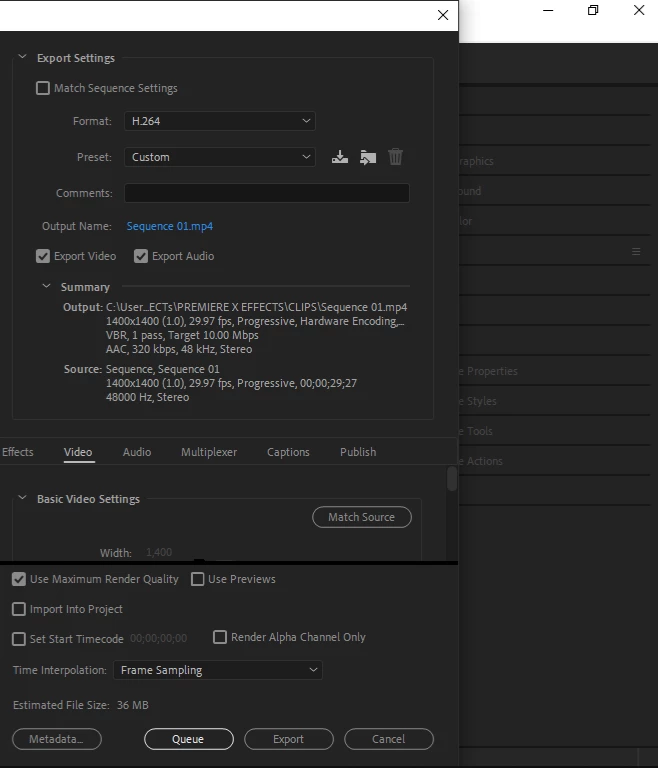
This topic has been closed for replies.

2 replies

Just Shoot Me
Legend
June 27, 2020

I moved your post over from the poorly named Community Help forum, which is for getting help using this forum system, to a better forum, Premiere Pro. If this is in error please state the exact Adobe program you are using

I hope this helps.

Ann Bens
Community Expert
Community Expert
June 27, 2020

 Please do NOT add images via the "attach files" box, as you are then forcing everyone to DOWNLOAD the file to view it outside their browser. Drag/drop the image files directly ONTO your reply box so other users can see them without needing to download unknown strange files.
Thank you!

Participant
June 27, 2020

Okay. I've made the changes. Please Can you help me out . I really need to deliver this post first thing tomorrow morning. 

Ann Bens
Community Expert
Community Expert
June 27, 2020

Turn off hardware encoding and max render and try again.