



silviaospina
Participant
January 23, 2023
Answered

Voice-over recording not working on Premiere Pro V.231

  • January 23, 2023
  • 9 replies
  • 6205 views

Hi everyone, 
So I've been recording my voice over's with no issue in Premiere Pro.... until now. It suddenly stopped working... it gives me the countdown and seems to be recording but when I stop it, there's no audio file on the timeline. Any clues on why this might be? I'm already checked System Preferences, Audio Hardware in Premiere's Preferences- both with computer audio and with an external microphone and nothing works. After reading forums for hours I decided to post in here in case anyone can help me... 
Very frustrating. 
Thanks in advanced everyone! 
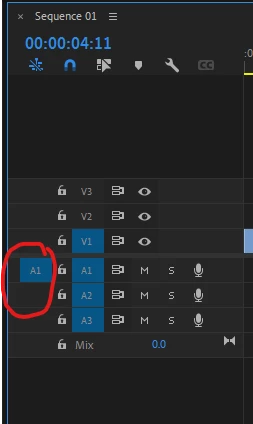
Correct answer luca_0576

Found a fix on pr2023.

Make sure both A1 boxes are turned blue like shown below before hitting voiceover.

9 replies

Participant
July 31, 2025

El mismo problema, se me colgo un dia y no volvio a grabar en la pista y debo recurrir a otro software

luca_0576Correct answer
Participant
July 22, 2025

Found a fix on pr2023.

Make sure both A1 boxes are turned blue like shown below before hitting voiceover.

Participant
July 31, 2025

Si siquiera me aparece esa opcion 

sunny654
Participant
November 23, 2024

Hello to everyone having this same issue. I was able to figure out a workaround to get voice overs recorded in premiere to go to the timeline after recording like normal.

The issue seems to do with permissions, premiere is actually saving the voiceover file, you can find it where if you scratch disks set to save captured audio. It just doesn't name, import, and place in the timeline like normal.

Solution: Run premiere "As Administrator" so it overrides any permission problems and functions like normal.

I'm not sure what the equivelent of this process would be on mac, but I imagine it's similar.

Participant
November 21, 2024

From what I can tell, it seems to be a permissions issue. In the beta it asks you on the Mac if you want to allow it to share your microphone when you allow her to share the microphone from the prompt it works. I assume this has to do with what Adobe changed in collecting your data. This is something that I hate that Adobe did they should not be collecting your data.

Participant
August 27, 2024

Same problem here.

Using a rode pod mic (usb-c) and PP 24.6 on a MacBook Pro (M2) with Sonoma 14.6.1.
I can use the mic in calls and in other software, just PP does not get any signal when recording audio (system settings permissions are set).

Participant
November 18, 2024

I'm having the same issue. It comes and goes. It seems like it's recording, but I can't find the audio file anywhere. What is this? Also I'm using Adobe Premiere Pro 25.

Participant
July 27, 2024

same problem Did anyone manage to fix it?

Participant
July 27, 2024
No,, useless support...
Participating Frequently
November 15, 2023

Same problem here.  Voice-over record sudden stopped recording sound but leaves a clip,  I've tried everything including the very latest update.  No luck.  Veryfrustrating. On the audio mix panel, the record button doesn't work either.

Kevin-Monahan
Community Manager
Community Manager
November 16, 2023

Hi @diana cf84411544,

Let me know which version of Premiere Pro you are working with, the OS, and info about the computer you are using.


Thanks,
Kevin

Kevin Monahan - Sr. Community & Engagement Strategist – Pro Video and Audio
Participating Frequently
November 18, 2023
Hi Kevin,
I’m using Adobe Premiere Pro 24.0.3 (Build 2) and working on a MacBook Pro, 15 inch 2018, macOS Sonoma 14.1.1 (23B81)
Hope this is what you need to solve the mystery!
Thanks so much for contacting me.
All best,
Diana

Sent from my iPad
Participant
March 28, 2023

I'm having the same issue. Did you ever find a solution?

Peru Bob
Community Expert
Community Expert
March 28, 2023

Did the mic work in the past? What kind of mic? How is it connected?

Kevin-Monahan
Community Manager
Community Manager
January 24, 2023

Hi Silvia,

Sorry! Did the mic work in the past? What kind of mic? How is it connected? Let us know. 


Thanks,
Kevin

Kevin Monahan - Sr. Community & Engagement Strategist – Pro Video and Audio
Participant
November 5, 2023

The Yeti Blue Stereo mic works on 2022 Premiere Pro and all other applications on my mac book pro. It doesn't work in the 2023 Beta version of the Premier Pro.  I have to open up 2022 PP and record, export, and import audio tracks as a work around.  This is a serious inconvenience and glitch.  All of the updates and bugs in Premiere Pro are making me want to get Final Cut Pro.

Kevin-Monahan
Community Manager
Community Manager
November 6, 2023

Hi @Mark25458521ktr1,

Sorry about that. Have you tried it in v. 24.0? Let us know if works there for you.


Thanks,
Kevin

Kevin Monahan - Sr. Community & Engagement Strategist – Pro Video and Audio