


- Home
- Premiere Pro
- Discussions
- Want to continue project on new computer but??
- Want to continue project on new computer but??

Copy link to clipboard
Copied
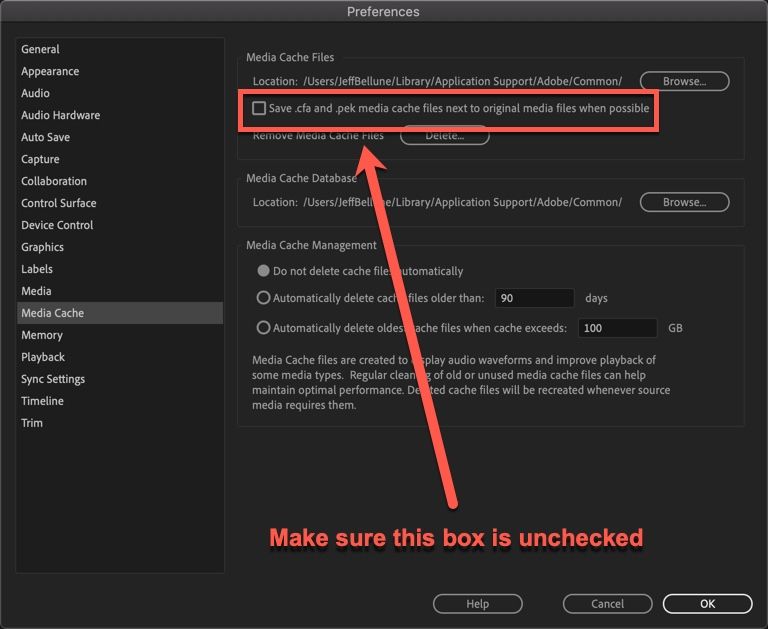
So I made use of project manager and made sure I sent a copy to my new computer... I can open my project and work on it everything is there, but the one thing that annoys me is that the peak files are being generated in the same disk location on computer! I have a special disk dedicated to cache&scratch and the cache is fine it does save the files there... but the peak files all keep loading in the same location as my project&media. is there anyway too fix this?? I made sure in project settings that all the scratch is saved on my special disk and restarted premiere after but nope... peak files still loading in same location.


 1 Correct answer


 4
Replies
4
4
Replies
4



Copy link to clipboard
Copied
is there anyway too fix this??
Yes, go to Edit > Preferences > Media Cache and change the location of Media Cache Files to your dedicated disk. Change Media Cache Database while you are there as well.
Now, close Premiere Pro and go to the location were they first was created and delete those files manually. Launch Premiere Pro and open the project again. This time new peak files are generated but will this time be placed on the disk you specifyed.
Copy link to clipboard
Copied
I did this!! but still it will save the peak files on the same disk???
Copy link to clipboard
Copied
Copy link to clipboard
Copied
This worked! thank you so much... was so simple but overlooked it haha


Get ready! An upgraded Adobe Community experience is coming in January.
Learn more
 AdChoices