3 replies

Participant
February 4, 2025

this worked for me -- mark in/out what areas of the transcript were affected and then re-transcribe seq while checking the boxes for "Transcribe to in point and out point only" and "Merge output with existing transcription". it should fix the timing within the marked area and leave everything else unaffected.

Participant
August 23, 2024

I'm having this same issue. I just added a 20 second title sequence at the beginning, but now the timing of the transcription is 20 seconds behind.

Stan Jones
Community Expert
Community Expert
August 23, 2024

The sequence view transcript times should adjust. Screenshots of the timeline, transcript tab, and program monitor would help.


Stan


Stan Jones
Community Expert
Community Expert
June 1, 2023

Guillermo,


What version of PR are you using?


Is Audio Track 2 linked to any other tracks?


Which audio track is used to create the transcription?


Are you removing sections from the timeline? Or adding them to the timeline?


How are you adding/removing?  For example, you can do an insert from the Transcription tab in the Text Panel.


Stan


Participating Frequently
June 13, 2023

What version of PR are you using?

The latest one 23.4.0


Is Audio Track 2 linked to any other tracks?

No


Which audio track is used to create the transcription?

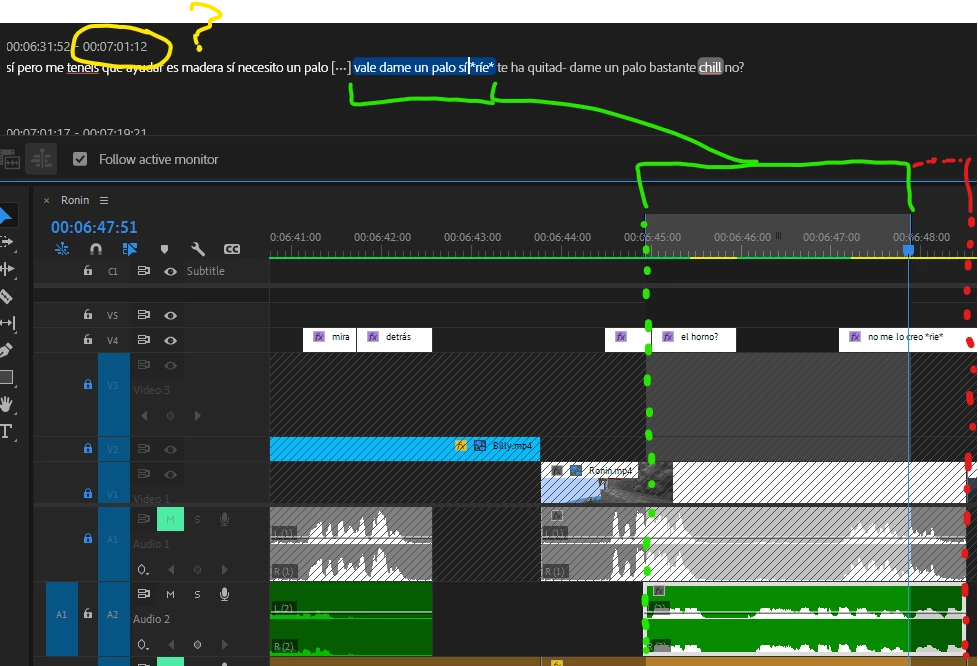
Audio 2 / A2, thats why i put the red mark. I mean the green mark is the wrong timing, the subtitle should be also inside the red mark.


How are you adding/removing?  For example, you can do an insert from the Transcription tab in the Text Panel.

The captions are already created, if there is an error with the timing how can i solve it? I cant add new subtitle in the captions panel and i cant change the timing of a single caption.

For example, if you see the image, if i wanted to change the "bueno" caption, 00:00:58:01 - 00:00:59:30, to for example 00:00:58:30 - 00:00:59:25 how can i do it?


Stan Jones
Community Expert
Community Expert
June 13, 2023

Guillermo,


You appear to have converted the captions to graphics text using the "Upgrade Caption to Graphic" function. You are in the "Graphics" tab of the Text Panel, not the captions tab. Once you convert the captions their timecode will not adjust correctly.


As long as you do this carefully, you can keep them in sync, but it is better to convert them only when you need to.


Stan