


Known Participant
September 28, 2011
Answered

Why Can't I Rename a Sequence?

  • September 28, 2011
  • 16 replies
  • 116622 views

Ok, so I'm in the project panel, right?  Minding my own buiz and doing what I do.  I want to rename a sequence that I've instinctively named "fat chick" because, well, uh, she was a bit heavy (and in a bikini).  Well, now I need to show the "fat chick" that's paying me what her sequence looks like.  So I want to change "fat chick" to "cute lady" so she's happy.  But guess what?  I can right-click and hit rename, but I never get further than that.  I can't rename it.  So I had to show her the sequence and hope she'd only see the video, not the name of the sequence. 

What's weird is I can rename a whole bunch of other sequences, but the other half of the time I can't.  Oh, I can rename it if it's sitting in the timeline of another sequence... but it only changes it there in the timeline.  (I've posted on this before I realize this is a limitation in Premiere).  But this is different.  I want to rename sequences from the project panel but can't.

Now she's all mad at me and threatening a lawsuit becaue I hurt her feelings, yada, yada.  It's a disaster... all this because I couldn't change the sequence name.

Ok, so the story's made up, but the renaming problem is true.  Is this a bug?  How can I rename sequences when they don't want to be renamed and are perfectly satisfied with the first name I gave them?
This topic has been closed for replies.
Correct answer Stella Haus

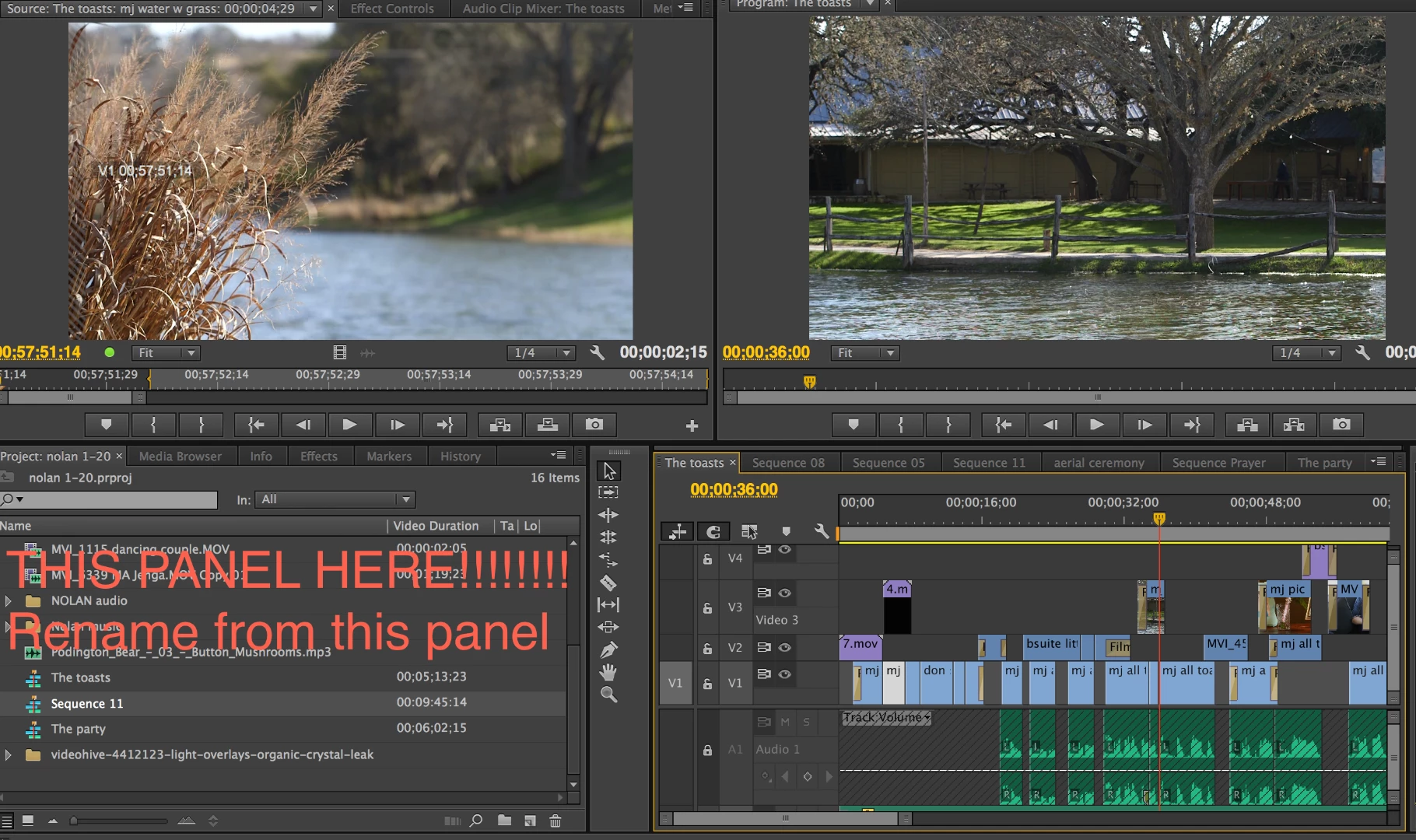
I figured it out. You cannot change the name in the Sequence panel, you can only change it in the Project Panel that holds all your files. Go to the sequence name in the project panel that you want to change and then right click and change the name. I had been trying to rename via the Sequence Panel.

16 replies

Stella HausCorrect answer
Participant
July 4, 2014

I figured it out. You cannot change the name in the Sequence panel, you can only change it in the Project Panel that holds all your files. Go to the sequence name in the project panel that you want to change and then right click and change the name. I had been trying to rename via the Sequence Panel.

shooternz
Legend
July 4, 2014

Correct.

Participant
March 12, 2014

this is an old thread but i just found it because i was having this problem. And i fixed it for myself. it turns out that if your project panel is being FILTERED it wont let you rename. but if you x out the FIND box and display everything again, you can do it.

Participant
March 15, 2013

This may have already been answered, but just in case it hasn't: Select the list option to view the items in the current bin (or wherever your sequence is), the select the sequence whose name you want to change. Hit the "Return" key, and the name of the sequence will become highlighted. You can now type in the new sequence name. Click anywhere outside the name to set it - if you hit the "Return" key you'll start the process again. Hope that helped!

Phyllis

Participant
November 12, 2021

Worked Beautifully! Thank you!


Participant
October 8, 2012

I have this problem when I use the search bar.  I have to clear the search bar and view all media before I can rename.  It is actually only certain searches.  Makes no sense, but when I clear, and scroll to the clip, I can rename.

Participant
February 4, 2012

Finally figured this out after 2 years...

Widen the width of the project panel (make sure it isn't smaller than the NAME column).

Problem should be solved! -Kelly

Powered_by_Design
Inspiring
February 4, 2012

@ HybridM&M

No matter how small I make the project panel I can still get the rename field to come up and work.

@ Toomany3

Mabye try reseting your workspace to a different one and see if it works there.  Maybe something is out of allignment.

GLenn

epicdeer
Participant
July 13, 2018

Resetting the workspace worked for me. Thanks, GLenn

Legend
September 28, 2011

Just left click on the sequence name directly.  It'll change to rename mode.

Known Participant
September 28, 2011

Yeah, that's what's supposed to work.  But when I click on the text of the sequence in the project panel, it just highlights it out (grey), but doesn't turn it into a white rename box like it does most of the other times.  Ok, whatever... so I'll just right click > rename.  No dice there either, although the option is available.  I click "rename" and nothing ever happens.  I can't rename it.  But when I do either of the above on other sequences it works as expected.

I restart Premiere and the computer and the same thing.

I then close my sequence timeline and try to rename and it still doesn't work.  Then I try importing the project into a new project and it still does it.

I have a work around when that happens (copy/paste into a new sequence with the name I want) but why would I be unable to rename certain sequences and others I can in the same project?    

the_wine_snob
Inspiring
September 28, 2011

Just a test, but in Project Panel, if you Rt-click on the Sequence, is Renaming still a no-go?

Good luck,

Hunt