


- Home
- Premiere Pro
- Discussions
- Re: Why is 4K video file size reduced?
- Re: Why is 4K video file size reduced?

Copy link to clipboard
Copied
I am running Premiere Pro 2019 on a new HP Envy 4K All in one pc. As a trial I exported a project using the "High Quality 2160p 4K" setting with an Estimated File Size of 12103 MB. I exported the file to the PC internal memory and the file size is only 2.22GB. It looks great but how is the difference explained? When I exported it to an external hard drive it was not reduced - although it took a long time!
As I generally export for YouTube using "YouTube 2160p 4K Ultra HD" will the reduction in file size affect the quality of the output on YouTube?
Thanks in advance


 1 Correct answer
I think I'm sending it to the wrong drive on the pc. one is 2TB HDD (D) and one is 256GB SSD (C) so I'll stick to the 2TB HDD. The external drive (G) is 10TB HDD

 15
Replies
15
15
Replies
15


Copy link to clipboard
Copied
Exporting to a external drive will take longer then export to an internal drives as transfer rate is usually better.
Unfortunately Youtube re-encodes.
Estimated file size is what it is: an estimate.
Copy link to clipboard
Copied
Ann Bens thank you for your response but that hasn't really answered my question. I understand what you say about estimates but I can't believe it can be a factor of 6 out. There appears to be some sort of compression occurring when I save to the PC which doesn't occur when I save to the external drive; that file was 12GB. I can't work out if it is a PC setting or a Premiere Pro setting.
Copy link to clipboard
Copied
Please post screenshot export settings.
Copy link to clipboard
Copied
Export to an external drive
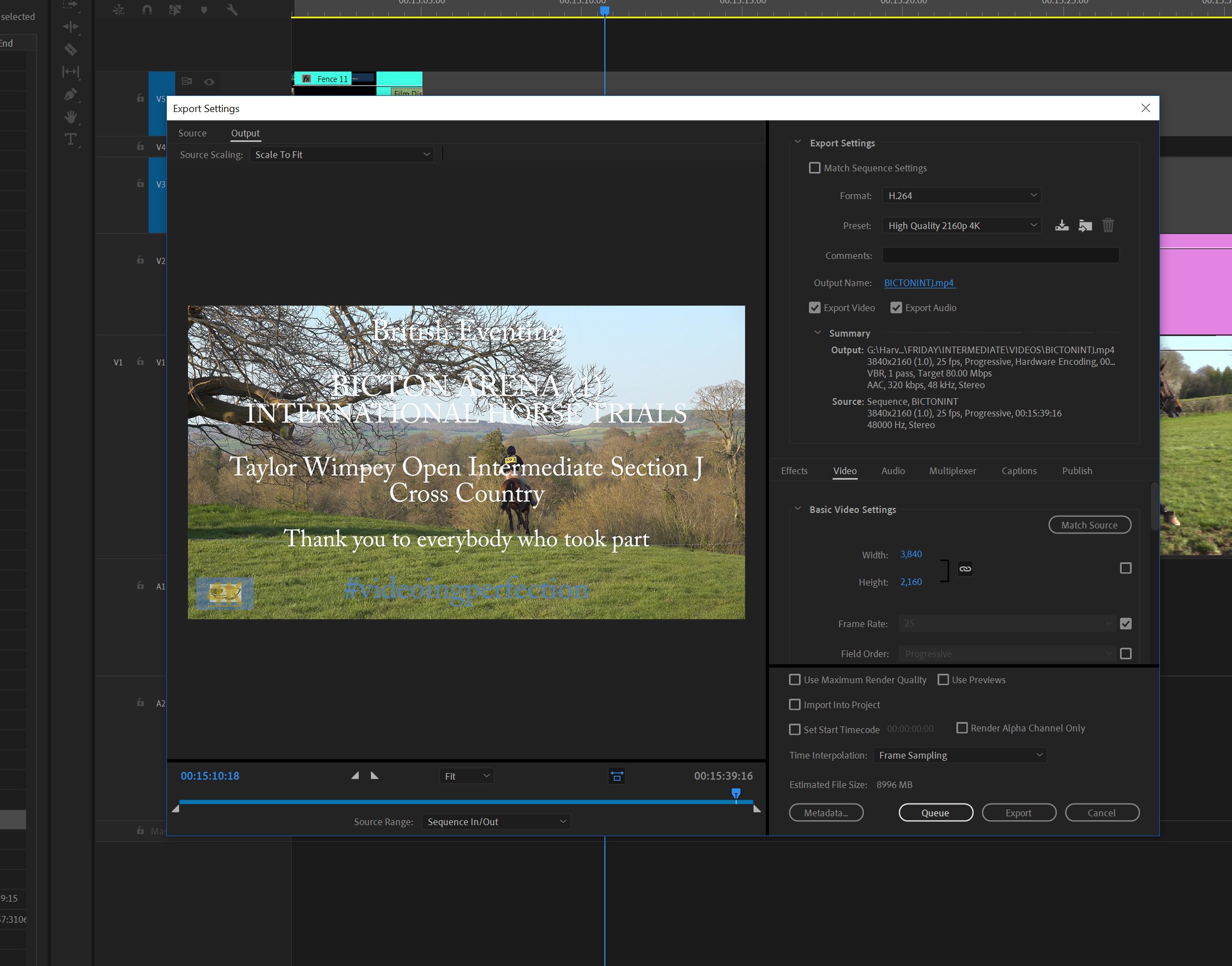
Copy link to clipboard
Copied
Export to the HP C drive

Copy link to clipboard
Copied
Copy link to clipboard
Copied
One is output to C and one is output to G but yes apart from that they are identical
Copy link to clipboard
Copied
Are both drives formatted ntfs?

Copy link to clipboard
Copied
Export speed depends on many things IMO. If you have manipulated your work too much, then the processor will have to process them all before writing them on disk. So it does not matter if you write to external or internal disk unless your machine do not process a lot of data. This is what I understand actually.
And @Ann+Bens as you are very expert, what bit rate you suggest we should use to export for YouTube? I assume there is no need to export videos in 90mbps as YT would certainly downgrade them.
Copy link to clipboard
Copied
It was more the difference in file size that puzzled me rather than the speed. I use the You Tube setting most of the time but was interested to see the high quality output on my new PC.
Copy link to clipboard
Copied
Please post mediainfo!!
Copy link to clipboard
Copied
There could be another reason, which is your Hard Drive's allocation unit -
.jpg)
You can google about it.
Copy link to clipboard
Copied
I think I'm sending it to the wrong drive on the pc. one is 2TB HDD (D) and one is 256GB SSD (C) so I'll stick to the 2TB HDD. The external drive (G) is 10TB HDD

Copy link to clipboard
Copied
Ok... look, people that have no idea of the solution, even being a certified adobe community professionnal, should really just not give false answers, because it gets more confusing.
It has nothing to do with the drives! David didnt speak about the time it takes to export but the file size!
David, the reason is: you are encoding with VBR 1 pass at 80 Mbps. VBR means variable bit rate.
Which means: the bitrate will vary up to a maximum of 80 Mbps depending of what the computer estimate it needs of bitrate while exporting. At the end you can very much end with a file at 20 or 30 Mbps, thus the file size is smaller than the estimated file size that is calculated for 80 Mbps. You can check the bitrate of your exported file by right-click Properties - Details.
Now the solution: if you want your export to be at 80 Mbps, select CBR = constant bitrate, at 80 Mbps.
Have a nice day
Copy link to clipboard
Copied
well actually, a CBR export of 80 Mbps gives me sometimes smaller file sizes than VBR1 80 Mbps. It's not logical. Like the estimated file size is 1200MB for some project, I end up with a 340MB at VBR1 80 and 280 MB at CBR 80! Makes no sense to me.
But with VBR2 at 80 Mbps there I get the 1200MB as estimated. Whatever Premiere 😃


Find more inspiration, events, and resources on the new Adobe Community
Explore Now
 AdChoices