


Windows: Copy-Paste within the same song in Adobe Premiere: How-to in logical format?
Greetings all:
Before anything, I am so brand new, I still have blisters on me.
I have severe Asperger's and severe ADHD (Well you could say, HHADHHHD, in my case. :S ), which does not help me in this specific matter.
That said:
I imported a song into Premiere, placed 2 Markers ... and got totally stuck there.
Went to Google, search for the How-To, and I did find quite a bit of information, TBH ... but not ONE that explained things in a logical format.
for instance, this lovely video, is a prime example of what I found in the several hours that I looked for an answer:
How to Copy and Paste in Premiere Pro (Simple to Advanced Tips) - YouTube
Lovely person, and he really tries to be of help ... but ... :
From the get-go, he begins about pasting a "Blue Example Bit" within a sound file.
Seeing this, I am like:
HOL'ON A SCON' THERE!!!
Where the heck did you get THAT from???
Explaining:
If logic and rational is lying to me, feel free to shoot me, but, if I, and I am far from smart, get things a wee bit, you need to:
1) Select the begin point and end point of the bit you want to be copied.
2) Then, you copy this, into either the RAM or a file.
3) Select the place where you want this to be inserted.
4) Only THEN, paste that bit where it belongs.
But our friend, he magically recieved the to be inserted bit, and did not need to do part 1) and 2), apparently.
Alas, neither God, nor devil seems to appreciate me, and thus ... I did not get this magical "Blue Example Bit" to insert in my song.
While the video clearly stated COPY and PASTE, in that order, out friend, then, is capable to insert his bit, and later in the video, will probably copy it from his sound file, to then, I think, through means of magic, bring it into the past, where he began the video.
I get it, I get it:
It is very hard to begin at the beginning, and follow the logical steps ... in the logical way.
Still, to me then, this is darn confuzzeling, I need logical and rational steps and clarity.
And all links I found thusfar, had issues like illogical made steps, like our friend, or were incomplete, like the very Premiere support, which told me this:
- Highlight the clip you want to duplicate.
- Right click (Windows) or Command click (Mac) on the clip and select Copy.
- Use right click or Command click again where you want to drop the duplicated clip and select Paste.
Cute, and how do I highlight that bit, please? o_O
Where I got with my song in Premiere, following logic (based on what I assume, is the right set of steps, as said, I am blistering brand new to Premiere, so please, bear with me):
1) I set a Marker at the start point of the bit I needed to copy.
2) I set a marker at the end point of the bit I wanted to copy.
3) ... and this is where things got wrong; when I do CTRL C, I get a message telling me: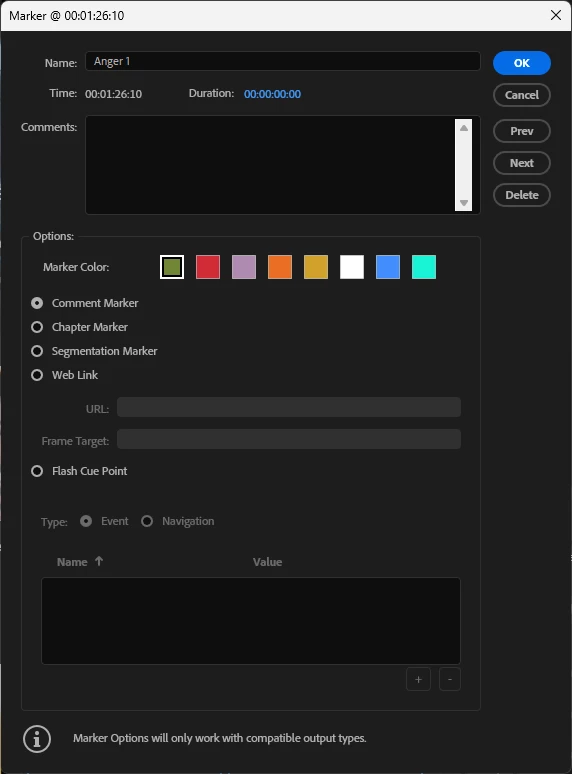
In itself, this is good, if not:
Duration ... what do I fill in there?
The time that the to be copied part is, as in 14 seconds (to say something)?
The time frame, as in from 1.26,10 to say 1,40,10?
Where can I see the data of it, as, I placed both markers by ear?
I do not find any data in this, in Premiere.
Also, why does Premiere not set this automatically, as I have placed 2 markers, one at the beginning of the to be coppied bit, and one at its end.
IMHO, Premiere should for what I think, at least, understand, that both start and end were marked?
Or, am I like horribly wrong in my assumption?
Do I even need markers,m for that matter?
Adobe support spoke of highlighting the bit I wanted to be copied, but how do I do that?
When I point my trackball mouse to the beginning, rightclick and hold the button, move to the end point of the to be copied part, Premiere does weird to me things like increasing volume and whatnot.
But selecting that part?
No, not really.
And nowhere some decent information to be foind on this. 😞
And so, I finally came here, hoping for a helping hand, that could explain to me my errors, and tell me which steps needed to be taken, preferably beginning at the beginning, and not like our friend from the video, at the end of the story, since, that breaks the single braincell I have left ... .
Thank you aforhand, and my apologies for the rant, it has been a hard day for me ... .
Kindest regards:
Xog.
 AdChoices