
Legend
October 29, 2021
Question

Workflows are destroyed in Premiere Pro v.22.0 | solved with color

  • October 29, 2021
  • 3 replies
  • 2390 views

To date, there are serious shortcomings in the workflows of Premier Pro v.22.0, which are still known to me:
1. Dynamic connection of Pr and AE;
2. Fading and disappearing of the Play Head on the timeline (with a double or triple question, the output is no good);
3. Very poor performance in playing files on the timeline.
4. Problem with linking Proxy. For some reason, in the new update, the connection with the proxy is not picked up automatically and occurs one clip at a time.

5. CPU load is at full power, and the graphics card is sleeping. Where is its power in visualization processing?

These are the main ones.

If you have problems with incorrect color display in clips on the timeline, please pay attention to the new feature - interpretation of the material before editing. It works.
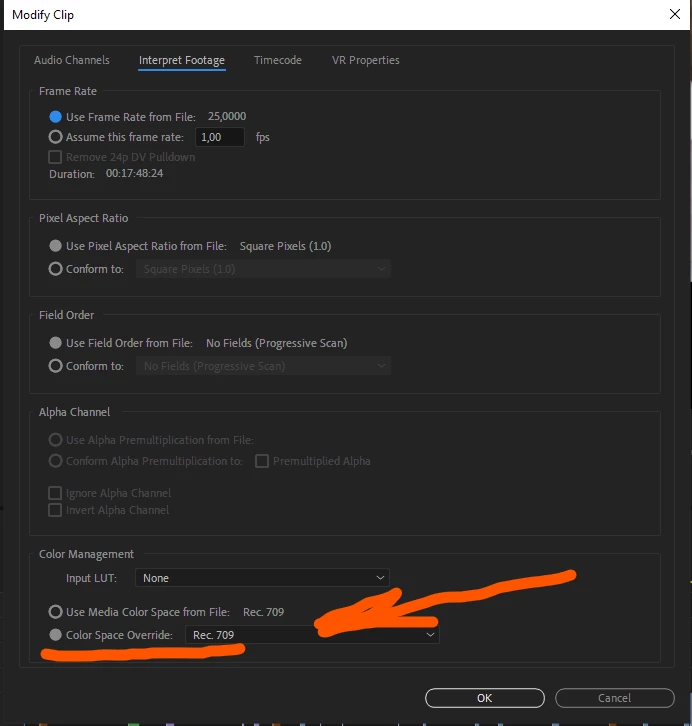
 

How about trying to check (who has free time from projects) to clean the Adode products with a special utility, and then install a new version
v. 22.0. I drew attention to the conflicts of some plugins, with which some failures occur. In the previous version 15.4.1, everything was normal. Now there is either a real flaw, or a conflict of the remaining files from the previous version with the new version.

Does anyone have any thoughts?

This topic has been closed for replies.

3 replies

Known Participant
October 8, 2022

Version 223 is TOTAL CRAP!!!!!!!!  I can't use it at all as my videos have banding and tearing so can't edit and can't export as video is not stable. I have reverted to the last stable version which is 14.9 and everything works well thank God but we pay a subscription for up to date software right? Anybody else having these issues?????

R Neil Haugen
Legend
October 8, 2022

No, which leads me to the obvious conclusion that something on your rig is way off. I've worked with Red, BRAW, ProRes, ProRes RAW, H.264/5, S-log variants in the XAVC stuff, some drone media, and haven't had any issues whatever.


What's your kit, your media & effects? Give plenty of details, and we'll see if we can't get this sorted.


And of course, you can have multiple major versions installed at the same time, so you can test one while using another. I've got from 2019 through the current public beta installed on my main rig. And my 'old', now secondary rig has back through 2015 on it.


Neil

Everyone's mileage always varies ...
Baffy19Author
Legend
October 8, 2022

I have encountered difficulties working in the h265 format. I have some opened, and others do not read. I suspect that the encoding of the file is broken. There were no problems with h264.

R Neil Haugen
Legend
October 30, 2021

For anyone working professionally, delivering to paying clients ... it is always wise to keep the older versions as your working setup while testing major version updates to see if they are stable on your machine.


For anyone having issues with the 22.x, stay working in 15.x until the 22.x version proves stable on your rig. One advantage of the Adobe apps over say Resolve is you can have multiple major versions installed simultaneously.


And for migrating projects ... I never recommend simply opening an old project in a new version. Use the MediaBrowser panel to navigate to the old version project file. Select and import the assets of that project file.


This seems to get a cleaner, more reliable forward migration plus you still have the older project file intact and working in case the new version ain't performing correctly.


Neil

Everyone's mileage always varies ...
Baffy19Author
Legend
October 30, 2021
quote

For anyone having issues with the 22.x, stay working in 15.x until the 22.x version proves stable on your rig. One advantage of the Adobe apps over say Resolve is you can have multiple major versions installed simultaneously.


Resolve releases a product that has no problems. They don't release raw material in with so many flaws. Therefore, they do not need to think about an alternate airfield. Let's strive also and everyone will be happy.

R Neil Haugen
Legend
October 30, 2021

Notice how long I've been here, I've noticed this trend: some Windows users have some problems, iMac has others. There are also general flaws. May consider the issue separately about installations for Windows and Mac operating systems. Maybe there will be fewer mistakes. For example, everyone has the same Resolve. Nvidia itself has broken down its installation drivers for games and editing programs. So there is some advantage in this.

With respect to the Adobe development team.


"Everyone has the same Resolve" ... not sure what you mean there. They have versions for Mac and PC, and of course users on various versions of each. Very much like the Adobe apps except each user can only have one version loaded at a time. Unlike the Adobe apps.


Neil


Everyone's mileage always varies ...
AuntyMofo
Participant
October 30, 2021

Thanks for sharing - I've had an issue with one particular effect since the update (Invert).


I tried your above fix on the off-chance it might help but no joy :'(


Wondered if you might have any other ideas as you seem quite knowledgable! More info on my issue here: https://community.adobe.com/t5/premiere-pro-discussions/premiere-pro-22-0-update-issues-with-invert-effect/m-p/12484975#M375042


Thought I may as well ask - getting a bit desperate as this project was due yesterday!


Thanks.

Baffy19Author
Legend
October 30, 2021

Hello.
I personally tested the standard Invert effect and it works fine in the new version v. 22.0. Here is a screenshot: