
Workflows are destroyed in Premiere Pro v.22.0 | solved with color
To date, there are serious shortcomings in the workflows of Premier Pro v.22.0, which are still known to me:
1. Dynamic connection of Pr and AE;
2. Fading and disappearing of the Play Head on the timeline (with a double or triple question, the output is no good);
3. Very poor performance in playing files on the timeline.
4. Problem with linking Proxy. For some reason, in the new update, the connection with the proxy is not picked up automatically and occurs one clip at a time.
5. CPU load is at full power, and the graphics card is sleeping. Where is its power in visualization processing?
These are the main ones.
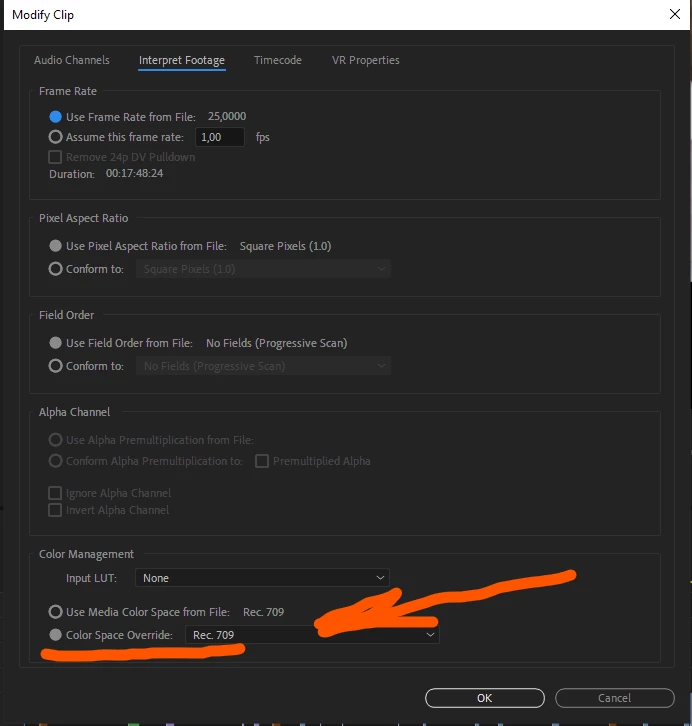
If you have problems with incorrect color display in clips on the timeline, please pay attention to the new feature - interpretation of the material before editing. It works.
How about trying to check (who has free time from projects) to clean the Adode products with a special utility, and then install a new version
v. 22.0. I drew attention to the conflicts of some plugins, with which some failures occur. In the previous version 15.4.1, everything was normal. Now there is either a real flaw, or a conflict of the remaining files from the previous version with the new version.
Does anyone have any thoughts?
 AdChoices