


Inspiring
May 9, 2019
Answered

Zoom in on Source monitor in 2019

  • May 9, 2019
  • 3 replies
  • 5977 views

All of my zooming in functions like command+=, shift + z, or command+- do not zoom in on the screen in the source monitor, but instead zoom in on timelines or on the scroll bar beneath the source window.  Is there a fix for this?  I am using the FCP 7 keyboard but it doesn't seem to work in the default Premiere keyboard setting either.

    This topic has been closed for replies.
    Correct answer MyerPj

    I'm glad Adobe doesn't take these comments personally. Why is it something to 'fix' like it's broken. I think it prevents people from looking around and finding answers.

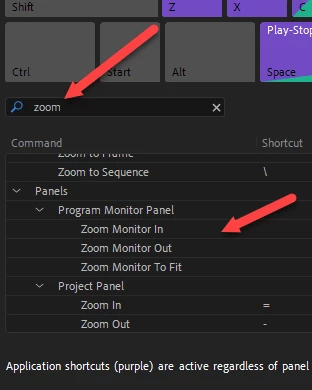
    Did you type in 'zoom' in the keyboard shortcuts dialog. You can set shortcuts for that. So the fix is to educate the user.

    3 replies

    Spiketrain
    Inspiring
    March 10, 2021

    Am I wrong? / Am I missing something? - I'm seeing the solution here... and have set up keyboard shortcuts to zoom in/out/fit the program monitor whilst editing... but the keyboard shortcuts only work if the blue line 'focus' is around the monitor at the time.

    So I'm working away on the timeline and I'm using my keyboard and ShuttlePro and trying to reduce mouse clicks - hence the point of keyboard shortcuts.... but I can't use this shortuct (and quite a few others too) without doing some clicking first (IE to change focus).

    There is a keyboard shortcut to 'toggle source monitor focus' too - so I set up my Stream Deck to apply this shortcut first, and then the zoom in/out/fit commands afterwards (IE a multi button shortcut sequence for all three actions).... but this doesn't seem to work very often since the focus isn't always in the same place each time I activate the shortcut sequence. IE the focus has to be in exactly the same place each time otherwise the first instruction to focus on program monitor just toggles past it. Am I right?

    R Neil Haugen
    Legend
    March 10, 2021

    The way PrPro is designed can be irritating. The problem they had though, was that there's so many bazillion things to have k-shorts for, that it seemed useful to differentiate where in the app some were used. As that way, the same k-short can be used for several different things. Hencs the "app-wide" and "panel focused" k-shorts.


    The app-wide k-shorts are of course the same no matter what panel has focus. Panel-focused k-shorts are for when a specific panel has focus. "Focus" being indicated by the blue line around a panel or panel group.


    I understand the reason behind it, but you're completely correct that in operation it can be a right royal pain. So yea, having button boxes that can do macros, so you can give it the command to switch to a particular panel THEN apply the k-short to do whatever you need done is handy.


    Sometimes one can build the macro so that X button goes to a particular panel, does a particular step, and then on release jumps to the panel you want focused next.


    Neil

    Everyone's mileage always varies ...
    R Neil Haugen
    Legend
    March 11, 2021

    Thank you so much Neil,


    It's to nice to get empathy!

    After some wrestling - I think I found a solution this evening using the Stream Deck. I seem to have managed to do exactly what you mention regarding the use of macros. It'll do just fine pretty sure.... onwards and upwards!


    I got a Razer Orbweaver Chroma because it was a cheap way to get seven levels of 20 buttons, and a colorist I know had used one successfully. But it's started being inconsistent ... the macros for some things play one day, not the next in PrPro. So I'm looking at replacing.


    The stuff we gotta have ...


    Neil

    Everyone's mileage always varies ...
    MyerPj
    Community Expert
    MyerPjCommunity ExpertCorrect answer
    Community Expert
    May 9, 2019

    I'm glad Adobe doesn't take these comments personally. Why is it something to 'fix' like it's broken. I think it prevents people from looking around and finding answers.

    Did you type in 'zoom' in the keyboard shortcuts dialog. You can set shortcuts for that. So the fix is to educate the user.

    Inspiring
    May 9, 2019

    I did look around but couldn't find it.  Anyway, that does fix it so thanks.  

    Sorry if I hurt the feelings of a multi-billion dollar corporation, lol.

    MyerPj
    Community Expert
    Community Expert
    May 9, 2019

    Understood.

    Yours is a good tip, I just set those for my keyboard also... both the source and program monitor, plus a hotkey for 'to fit' same hotkeys in both monitors and the same keys for the timeline zoom in / out.

    cheers!

    R Neil Haugen
    Legend
    May 9, 2019

    Which "panel" has focus?

    If the blue line is around the Source monitor, those should work the Source monitor ... but if the blue line is around the Timeline or Program monitor, they'll work the main sequence in the Timeline panel.

    Neil

    Everyone's mileage always varies ...