kulpreet singh To however is doing this, please stop marking a question as "answered" when there has not been an actual answer to the question.
Ferdinand83 I have a fix for this.
There is a problem with the way a lot of the Adobe apps behave when scaling for high DPI displays in Windows. Some people have proposed changing the Windows display scaling to 100% instead of the default 200%. Yes, that solves it but makes windows basically unusable because everything is tiny.
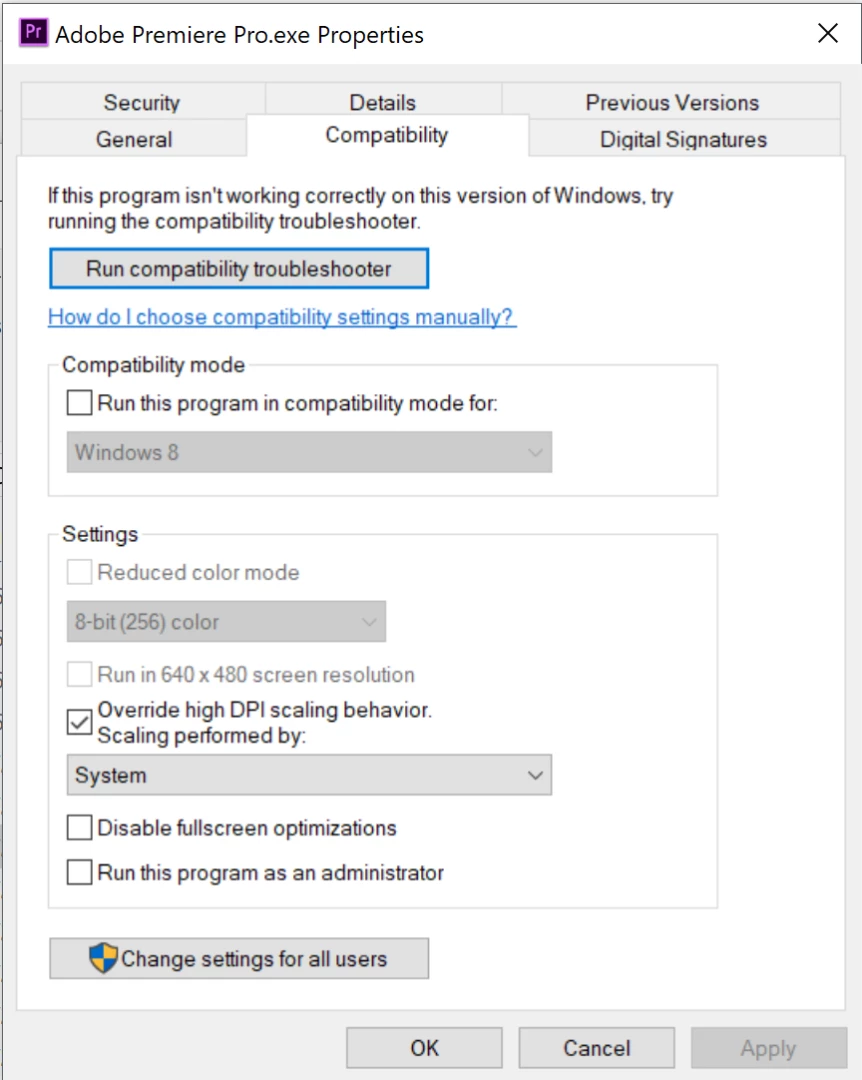
Here's the fix I found, though. Navigate to the .exe file for Premiere Pro in your Program Files/Adobe folder. Right click on it and choose properties. Then click the "Compatibility" tab and then the checkmark box for "Override high DPI scaling..." and in the dropdown menu set it to "System."
(Side note: I had a different problem with scaling in After Effects and in that case I had to set it to "Application" instead of "System" to fix it. Try the other options if one doesn't work.)
Once I did that, the timeline zooming worked like it used to on my old computer.


 AdChoices