
Participant
July 21, 2021
Open for Voting

Change to Color Effect Has Been Removed - Please bring it back.

  • July 21, 2021
  • 18 replies
  • 26996 views

Can anyone help me? I just recently turn off my computer for a night's rest then the next day this pops up. My premiere cant seem to find the change to color filter and I dont know how to get it back. pls help need this asap, big thanks.
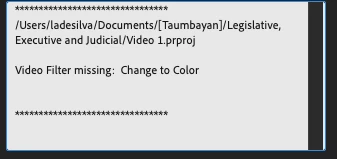


I altered lot using this filter!!! Pls help me need this asap!! Big thanks!!!


Mod note: Title changed slightly.

18 replies

R Neil Haugen
Legend
June 10, 2025

Most of us totally sympathize, as peer users. A lot of us "lost" effects we used, if different than your preferences.  But then, we all do work differntly anyway.


As a survivor as a business owner of many years, I had to make a lot of decisions I did not like making. But were required to keep the business moving forward, if not to keep it solvent.


So I learned to understand such decisions. And their necessity. Even when I don't like them.


(I'm still ticked about SpeedGrade being EOL'd ... personally ... ha!)

Everyone's mileage always varies ...
cs188creations
Participating Frequently
June 10, 2025

Also disappointed about this bring removed... used it all the time for quick and dirty color changes. Wish they had gotten rid of Color Replace and kept Change To Color because it was farrrr more advanced in its capabilities. Heck, I always thought Color Replace *was* the older plugin, based on how terrible it is! Color Replace is awful at handling gradients. I suppose Lumetri Color has the capabilities to get it done, but it feels like much more work to achieve the same result.

MyerPj
Community Expert
Community Expert
December 10, 2024

dci..man, you didn't read the announcement carefully, or at all. I'm thinking it was the 2nd paragraph, maybe the 3rd. Read it and see how you are wrong, then post here to clear up the info.

Participating Frequently
December 10, 2024

What does that even mean? where do i find a way to change to color since premiere stupidly removed it?

dcijazzman
Participating Frequently
December 10, 2024
Adam21903416lp1l - Apparently because Adobe thinks not enough people use
Change To Color, they were willing to throw the users who find it useful
under the bus. Worse still is that the many existing projects that use this
effect have to be edited to make up for the gap. Adobe seems to want us to
use Lumetri for just about everything having to do with color. Personally,
I find it cumbersome for achieving the same end that Change To Color and
Change Color achieved in a very simple and elegant way. I know many people
prefer Lumetri for this particular effect, but it's such a shame that those
who prefer the standalone effect got screwed, and have to update *every
single instance of it* in existing projects.


Adobe: At the very least, please return these two effects to the obsolete
folder (whether everyone in the Adobe-sphere thinks it's a good effect or
not), just so we don't have to update every single instance of them in
existing projects. Thank you!
R Neil Haugen
Legend
November 18, 2024

Replace Color effect is still there.


Although I have extensive experience in color correction and managment, I'm puzzled at using Change Color for general color correction purposes. Start a new thread on color correction/management for your needs, I'll pop in.

Everyone's mileage always varies ...
Participant
November 18, 2024

Hello, Good Afternoon to all the lovely people on thios Adobe community forum. It appears that Adobe has removed the 'Change To Color' effect in video editing under the colcor correction tab. Does anybody know how to chang to color in 2024? I do NOT know how elese to edit the color without it. 


Respecftully, Mason Minogue.

MyerPj
Community Expert
Community Expert
November 2, 2024

Jarle Leirpoll has a preset (and an idea) to save some processing power in his free presets pack available here:

https://premierepro.net/jarles-premiere-pro-presets-version-4/

This will lighten up Lumetri instances


R Neil Haugen
Legend
November 2, 2024

Staffers have given rather detailed responses several times.


Besides being ancient code, when mixed in process order with GPU Accelerated effects, at times the entire stack of effects get dropped from GPU processes.


Plus, as I've noted, numerous pro colorists did extensive testing of them, and did not find the math used correct in some circumstances. And therefore advised any professional user to avoid them like the plague.


I've never been a huge fan of the Lumetri panel. I made myself rather persona non grata with some supervisors, back when they killed SpeedGrade. For my several lengthy, detailed posts,  pointing out the massive limitations being imposed on us.


That's said, I can push Lumetri to do things many of my colorist acquaintances didn't think it could do. Partly due to having a full Tangent Elements control panel. Which allows you to work multiple controls against each other simultaneously, and that allows for more targeted corrections than seem possible with mouse usage.


I agree with some of your suggestions. Personally I've pushed for each specific tab/section of Lumetri to be selectable in whatever order we would like.


And for us to be able to select say HSL, then Wheels, then Basic, and another HSL if we wish.

Everyone's mileage always varies ...
R Neil Haugen
Legend
November 2, 2024

Reality is a hard thing. Sorry, I know they were useful for you. I lost a couple I really liked also.


But that "valuable" tool was used by under 1% of the user base. NOT valuable to the vast majority of users. Bad math and ancient code.


You would be better off to give ideas for specific changes you need in the current effects to meet your needs. They aren't going to put time into something almost never used.

Everyone's mileage always varies ...
dcijazzman
Participating Frequently
November 2, 2024
Thank you. What was the reason for discontinuing these effects? Why would
Adobe go to the trouble of even taking that step? Did the effects create a
problem for the app's functionality?

Also, does Adobe think 1% of their PP users should have their needs unmet
(particularly when editing older projects that used these effects)?

To answer your call for specific ideas to improve current effects:

1) I have always found Lumetri has too many effects bundled into one large
effect. Simply accessing some of Lumetri's effects takes time. Some of
these effects should be made into simple, single offshoots. Saturation and
Change Color for example. When a user only needs one of these effects, it
seems like it would be easier on the app's functionality to run the single
effect, rather than the full bundle. And it would certainly be easier for a
user like me to use the single effect, if only because I can access the
settings with much less time (no unnecessary scrolling and opening of
drop-down options required).

2A) Please bring back "Change Color" and "Change To Color" as single-use
effects. Update the math and make it GPU-accelerated if necessary, but
please offer the same exact settings/tools that were in the original
versions.

2B) Most importantly, make these new versions of "Change Color" and "Color
To Color" seamlessly open and function when opening older projects that
used these effects. For people like me who used these effects often, it
will save much time and heartache, and I will be left with the impression
that Adobe cares about all its users, even the lowly 1%.

Thank you
dcijazzman
Participating Frequently
November 2, 2024

Color Replace is missing key tools that were present in Change Color and Change To Color. So, though it has some use, it fails when dealing with gradients and shadows of a color. Also, with old projects, users have to redo every instance of their use of Change Color or Change To Color. Adobe should have kept these two valuable effects. They can correct this error by returning them as soon as possible in an update.