



Eccentric Locust
Inspiring
December 2, 2023
Open for Voting

Enable Additional Hardware Accelerated Decoding Support for H.264 and HEVC Footage

  • December 2, 2023
  • 29 replies
  • 5752 views

I did some research recently due to a massive playback issue not too long ago with some HEVC footage I recorded with OBS Studio (for some context, the OBS footage was constant frame rate, not VFR).


Here is the link to that post for reference:

https://community.adobe.com/t5/premiere-pro-bugs/hevc-8-bit-4-4-4-footage-is-very-hard-to-playback-in-premiere-pro-sometimes/idi-p/14229324


To sum it up, I realized that one of the main causes for my playback issues was with Adobe's lack of support for hardware accelerated decoding for a majority of the flavors of H.264 and HEVC codecs.


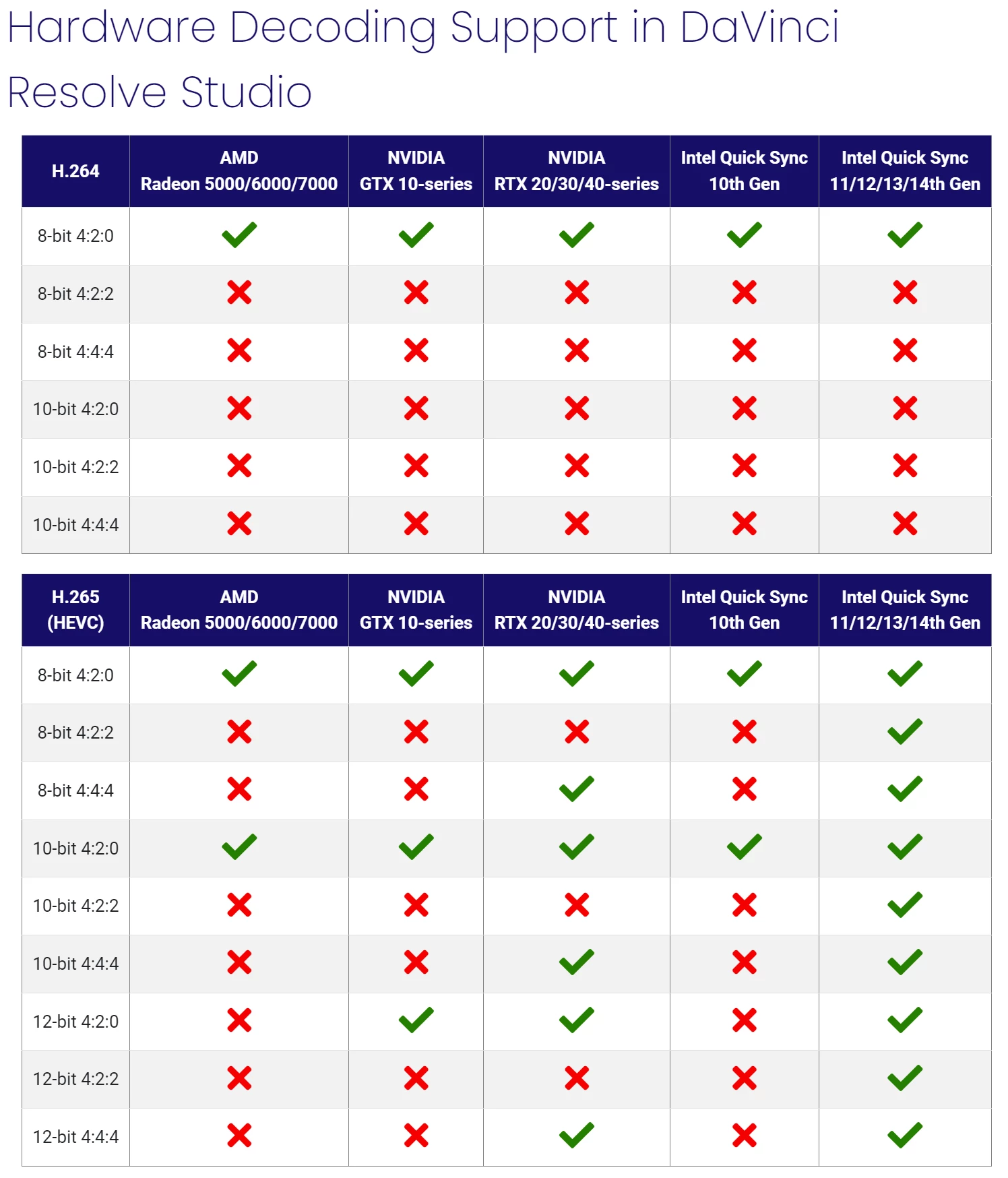
Here are a couple screenshots as well as links to the articles from Puget Systems back in December, 2022:
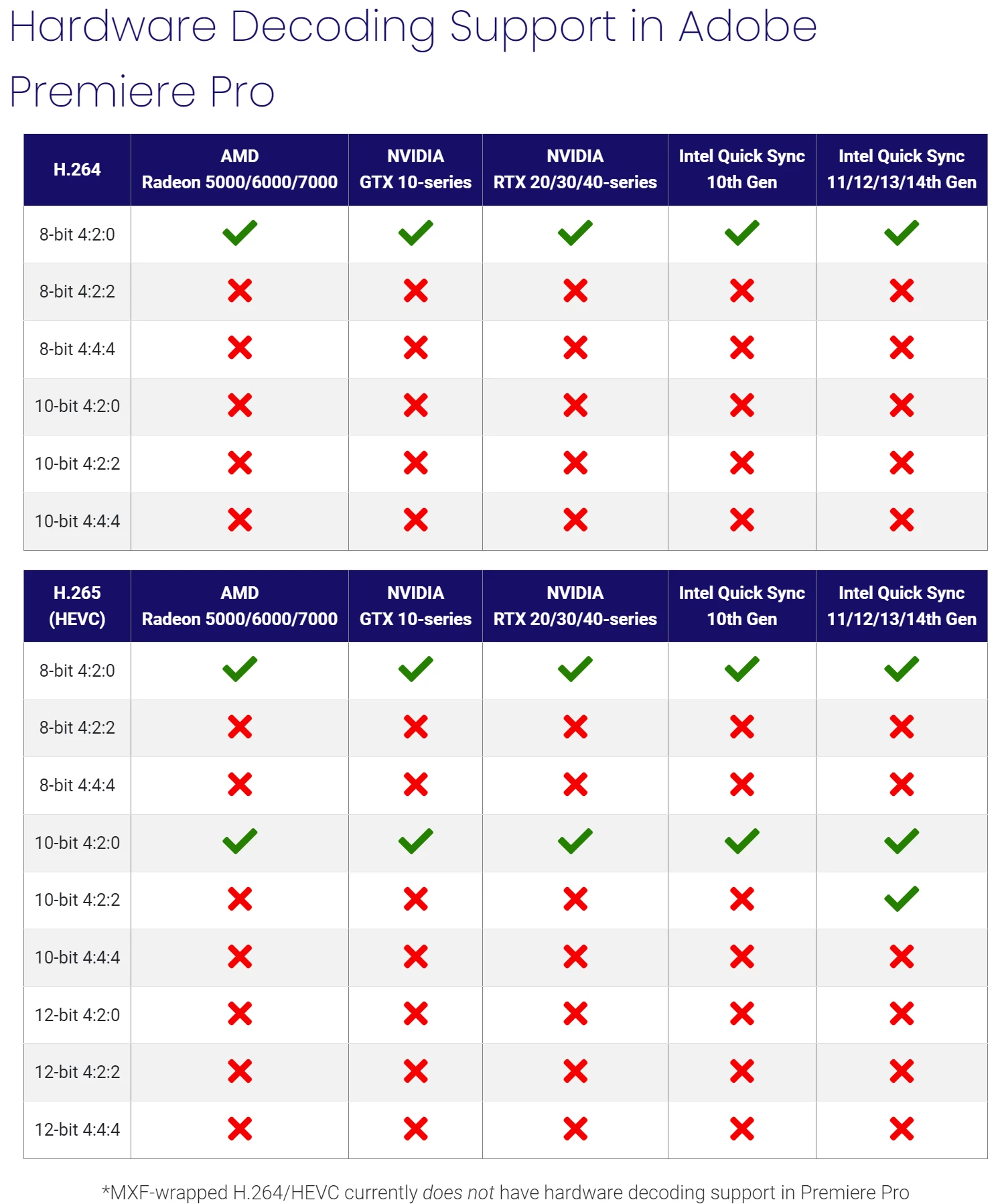
 

Premiere Pro: https://www.pugetsystems.com/labs/articles/what-h-264-and-h-265-hardware-decoding-is-supported-in-premiere-pro-2120/

DaVinci Resolve: https://www.pugetsystems.com/labs/articles/what-h-264-and-h-265-hardware-decoding-is-supported-in-davinci-resolve-studio-2122/


For some context, here are a few specs from my PC setup:


CPU: Ryzen 9 7950x 16-Core, 32-Thread

GPU: NVIDIA RTX 4090

RAM: 128GB of DDR5


My GPU is an RTX 4090 and even though it can decode video with NVDEC in all flavors of H.264 and HEVC codecs (including AV1, which Adobe currently doesn't support as of this post), it doesn't get used due to Adobe's lack of support for the footage I'm editing in (HEVC 8-bit 4:4:4 in MOV and MP4). And so that task is given to my CPU.


However I have an AMD CPU, a Ryzen 9 7950x, and unfortunately AMD doesn't put their Video Core Next hardware core in their CPUs; unlike Intel, which puts their Quick Sync Video hardware core in their CPUs. So really, the video decoding on my system becomes software only instead of hardware accelerated.


This makes the editing experience in Premiere Pro extremely difficult to manage with poor video playback in my timelines to the point where it's sometimes impossible to even work without transcoding to another codec.


For now, I've been transcoding to ProRes proxies to get around my issue.


Suggestion:

I highly recommend Adobe enable more hardware accelerated decoding support for the different flavors of H.264 and HEVC codecs.


While I understand that a lot of people are often editing 8-bit 4:2:0 footage with these codecs, having support for only this heavily overshadows editors and filmmakers that are recording in higher quality flavors of these codecs either because they want to or they simply can't afford to use ProRes due to high file sizes.


Other editing platforms, such as DaVinci Resolve, currently have more hardware accelerated decoding support than Premiere Pro (as seen from the chart above) and so I would really appreciate it for Adobe to really up their game on this.


I love Premiere and so I'd love to see smooth playback in my editing timelines for more types of footage!

29 replies

Brainiac
June 13, 2025

An update:


The official release version 25.3 is now available. Currently, only Blackwell-architecture Nvidia GPUs support hardware 10-bit 4:2:0 and 10-bit 4:2:2 H.264 decoding, while hardware 10-bit 4:2:2 HEVC decoding is a first for Nvidia (Intel and Apple GPUs already support hardware 10-bit 4:2:2 decoding for HEVC).

Community Manager
March 20, 2025

Hi everyone,

We have released hardware acceleration support for 10-bit 4:2:2 media in both H.264 and HEVC codecs on NVIDIA Blackwell GPUs in the beta builds.

Here’s the announcement: https://community.adobe.com/t5/premiere-pro-beta-discussions/now-in-beta-improved-support-for-nvidia-blackwell-architecture/td-p/15223226

If you have a Blackwell Architecture GPU, we’d love to hear your feedback from the Beta builds.

Thanks,
Mayjain

Brainiac
March 7, 2025

Thanks for the clarification.

Fergus H
Community Manager
Community Manager
March 7, 2025

@RjL190365 I was looking for a post on our forum and came across this thread. As mentioned in the link @mayjain7130546 provided, we are working on supporting H.264 and HEVC 10-bit 4:2:2 in the NVIDIA Blackwell Architecture-powered GPUs. 


I did want to comment on something you said back in January:

"I am also expecting Nvidia to unlock 4:2:2 hardware decoding and encoding support (at least for HEVC) in its Turing and newer-gen GPUs beginning with driver branch 570"


If you're referring to 10-bit 4:2:2, that will only be available in Blackwell. It's a change in silicon that cannot be made available in older NVIDIA GPUs. 


Regards,

Fergus

Community Manager
January 11, 2025

Hi @RjL190365,  @Eccentric Locust and everyone,

Similar discussion happened on this post:-
https://community.adobe.com/t5/premiere-pro-ideas/feature-request-add-other-codecs-flavours-support-to-premiere-pro/idc-p/15079456#M18657

As mentioned by Fergus, "We've been working closely with Nvidia to support their new GPU.... "

Thanks,
Mayjain

Brainiac
January 10, 2025

I am also expecting Nvidia to unlock 4:2:2 hardware decoding and encoding support (at least for HEVC) in its Turing and newer-gen GPUs beginning with driver branch 570, which is due to be released whenever the Blackwell GPUs start shipping to distributors.


Adobe users may have to wait longer for this support to be added to its Nvidia codec.

Eccentric Locust
Inspiring
January 9, 2025

@Daniel Laan Actually, it still stands! I did see the announcement at CES 2025 for 4:2:2 encode and decode for the latest RTX 50-series GPUs, which is great to see!


However, it is up to Adobe to impliment support for it in their software; which after the announcement, I hope it happens soon.


For instance, the RTX 4090 supports 4:4:4 encode/decode on codecs like H.264 and HEVC. But Adobe doesn't have support for that at the moment.

Daniel Laan
New Participant
January 9, 2025

This didn't age well. NVidia supports 4:2:2 encoding and decoding on Blackwell as announced at CES 2025.

Brainiac
August 13, 2024

Hi.
You don't have to go far here. Everyone who works or is related to color knows and understands perfectly well that it is impossible to paint good frames in 8-bit color. There is a severe destruction of pixels when creating a certain concept of a cinematic look. Just look at how many colors are contained in an 8-bit color. That's right, 16.78 million in color. And how much is in 10-bit? Billions already. To be more precise, 1.07 billion. I think it's not even worth persisting and squeezing out 8-bit sources to achieve the desired result. Modern cameras shoot in both 12 and 16 bit color, and just imagine what a difference it will be with the previous ones (12-bit = 68.68 billion!). If anyone here says that I paint and 8-bit is enough for me, for God's sake. But not for everyone, including me. The density of color in the modern world is important for flawless work and creating an amazing product that is pleasant to look at.
Good luck to everyone.


New Participant
August 13, 2024

Recently, I have made research on this topic and went already through the same links and resources here posted/ mentioned.


Firstly, I strongly support the point made by @Eccentric Locust , and @Baffy19 . I am using Sony A 7IV, in which we have


XAVC HS  (H.265) - Highly compressed

XAVC S  (H.264) - Medium compressed

XAVC S-I  (H.264) - Mostly un compressed


options for 4K videos. The chroma subsampling choices varies with different fps and bit depths (8 or 10).


I would love to edit with uncompressed XAVC S-I  (H.264), 60fps where I am only opt to 10-4:2:2 depth and chroma subsampling.


Due to 10 - 4:2:2 this is not possible in Adobe premier, unless you have intel iCPUs which is capable of it. I DO NOT WANT TO UPGRADE, only for this reason, I am asking why it is not possible for GPU manufacture can not support the latest and best bit depths and chroma subsampling??

I am greatly disappointed, that I have to make proxies for my work otherwise have to shoot, 4:2:0.


The thing I do not understand is, the highly compressed codecs (i.e. XAVC HS  (H.265) ) usually suppose to take CPU rather GPU according to the difficulties in the post describing. But adobe support the H.265, 10-4:2:0 even 60fps, for GPU acceleration.


@Adobe  @NVIDIA @AMD Please take this topic as one of the feature request for future software - driver updates!

Being, a Software developer, I do not see the difficulties writing the codecs for other various bit depths and chroma subsampling, if you already have one or more working/ supporting format, that already released!