


Participant
March 5, 2025
Open for Voting

New 2025 Audio Crossfade : Add keyboard modifers to allow L or R origin crossfades

  • March 5, 2025
  • 2 replies
  • 330 views

With the new audio crossfade interface in P25, it would be helpfull if there was a modifyer key that would alow editors to specity an origin point for the crossfade other than center.


I find I'm often having to make the crossfade durration, then drag it into the position I want.
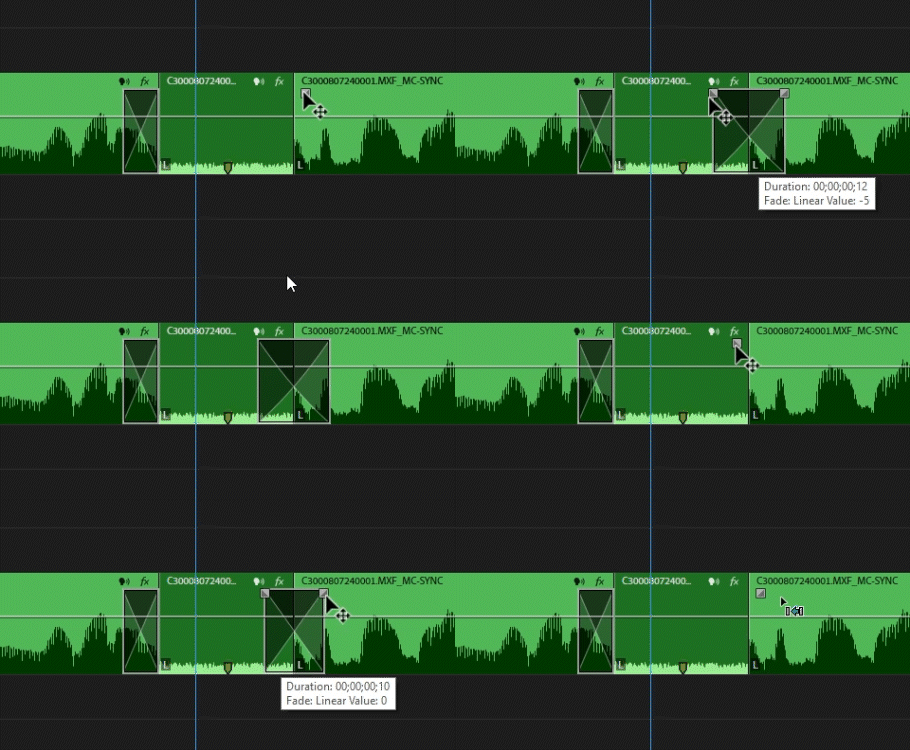


I see that the 'alt' key is assigned, but that does a fade, not a crossdisolve


2 replies

SquareEyz
Inspiring
April 7, 2025

This seems to have been almost resolved in 2025.2.0.

Once the crossfade has been created, hold the shift key while grabbing the 'tangent' box in the L/R corners and the crossfade extents from there- not the center. Still a few extra clicks. Would love for this to be the case off the bat :ie hold the shift key, drag the crossdade 'tangent handle' box, and the user has an audio crossfade that is a 'start at cut / end at cut', instead of only 'centered on cut'

SquareEyz
Inspiring
March 24, 2025

I would like to see this! pretty anoying that there is no difference between pulling a 'tangent handle'/ left or right (on clip A or B).  Another way of putting this is to just give the user a a 1 step GUI method of creating "starting at cut / ending at cut" audio crossfades, as opposed to only 'centered on cut'.
The workaround involves several extra steps.