


Adding a second timeline

Copy link to clipboard
Copied
Can I add a second timeline for a completely different cut using the same media?
Thanks
Mick


 6
Replies
6
6
Replies
6



Copy link to clipboard
Copied
Step 1 will solve this.

Copy link to clipboard
Copied
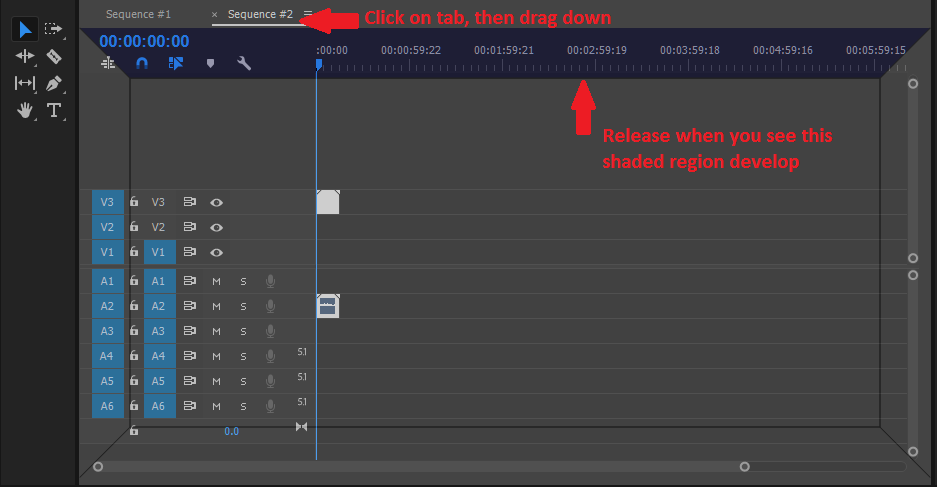
Open up both sequences. Then click and hold on the tab of one of the sequences and drag it down until you see the horizontal snap region, then release.

Copy link to clipboard
Copied
I only have one sequence. I'd like to nest a second timeline within the first so that I can do a shorter cut within the larger version, if that's doable.
And Jim, thanks for the info, but your post is replete with "fed up with rookies" ness. This may all be elementary to an expert but us newbies gotta start somewhere so be careful of over-intellectualizing replies. No offense meant.

Copy link to clipboard
Copied
There are different ways to do what you want.
Perhaps the easiest is to right click on the original sequence in the Project Panel and from the drop down menu choose Duplicate.
Double click on the duplicate to open it in the timeline and start cutting.
MtD
Copy link to clipboard
Copied
Also, if I revise th
e original cut and save it under a different name will it save both versions?
Copy link to clipboard
Copied
Also, if I revise th
e original cut and save it under a different name will it save both versions?
Yes
MtD


Get ready! An upgraded Adobe Community experience is coming in January.
Learn more
 AdChoices