


Copy link to clipboard
Copied
For the past few weeks, Adobe Story has been giving me issues. It gets stuck loading scripts. The first week or so, it would get stuck loading a script, and no matter how many times I refreshed it, it didn't work. So, I'd copy the script, and the copy would work for a few weeks.
Now, nothing opens. No copies, no new documents, nothing opens as it should. Story Classic doesn't open, I cannot download the Story Desktop App, and am stuck. Doesn't matter what browser, what computer, Adobe Story is a broken product that is holding my work hostage. I was lucky enough to have downloaded my current project as an STDOC the last time I used Story, but since it's an Adobe only filetype I can't open it with any other products.
I have projects, with deadlines that I have to follow, and this is ridiculous. Every support person I've talked to has just told me they're pushing the problem to back-end developers, and that I should wait until they contact me.
The last fellow was unable to help me solve ANY of my problems, and when he realized this was the case, abruptly ended the chat.
Has anyone found any workarounds to this issue, or even the ability to open an STDOC in another piece of software?


 1 Correct answer

Hey mdcoxmt & davidoj,
Sorry for your issues!
I'd recommend the following steps:
- Log out from Adobe Story
- Go to your browser settings and delete cookies & cache for Adobe Story
- Make sure Flash & Popups are enabled for Story

- Try using Story in Incognito mode (Chrome) or Private Browsing (Firefox)
If it still doesn't work, launch the classic version of Adobe Story and check if you're able to load the scripts.
Thanks,
Rameez

 5
Replies
5
5
Replies
5

Copy link to clipboard
Copied
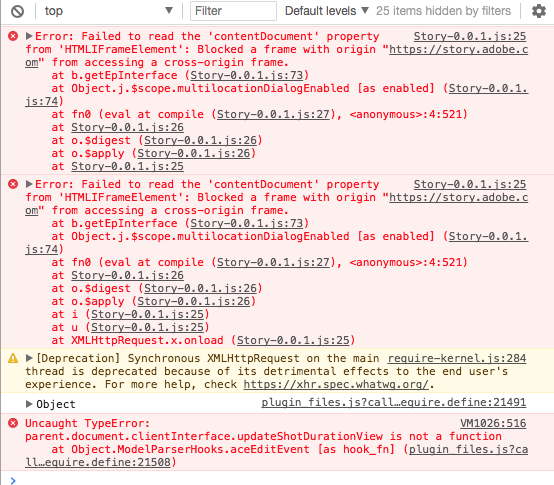
I've attached a screenshot of the console, which I believe is probably relevant information to my problem. This screenshot was taken a few minutes after clicking on a script and having the loading icon pop up.


Copy link to clipboard
Copied
Moving to Adobe Story

Copy link to clipboard
Copied
I'm having the same issue as of a few days ago. When I try to open a script it will get stuck on the loading screen, and then when I try to reload it still won't load AND says the script has ZERO pages. This has been incredibly frustrating and I have tried to load the scripts on many different browsers.
Copy link to clipboard
Copied
Hey mdcoxmt & davidoj,
Sorry for your issues!
I'd recommend the following steps:
- Log out from Adobe Story
- Go to your browser settings and delete cookies & cache for Adobe Story
- Make sure Flash & Popups are enabled for Story

- Try using Story in Incognito mode (Chrome) or Private Browsing (Firefox)
If it still doesn't work, launch the classic version of Adobe Story and check if you're able to load the scripts.
Thanks,
Rameez

Copy link to clipboard
Copied
Hi......could I ask this thread to consider adding a comment in support of keeping Adobe Story going on the following thread? The hope would be that if enough people contributed Adobe may listen.
Thanks
Bill


Get ready! An upgraded Adobe Community experience is coming in January.
Learn more
 AdChoices