



Arrow Keys Nudge Timeline playhead instead of layer in Program Monitor
Using: Premiere Pro 2019
I recently had some issues and was forced to reset preferences and delete all saved workspaces to resolve the issue, but this left me with a new issue as I used to be able to click 'Vector Motion' in Effects Control, and then click the layer inside of the Program Monitor which would then let me 'nudge' the layer using the arrow keys but now everytime I nudge it, it simply nudges the playhead over inside the timeline instead of the layer inside the program monitor.
*I do have the Program Monitor selected and not the Timeline when attemping to nudge*
I can move the layer with mouse pointer as normal, but soon as I try nudge, it goes right back to nudging playhead timeline.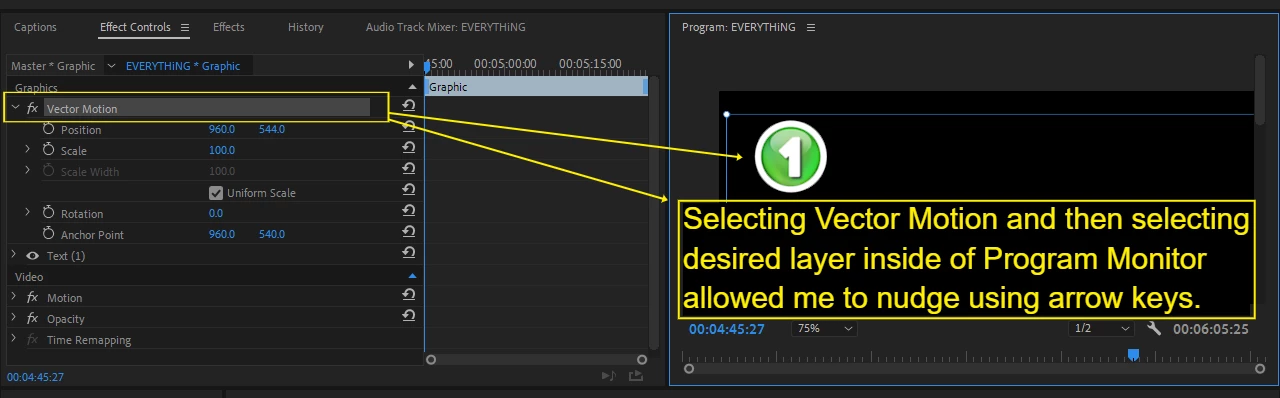
Is this a setting that I need to select in Preferences or Keyboard Shortcuts (as I was also cleaning out a bunch of shortcuts prior to this) to achieve nudge layer inside program monitor?
 AdChoices