Exit
  • Global community
    • Language:
      • Deutsch
      • English
      • Español
      • Français
      • Português
  • 日本語コミュニティ
  • 한국 커뮤니티
0

Border around program and source monitors

Engaged ,
Jan 08, 2017 Jan 08, 2017

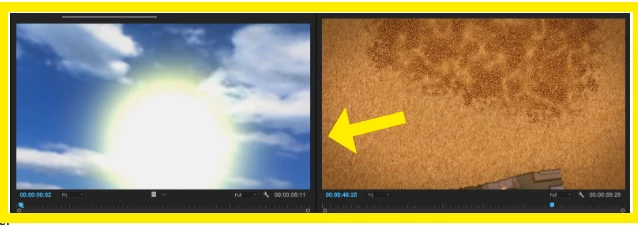
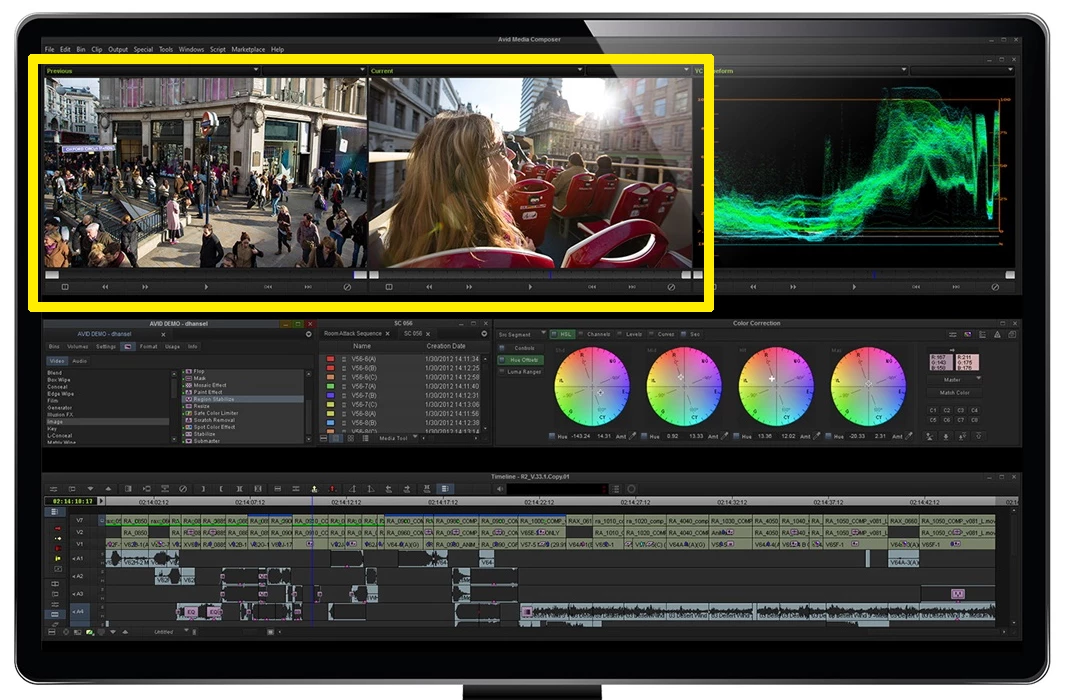
I was trying to set up Premiere like a layout in Resolve and realized that the one difference between this NLE and others (including Avid) is that there is a larger, more definitive border around the Program and Source monitors. This causes one window to begin shrinking long before the other completely fills its space.

It may be only an 1/8" or so on a 1900x1200 monitor, but I can tell you the effect is noticably smaller monitor areas on the main screen when editing.

Am I missing something? is there any way to change this in the program?
1.9K
Translate
Report
Community guidelines
Be kind and respectful, give credit to the original source of content, and search for duplicates before posting. Learn more
community guidelines

correct answers 1 Correct answer

LEGEND , Jan 08, 2017 Jan 08, 2017

OK, so you want to see this:

Screen Shot 2017-01-08 at 3.38.29 PM.png

Instead of this?

Screen Shot 2017-01-08 at 3.38.47 PM.png

I'm not sure that there is a way to control that in the way Premiere displays the monitors.

MtD

Translate
LEGEND ,
Jan 08, 2017 Jan 08, 2017

Can you post a screen shot that shows your issue? I'm not sure i understand what you are asking, in particular:

RESH wrote:

This causes one window to begin shrinking long before the other completely fills its space.

You do have the monitors set to "Fit", correct?

MtD

Translate
Report
Community guidelines
Be kind and respectful, give credit to the original source of content, and search for duplicates before posting. Learn more
community guidelines
Engaged ,
Jan 08, 2017 Jan 08, 2017

Yes they are set to "fit."  I'll attach a shot from my layout. This is as close as I can get these two windows without one resizing. They both have borders around them.

The two links will take you to the other sites. There are shots there about 1/3 of the way down that shows how their two monitors only have a thin line between source and program (you'll have to look around for the editing screen shot.)

BTW, it was different in Pr CS 5.5. I think it is the new design doing this.

www.avid.com/media-composer

www.blackmagicdesign.com/products/davinciresolve

Premiere:space between.JPG

Translate
Report
Community guidelines
Be kind and respectful, give credit to the original source of content, and search for duplicates before posting. Learn more
community guidelines
LEGEND ,
Jan 08, 2017 Jan 08, 2017

OK, so you want to see this:

Screen Shot 2017-01-08 at 3.38.29 PM.png

Instead of this?

Screen Shot 2017-01-08 at 3.38.47 PM.png

I'm not sure that there is a way to control that in the way Premiere displays the monitors.

MtD

Translate
Report
Community guidelines
Be kind and respectful, give credit to the original source of content, and search for duplicates before posting. Learn more
community guidelines
Engaged ,
Jan 08, 2017 Jan 08, 2017

Exactly, MtD.

You can imagine having only those two windows in Media Composer across the top half of your screen with that tiny thin line between them. I had tested Avid on my system and that was the first thing I noticed. The images seemed huge and impressive.

Premiere seems to have these giant borders around their windows that is a waste of screen real estate. Again, I thnk this problem creeped in with the later versions (since 5.5) and the tabs and such.

Guess I'll mark the answer correct since you at least acknowledged what I was seeing.

One other thing, I also noticed that you can't get the two images exactly equal. If you align the top two when resizing your windows you can see that the program monitor is shifted up at the bottom, or it's  just smaller, either way it bothers me.

This really needs to be looked at.

Translate
Report
Community guidelines
Be kind and respectful, give credit to the original source of content, and search for duplicates before posting. Learn more
community guidelines
LEGEND ,
Jan 08, 2017 Jan 08, 2017

File a feature request - you may not get (most likely won't get) a response, but apparently they do read all submissions:

Feature Request/Bug Report Form

MtD

Translate
Report
Community guidelines
Be kind and respectful, give credit to the original source of content, and search for duplicates before posting. Learn more
community guidelines
Engaged ,
Jan 08, 2017 Jan 08, 2017

Guess it's the only resort. Last request took years to implement.

Thanks.

Translate
Report
Community guidelines
Be kind and respectful, give credit to the original source of content, and search for duplicates before posting. Learn more
community guidelines
Engaged ,
Jan 13, 2017 Jan 13, 2017

I guess the oversize border problem appeared in 2017. here are better screen captures from both illustrating the border problem, as well as the two videos being the same height.

PP 2015_4.JPGPP 2017_0_1.JPG

Translate
Report
Community guidelines
Be kind and respectful, give credit to the original source of content, and search for duplicates before posting. Learn more
community guidelines
Engaged ,
Jan 13, 2017 Jan 13, 2017

It wouldn't let me edit the post. But I wanted to add that for the record I have submitted a bug report.

Translate
Report
Community guidelines
Be kind and respectful, give credit to the original source of content, and search for duplicates before posting. Learn more
community guidelines
LEGEND ,
Jan 13, 2017 Jan 13, 2017

Hmmm . . . even FCP-X goes for the zero bezel look:

Screen Shot 2017-01-13 at 4.12.50 PM.png

MtD

Translate
Report
Community guidelines
Be kind and respectful, give credit to the original source of content, and search for duplicates before posting. Learn more
community guidelines
Engaged ,
Jan 13, 2017 Jan 13, 2017

Yeah, that looks so normal (and professional.)

I'd settle for the bigger images alone, but I figure if they can fix the lopsided sizes as well, that would be great.

The bug report doesn't offer the option to upload images. But I'll hold on to these in case they want to see them.

BTW, the first picture is from 2015.0.4, the second is 2017.0.1

Translate
Report
Community guidelines
Be kind and respectful, give credit to the original source of content, and search for duplicates before posting. Learn more
community guidelines
Engaged ,
Jan 14, 2017 Jan 14, 2017
LATEST

Okay, I figured out the two different height problems. You have to set "tabs" both to small, or uncheck both (big) in each panel group setting. One mystery solved.

Now if they can fix the frame back to the way it was in 2015.0.4.

Translate
Report
Community guidelines
Be kind and respectful, give credit to the original source of content, and search for duplicates before posting. Learn more
community guidelines