


Participating Frequently
September 14, 2019
Answered

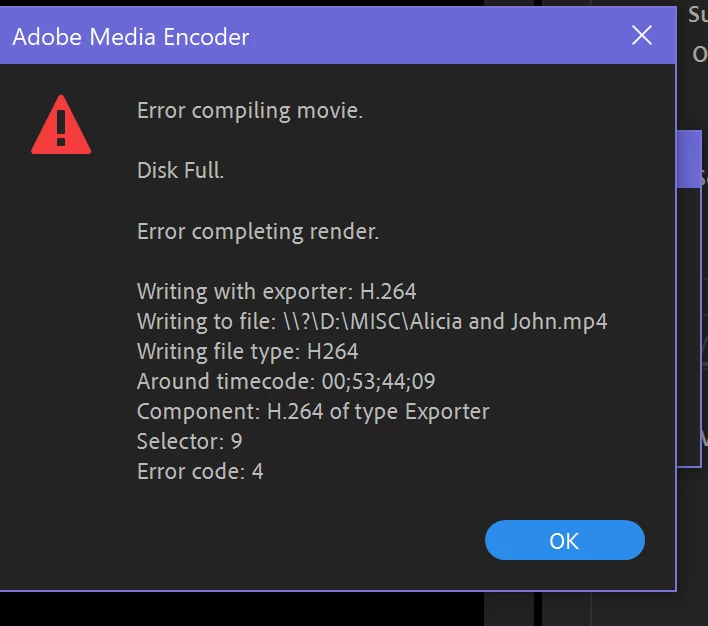
Export error compiling movie disk full

  • September 14, 2019
  • 14 replies
  • 28278 views

I have been getting an error message when trying to export my project out of premier. The rendering progresses to about 50% then the error message appears. I know I have enough disk space as i have tried exporting to several different places, all that have more than enough space. I was able to successfully export the project once as a rough cut but after making changes have not been able to export it. The only major change from the original export is that i applied warp stabilizer to several clips. There seems to be one clip that is causing the prolem. I am able to export clips before and after the clip in question but if i try to export this clip, the progress bar does not show and change even if I let it render for a whole day. Ive tried removing the warp stabilizer from the clip, changing export settings, deleting and adding the clip back to the sequence, and opening the sequence in a new project but nothing has worked. Short of scrapping the whole project and starting from scratch I dont know what else to do. Help!
    Correct answer Kevin-Monahan

    AKG24,

    Sorry. The error at the top of the dialog box indicates the disk is full. Error code: 4 is a "Disk Full" error. My diagnosis is that there is an issue with the disks and that Premiere Pro seems to think that the one selected for export is full. I hope you solved your issue.


    Thanks,
    Kevin

    14 replies

    Participant
    September 9, 2025

    I had been stressing about this issue for days nothing seemed to work. tried everything suggested by random people on the interenet. reddit, youtube, adobe community, you name it. i was about to switch to other editing software but finally the thought of a clean windows installation crossed my mind. I think i had messed up my system by installing a codec. i did a clean windows reinstall and it solved the issue. do it  from settings, windows update option you will have all your data and apps preserved. might take 30 minutes. 

    Peru Bob
    Community Expert
    Community Expert
    September 10, 2025
    quote

     you will have all your data and apps preserved.


    By @Sachin36887180doex


    But you should have backups, just in case of disaster.

    Kevin-Monahan
    Community Manager
    Kevin-MonahanCommunity ManagerCorrect answer
    Community Manager
    February 24, 2022

    AKG24,

    Sorry. The error at the top of the dialog box indicates the disk is full. Error code: 4 is a "Disk Full" error. My diagnosis is that there is an issue with the disks and that Premiere Pro seems to think that the one selected for export is full. I hope you solved your issue.


    Thanks,
    Kevin

    Kevin Monahan - Sr. Community & Engagement Strategist – Pro Video and Audio
    Peru Bob
    Community Expert
    Community Expert
    September 22, 2019

    I have 112 GB free of 237 GB total

    You may need a larger system drive.

    Ann Bens
    Community Expert
    Community Expert
    September 21, 2019

    I will ask again: how full is your system drive.

    AKG24Author
    Participating Frequently
    September 21, 2019
    I have 112 GB free of 237 GB total
    R Neil Haugen
    Legend
    September 21, 2019

    Perhaps try turning off Hardware processing in the Preferences.


    Neil

    Everyone's mileage always varies ...
    R Neil Haugen
    Legend
    September 17, 2019

    For that, I would say basic Cineform or ProRes422 or Lt would work fine as a DI file. Export those clips with "import into project" clicked in that group of items just above the Export/Queue buttons.


    Then replace the clips in the sequence with those new files, save, and try another export.


    Neil

    Everyone's mileage always varies ...
    AKG24Author
    Participating Frequently
    September 21, 2019

    So I have replaced the clips that had warp stabilizer applied to them and I tried exporting the entire project. I am still getting the same error that neither my windows player or VCL can play the clip. The audio exports as a separate MP4 file and will play audio if opened but no video to go along with it. Im exporting the project H.264 format which Ive used successfully in the past. Any thoughts?


    Ann Bens
    Community Expert
    Community Expert
    September 16, 2019

    How full is your system drive?

    R Neil Haugen
    Legend
    September 16, 2019

    Check the clip being an issue. Or Premiere's database is the one with the problem.


    Occasionally the cache files or database itself gets wonky. The first thing to figure out where your cache and cache database files are stored from your Preferences panel. Close Premiere, go to those in Finder or Explorer and delete everything in the folders.


    Reboot the launch Premiere and see if you still have that issue.


    Then, "cut" that clip from the project, save and close. Reopen, and re-import the clip into the project. Do your warp work, and see if it works.


    The Warp effect is built to handle short clips. Longer ones can tax the hardware and software.


    Treat Warp like you treat Dynamic Link comps from After Effects; when you have either the Warp settings or the comp to where they're "done," export/render a clip in your chosen "digital intermediate" format, something like Cineform, ProRes 422, or DNxHD/R, and replace the clip on the sequence with the fully rendered new media.


    Then when it's time to export your deliverable, that export is much faster as it doesn't have to compute the Warp or the Comp. And ... you get fewer issues with exports failing.


    Neil

    Everyone's mileage always varies ...
    AKG24Author
    Participating Frequently
    September 17, 2019
    Thanks for the information, it has been very helpful. So, I was finally able to export the whole project but I think you are right, warp stabilizer is causing export to fail because when I export the project I am not able to open it with any media player (windows or VLC). So my next plan is to do as you suggested and export the clips that have warp stabilizer into a digital intermediate. Im not very familiar with these digital intermediate forms, so my question is: is there one you recommend over others, I know it depends on what I plan on using my final project for so heres a quick synopsis: Project is a recording of a wedding and it will only be used as a personal wedding video for the bride and groom.
    AKG24Author
    Participating Frequently
    September 16, 2019

    I am using an external drive that has a total free memory of 244 GB. The expected file size after exportation is about 6000 MB. 

    R Neil Haugen
    Legend
    September 16, 2019

    Then I would go towards that one clip being an issue.

    Everyone's mileage always varies ...
    R Neil Haugen
    Legend
    September 14, 2019

    Is that storage available after accounting for project size and everything? It's the total free versus expected file-size that I'm asking about.


    Neil

    Everyone's mileage always varies ...