

Community Manager
May 22, 2020
Answered

FAQ: How to solve crash while using Export Settings in Premiere Pro v. 14.2?

  • May 22, 2020
  • 18 replies
  • 79899 views

Update: This issue has been fixed in Premiere Pro v14.3. Please download the latest update from the Creative Cloud Desktop app. 


We are investigating an issue where Premiere Pro v14.2 might crash or get in a non-responsive state while using the Export Settings window. This issue has been observed on systems using NVIDIA GPU not supporting NVENC. If you are using such GPUs and experiencing a crash or freeze while using the H.264/H.265 format, please follow these steps to fix it.


Navigate to Premiere Pro Preferences > Media and uncheck Enable hardware accelerated encoding and decoding. Restart Premiere Pro and try to export.
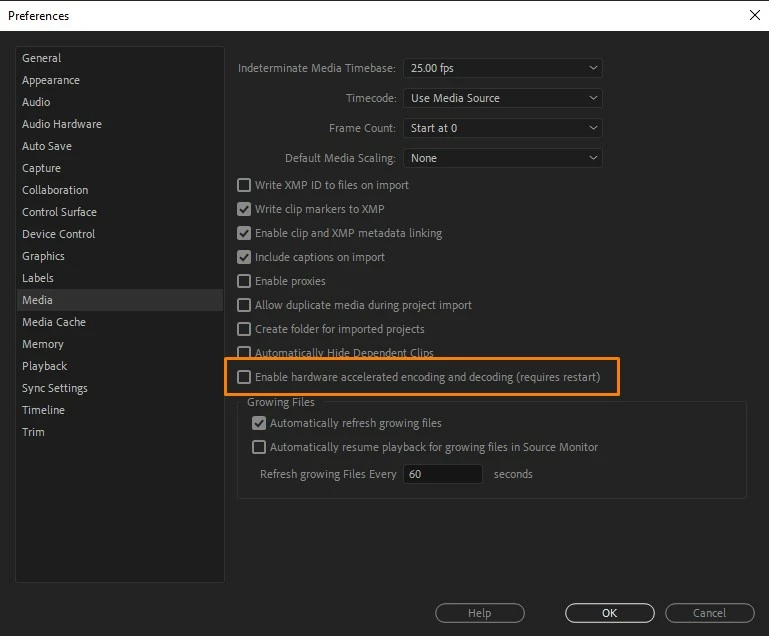
 

Hope it helps. If you are experiencing a crash while exporting with any other format/codec, please create a new community discussion and we will get that issue checked. 


Thanks, 

Sumeet



Correct answer Kevin-Monahan

Hi,

For those of you experiencing the issue brought up in this FAQ, take note! Please create a new post for your version of Premiere Pro. This post is already almost 2 years old!

Thanks,
Kevin

18 replies

Kevin-Monahan
Community Manager
Kevin-MonahanCommunity ManagerCorrect answer
Community Manager
January 13, 2022

Hi,

For those of you experiencing the issue brought up in this FAQ, take note! Please create a new post for your version of Premiere Pro. This post is already almost 2 years old!

Thanks,
Kevin

Kevin Monahan - Sr. Community & Engagement Strategist – Pro Video and Audio
RRCycling
Participant
August 3, 2021

Nope. Trying to export a 360 video edit and PP and Media Encoder always freezes my pc and I have to hard restart. I have not been successful in rendering a 360 video yet.

Participant
July 20, 2021

The problem is definetly not solved - also appears in V15.2.


Found a work around. I am exporting in Quicktime and then using a converting tool and convert the film to H.264 (mp4). Not a good solution, but for exporting previews of movies worked fine. 


Kevin-Monahan
Community Manager
Community Manager
January 13, 2022

Wolfgang,

Something is amiss with your GPU, more than likely. I would try Software Encoding. Next time, please include system info so we can help.


Thanks,
Kevin

Kevin Monahan - Sr. Community & Engagement Strategist – Pro Video and Audio
Participant
February 7, 2021

Just downloaded the latest version and it's still happening in 14.8 as another user reported. For me, it tends to freeze on export around 60-80% completion. I didn't have this problem until recently, so I'm wondering if it's due to another driver update not being compatible with Premiere. Who knows. Either way, I can no longer export, which renders the software completely useless.

Participant
February 7, 2021

Forgot to mention another gem with this bug: If I force-quit Premiere after it freezes during export, then reopen and try to go to File > Export > Media, the export window never opens. Essentially, until I restart my computer, I can't even get back into the Export options. FIX THIS ADOBE.

Participant
February 7, 2021

Apologies for all the updates. I did figure out a really dumb workaround for the issue with the Export window not appearing. If you select the Timeline pane first, apparently THEN the window will appear. How stupid.

Known Participant
January 20, 2021

Solution works, but Problem still persists at 14.8. 

Known Participant
January 21, 2021

Well,


Worked for a bit....then it started crashing again. Searched the forums and switched the Gaming Ready Drivers for the Studio Drives. Solved the problem apparently. 

Participant
January 14, 2021

I have just started experiencing app crashes on export after installing the latest Nvidia drivers with Premiere Pro 14.6 build 51.

Updating Premiere and Adobe Media encoder resolved the issue for me.

Specs:
Windows 10 Pro 19042

Intel i7-8700K @ 4.5Ghz

GTX 1080ti

32GB RAM @ 3200Mhz

Boot disk is 1TB Samsung Evo 970 Plus

Secondary disk is 500GB Samsung 970 Evo


Participant
January 14, 2021

Edit: The freezing is still occurring, just later on the encoding process. (14% instead of 4%)

Will try out some further troublehsooting and update if I find a solution


Participant
January 17, 2021

Software rendering is working for now, but I'm still unable to export using hardware rendering.

radimd81658090
Participant
January 12, 2021

In my case, the error went back in version 14.7 and 14.8, maybe new NVidia drivers cause this problem?

Participant
January 11, 2021

its working..thanks for this info..

Participant
December 29, 2020

Chiming in the thread, as I was experiencing the same issue a few days ago. Using PP latest version. I was exporting a 5min film, using H.264 codec at 4K. Video kept crashing right before it was done exporting and it would take forever before it even got there. I have a 2019 Macbook Pro 

2.4 GHz 8-Core Intel Core i9 

Intel UHD Graphics 630 1536 MB and 32 GB of memory  2667 MHz DDR4.

Tried exporting to other codecs and formats to see if maybe it was happening only on the H.264 but same thing kept happening. Crashed towards the end of the export process.  So here's a little workaround that worked for me as I was on a time crunch to deliver the film. I exported just the video as Apple Prores LT, in 2 seperate parts (no audio). Then brought in the 2 prores quicktime files into a new sequence, put them together along with the audio mix file. And then proceeded to export that as an H.264 and that worked. Not sure what the bug is but it was very frustarting wasting half a day just on failed exports, not to mention the stress of having to deliver. Hope this workaround helps as it did for me! 

account closed
Participating Frequently
December 29, 2020

Yeah, I solved it through a similar approach, just separating audio and video rendering and putting htem together later on. Allthough I need to add, that I have not experienced any issues since the last update.

Participant
December 10, 2020

Just thought I'd add my info to the mix as I'm currently experiencing this issue and I have the latest version. I always know when an update is ready as things stop working as they should, lightroom, photoshop and PP all the same. However the update usually fixes those 'issues', not this time! this may speed up my transition to Davinci!

Known Participant
December 10, 2020

I had many issues with Premiere this year and I'm trying Final Cut Pro X now. We have 90 days to try it. I'm loving it. I always used Premiere Pro and After Effects, and never used other editing app. I think i'm much faster editing in FCP.  I'll be using Photoshop and Lightroom for photos and FCP for editing...