



Community Manager
March 23, 2021
Answered

FAQ: How to solve preview issue (red/blue tint) with Canon C300 MKII MXF files in Premiere Pro 15.0?

  • March 23, 2021
  • 13 replies
  • 9926 views

Update: This issue is being addressed in our Beta releases and will be available in a future stable release. You may download the latest Beta build from the Creative Cloud Desktop app. Refer to this link to know more about Adobe Creative Cloud Beta.


We are investigating an issue with Premiere Pro v15.0 where the MXF files from Canon C300 Mark II show red/blue tint when previewed in the Source/Program monitor. The issue seems to be related to incorrect interpretation of channels. We are working on getting this issue sorted in a future release.
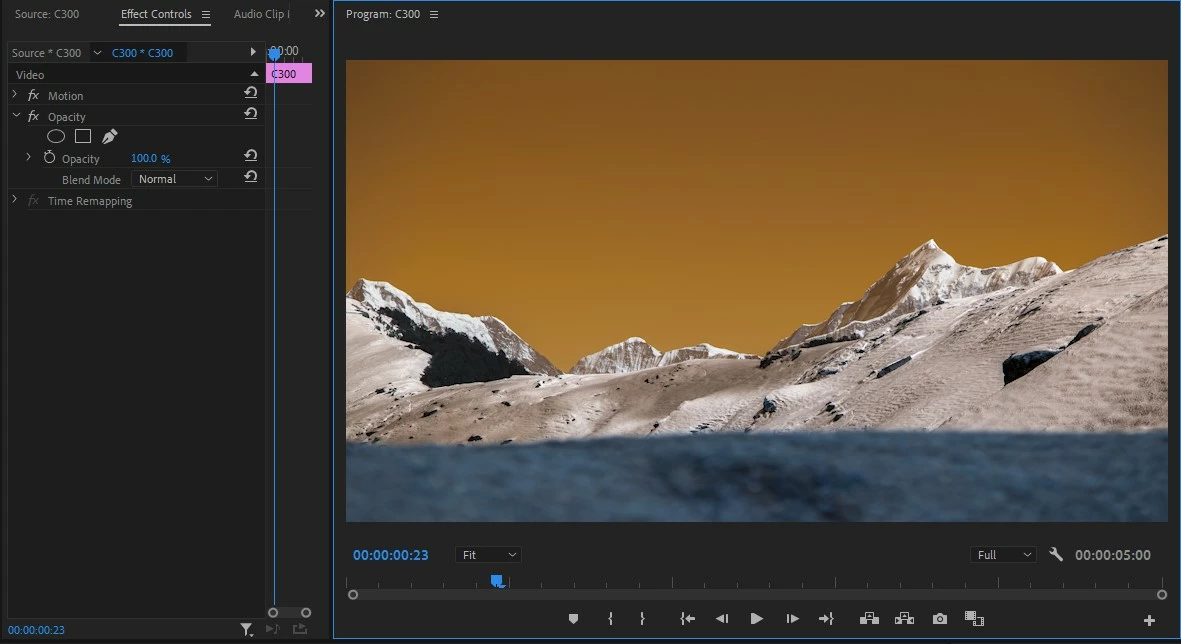
For the time being, you may try these steps to restore the correct preview.

  • Apply Channel Mixer effect (Effects > Obsolete > Channel Mixer) to the MXF clips affected by this issue
  • Highlight the clip & navigate to the Effect Controls panel
  • Under Channel Mixer apply these values
    Red-Red 0
    Red-Blue 100
    Blue-Red 100
    Blue-Blue 0

This should restore the correct preview.
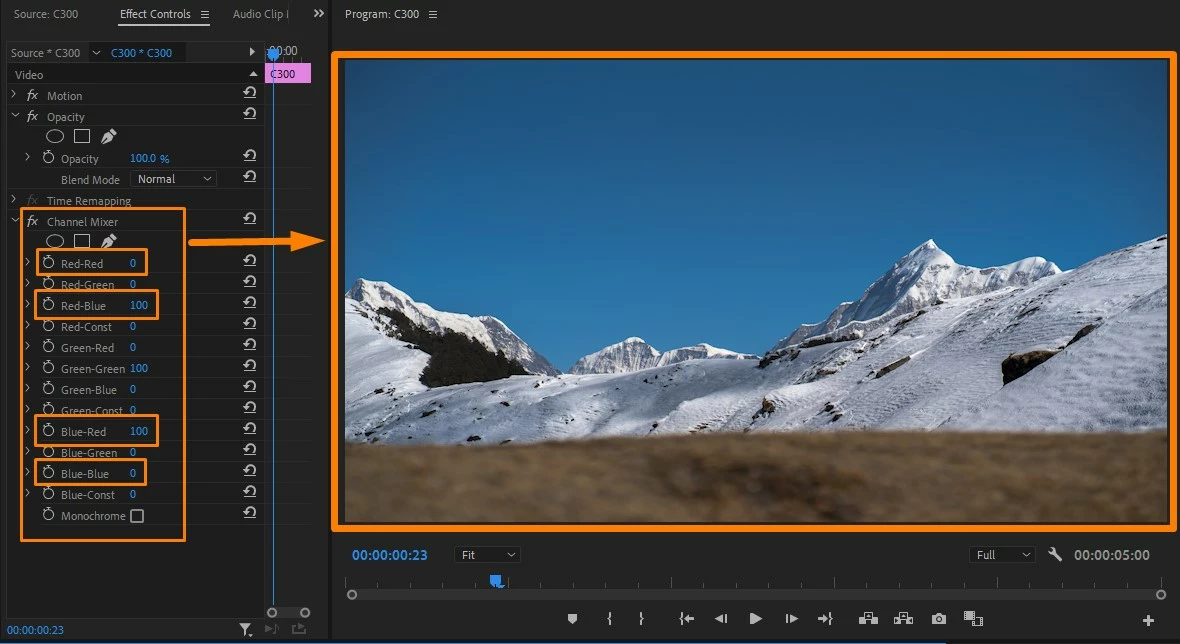
Note: Please remember to remove the Channel Mixer effect from the clips once the bug fix is released.


Hope this helps in solving the issue. Let us know if you have any questions.


Thanks,
Sumeet

This topic has been closed for replies.
Correct answer Sumeet Kumar Choubey

Hi everyone,


This issue has been fixed in the latest version of Premiere Pro (v15.2). You may download the latest version of Premiere Pro from the Creative Cloud Desktop app. Hope it helps.


Thanks,
Sumeet

13 replies

andreib60858568
Participant
March 26, 2021

Dear Sumeet, thank you for the workaround. But I take it, this workaround as a temporary cosmetic solution. As soon as a fix is there, I'd have to redo proxies on a larger project and this would take a lot of time. Can you estimate how long before an update where this gets fixed? Thank you.

Participant
March 25, 2021

This makes the new version completely unusable to me since most of my projects over the last couple of years were shot on this camera. Is there any timeline for a fix for this issue through firmware? I am not willing to go in and add Channel mixer to all of my clips in all of my projects.


Participant
March 23, 2021

Thank you very much! This solved my problem where green-screen footage shot C300 MKII in 12bit in 4:4:4:4 on a green screen was showing blue skin tones (smurf-like) but yet the green was fine. Please keep us updated when this is resolved.


Participant
April 19, 2021

Hello Adobe Support!
With the previous version of Adobe Premiere, there's an ongoing issue where video shot with Canon EOS C300 MK II doesn't display the color channels correctly. I'm well aware of the fix Adobe has found to apply the Channel Mixer filter with the following parameters:


Red-Red 0
Red-Blue 100
Blue-Red 100
Blue-Blue 0


https://community.adobe.com/t5/premiere-pro/faq-how-to-solve-preview-issue-red-blue-tint-with-canon-c300-mkii-mxf-files-in-premiere-pro-15-0/m-p/11920896


However, as a long-term solution, this doesn't work and has workflow issues. Especially for those whose projects are exclusively shot with this camera. Is there a solution to this in the latest release, OR can we expect this to be resolved in a future update soon?


(To those experiencing this issue, what I have found is to make an adjustment layer and apply the Channel Mixer settings to it, and then put your affected C300 video clips below it. Still allows you to work with the native clips, and apply Lumetri color correction to the clips themselves and/or to an adjustment layer on top as well.)


Charlie Forbes

Kevin-Monahan
Community Manager
Community Manager
April 19, 2021

Hi Charlie,

Sorry about that. We are addressing this bug right now. We in support cannot ever say when something will be fixed or addressed. That said, you can always try the Beta version to see if the fix is coming in the upcoming version or not. Hope that helps.


Thanks,
Kevin

Kevin Monahan - Sr. Community & Engagement Strategist – Pro Video and Audio