


- Home
- Premiere Pro
- Discussions
- Re: GPUsniffer.exe will not accept my GeForce GTX ...
- Re: GPUsniffer.exe will not accept my GeForce GTX ...

Copy link to clipboard
Copied
I updated my GPU drivers since the 296.10 version is over a year old, but the Mercury playback hack wouldnt work anymore. I was going bonkers all day today trying to troubleshoot the issue. I uninstaleld and reinstalled a bunch of times. GPUsniffer would give the notice that it "did not find any devices that support GPU computation". I went back to the old drivers and sure enough, GPUsniffer would detect it.
I wanted to make this post for people googling issues with the hack involving the cuda_supported_cards.txt file involving CUDA enabled GeForce cards that aren't officially approved by Adobe, and also so the engineers at Adobe can maybe look into their end to see if its the GPUsniffer.exe that is the problem with not being able to detect the drivers, or maybe it's Nvidia's problem on their end that the drivers can't be detected. At least you guys can talk to one another to straighten things out.


 1 Correct answer

I have a 560 Ti running the 314.07 drivers and I use hardware MPE. I don't bother with GPUSniffer any more -- I just delete the cuda_supported_cards.txt file. Pr doesn't skip a beat and I get all of its CUDA goodness.
Jeff

 19
Replies
19
19
Replies
19


Copy link to clipboard
Copied
Since this is a user to user forum, with only sporadic postings by Adobe staff, you should file a bug report
https://www.adobe.com/cfusion/mmform/index.cfm?name=wishform
Copy link to clipboard
Copied
I have a 560 Ti running the 314.07 drivers and I use hardware MPE. I don't bother with GPUSniffer any more -- I just delete the cuda_supported_cards.txt file. Pr doesn't skip a beat and I get all of its CUDA goodness.
Jeff

Copy link to clipboard
Copied
why dont you paste your gpusniffer results and your cuda.txt file in here for us to see. 99% of the time it is a typo in the txt file.

Copy link to clipboard
Copied
I also use a 560 Ti, and all drivers have worked no problems. This isn't an nVidia or PP issue, something on your machine got wonky.
Copy link to clipboard
Copied
OK guys, i just went ahead and made a video showing you exactly what I'm doing and what happens with new and old drivers installed. You'll see that the new drivers simply do not work with everything else necessary to make the hack work remaining constant. In the middle of the video you might want to skip through since there's a long spot where the old drivers are installed.
I'm totally open to the fact that something could still be wrong on my end, but what can it be when this video shows the only difference between it working and not is clearly a driver change??
Copy link to clipboard
Copied
something could still be wrong on my end, but what can it be
I'm stumped on this myself. I only know that it normally does work. I just don't have any ideas about why it isn't for you.
I don't know how this might tie in, but I've never used GPUsniffer, or changed any of the nVidia settings. Simply adding the card to the text file has always worked. Maybe you've changed something in the nVidia settings that makes a difference.
Copy link to clipboard
Copied
The only thing I changed in the Nvidia side of things was selecting the premiere exe and setting the multi display acceleration to compatability mode as had been adivsed in many articles and videos explaining the hack. I have been tweaking those settings back and forth with the new drivers but they do nothing either.

Copy link to clipboard
Copied
i have a gtx 650 ti with the driver 314.14-desktop-win8-win7-winvista-64bit-international-beta but not work in cuda how to know if is working? i made a screen of gpusniffer but is diferent the answer some sugestion??? thanks
Copy link to clipboard
Copied
You know if it's working by checking the PP settings.
Copy link to clipboard
Copied
Sorry but now that i seed that i put the gpusniffer of after effects, in premiere is this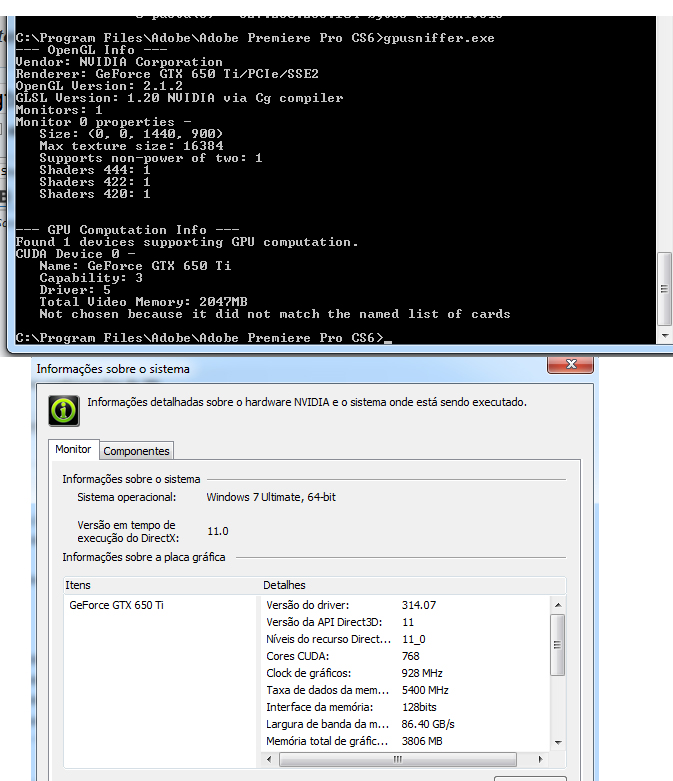 some sugestion???? thanks!!!
Copy link to clipboard
Copied
Just delete the cuda_supported_cards.txt file and you'll be good to go.
Jeff
Copy link to clipboard
Copied
Yes!!! realy now is working!!! thanks!!!!!!
Copy link to clipboard
Copied
You're welcome. 
Jeff

Copy link to clipboard
Copied
Hello,
I have followed this thread and I amd still not able to change the default player, only the Adobe Player is shown. When I use GPUSniffer the GeForce GTX 760 card is detected. I added the card to the cuda_supported_cards.txt that didn't work. I renamed the cuda_supported_cards.txt file, that didn't solve the problem. When I start Premiere Pro (CS5) I can choose "Mercury Playback Engine GPU Acceleration from the Video Rendering and Playback Renderer drop down. The driver is version 327.23, there is no newer driver available.
Can any suggest why I cannot set the player to the video card?
TIA,
Lou
Copy link to clipboard
Copied
You're talking two different things here. The Player used has nothing to do with hardware acceleration. You can just leave it at Adobe Player.

Copy link to clipboard
Copied
can i get a walk through on how to do this? i have a GTX 750ti and am having this issue all of a sudden.

Copy link to clipboard
Copied
Hi Jeff, apologies for resurrecting an old thread but could you point me to the location of the, cuda_supported_cards.txt please.
Many thanks

Copy link to clipboard
Copied
@peneau this is a very old thread: the cuda_supported_cards.txt does not exist anymore.
Jeff is no longer an Adobe software user.
Copy link to clipboard
Copied


Find more inspiration, events, and resources on the new Adobe Community
Explore Now
 AdChoices