


New Participant
January 30, 2018
Question

Import Error (Error 99) While Compiling Movie

  • January 30, 2018
  • 4 replies
  • 4955 views

Here is a screenshot of the error message I am getting:
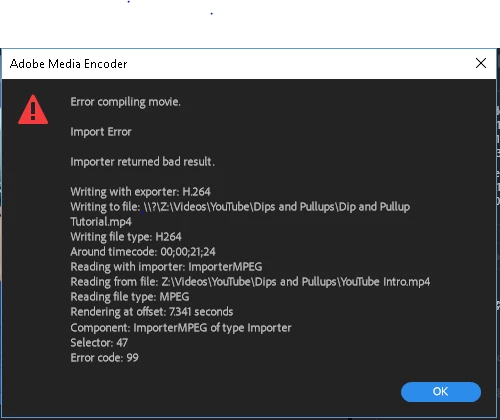
I have looked through many of the solved forums and tried the various solutions, with only one working (but resulting in a huge quality drop).
When I pull up Sequence Settings and un-check the box for "Composite in Linear Color," and set the FPS to 25 or lower, it works. The issue is the tremendous decrease in quality. This is true for any project where I have the file referenced, and when I remove said file from the project, I no longer get this error and can export at whatever FPS I desire. I do the checks by Rendering In/Out as that aligns with whether or not the export works. So, it's obviously an issue with that one file.


HOWEVER, my business partner is able to export the same projects at the default settings (so the higher quality is maintained and he doesn't have to do any of the workarounds) despite using the same file and pulling it from the same location (we store the files in a shared cloud hard drive) and doing so on a laptop with less RAM and processing speed.


Here are the properties of the file. It is 9.24 MB and is an MP4 file.
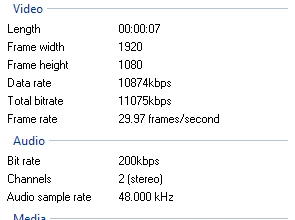
To sum it up, I'm trying to pinpoint what is causing this file to cause issue for me while not causing an issue for the other person exporting projects with this file in it.

This topic has been closed for replies.

4 replies

New Participant
November 19, 2019

Hi, has anybody solved this yet? 


I’ve got the same exact problem. On a MacBook Pro with the following specs.


Generous_enthusiast5EBD
Participating Frequently
July 15, 2018

I figured it out. (At least in my case - Error 99)

1. First of all, try to reimport all of the footage.

2. If that doesn't help then you have to figure out which part of the video is causing the render error.

3. Create a "pre-rendering" in your timeline and look for the error. If you found the video/footage that's causing the error you have to rerender it into a MOV file in a different program.

4. Then delete the "error footage" and replace it with the new one.

Now everything should work fine!

R Neil Haugen
Brainiac
January 30, 2018

I think you've got some corruption in the media cache/cache database for that file. Try removing it from the project, entirely ... close PrPro, dump your media cache/cache database files, restart PrPro, and re-import the file then after it's got a chance to conform, try using it back on your sequences.

Neil

Everyone's mileage always varies ...
Brainiac
January 30, 2018

This is true for any project where I have the file referenced,

What does that mean?

AJW47Author
New Participant
January 30, 2018

Hey, sorry for the unclear wording; I mean in any project where I am using that file.

Brainiac
January 31, 2018

If Neil's advice doesn't solve the issue, try renaming the file with Premiere Pro closed.

Still no joy?  Try transcoding to a new Cineform file using AME.