easygoing_idea1549
Inspiring
March 26, 2019
Answered

Interlaced Confusion

  • March 26, 2019
  • 1 reply
  • 2334 views

Hello everyone,

this discussion is related to my other question here.

As i explained in my other discussion, some time ago i did a project with all kinds of interlaced and progressive footage, delivery format was MXF OP1a XDCAM HD 50 PAL 50i. The Project came back from quality check because of stuttering in Lower Field First footage.

What kind of startles me is: i did some tests yesterday and found that when i leave "Modify> Interpret Footage" on lower, put it in a Progressive Sequence and render to Upper Field MXF, the Stutter is gone. Also, when i conform the Lower Field Footage to Upper Field, put in an Upper or Progressive sequence and render to Upper MXF, its gone too... Only when i leave the footage to be interpreted as it is (Lower), put it in an Upper Sequence and render to Upper MXF (which should be the correct way to work, by my logic), the stutter appears. Can someone please try to explain to me whats going on?

How would you guys handle this? If you have to work with all three kinds of interlaced-progressive Footage in many different codecs and formats? Would you always set the sequence to the final delivery format? And go through every single shot and conform it to that format? Or would you rather work with a progressive sequence?

I would be most thankful for any tipps and insights,

Thanks!

iMac (Retina 5K, 27-inch, Late 2015)

4GHz Intel Core i7

24GB 1600 MHz DDR3

AMD Radeon R9 M395X 4096MB

MacOS 10.11.6

Premiere Pro CC 12.1.2

This topic has been closed for replies.
Correct answer Averdahl

Assuming that the most source footage is Upper Field First (UFF) i would have done this:

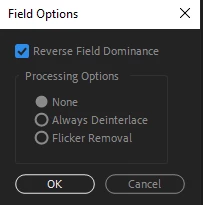
Edit everything in a UFF timeline. Leave the progressive footage untouched, dont use Interpret Footage. With clips that are LFF, don´t use Interpret Footage. When LFF clips are on a UFF timeline, right click on the LFF clip and choose Field Options and tick Reverse Field Dominance and click OK. It is possible to select multiple clips at once so it can be changed quickly. This should get the job done.

The Interpret Footage feature should only be used when Premiere Pro fails to interpret the field order of a clip correctly since it will not automagically change from LFF to UFF without issues.

1 reply

Averdahl
Community Expert
AverdahlCommunity ExpertCorrect answer
Community Expert
March 26, 2019

Assuming that the most source footage is Upper Field First (UFF) i would have done this:

Edit everything in a UFF timeline. Leave the progressive footage untouched, dont use Interpret Footage. With clips that are LFF, don´t use Interpret Footage. When LFF clips are on a UFF timeline, right click on the LFF clip and choose Field Options and tick Reverse Field Dominance and click OK. It is possible to select multiple clips at once so it can be changed quickly. This should get the job done.

The Interpret Footage feature should only be used when Premiere Pro fails to interpret the field order of a clip correctly since it will not automagically change from LFF to UFF without issues.

easygoing_idea1549
Inspiring
March 26, 2019

Averdahl​ Thank you so much, i did not know that! Do you know After Effects as well? Is there a "Reverse Field Dominance" Option too? I always use interpret footage in AE when i have to change Field order, so i assumed it was the same in PP...

Does it happen to you often, that PP misinterprets Field Order? Because in above mentioned Project i suspect that it did, because some Clips on the same Card are marked Progressive, others UFF, and the camera operator says he didn't change settings. Also, on one Clip where PP says its Progressive i did a time reverse and got said stuttering. When i interpreted to UFF, the Stutter was gone. But if the Footage would really be progressive, shouldn't it be no matter, if i time reverse it or not? (This was in an UFF Sequence.)

Also, since you obviously know what you are talking about, would you please be so kind and take a look at my other question here?

This matter is even more pressing...

Thanks again for your help!

Averdahl
Community Expert
Community Expert
March 26, 2019

Do you know After Effects as well? Is there a "Reverse Field Dominance" Option too? I always use interpret footage in AE when i have to change Field order, so i assumed it was the same in PP...

I have worked not with mixed field orders in After Effects, so i don´t know how After Effects handle it. From the testings i just did it seems that After Effects handle this in a different way. Someone with better knowledge in After Effects might chime in with more details.

Does it happen to you often, that PP misinterprets Field Order?

It happens from time to time. I have DV clips captured with a Intensity card from Blackmagic Design and they are UFF but Premiere Pro has for years imported those clips either as LFF or progressive.

There are three vital things to know in order to reduce the risk at exporting stuttering footage. Know the field order of the footage, edit the footage in a timeline that matches the field order of the source footage, export using the same field order as the source footage and the timeline. If all three matches everything will look as expected. If one or more parameters deviates from each other, the exported footage will stutter.