


Participant
June 27, 2020
Answered

Lumetri-Color LUTs are glitching

  • June 27, 2020
  • 2 replies
  • 1674 views

Recently I was using Lumetri-Color to do simple color-grading for my project. After starting the project later, the complete image was glitched in the upper part. I just realised that all my footage was glitched like that when I was using the LUT-Function in Lumetri-Color. When I turn off the effect in the Effects Panel the glitches disappear. Even if I start new projects it's the same. It makes no difference which LUT I am using. 


In addition I noticed that the glitch-effect is increasing when I reduce the opacity of the LUT. When I use a opacity of 100% it seems like the glitches are gone. Anybody know this bug and how to deal with it? Thank you for your attention. Pax
 

This topic has been closed for replies.
Correct answer Neiolytic

I made a video about it and how I resolved it.. for now.

Here's the video if you need a step by setp guide: https://youtu.be/PZDEOyxz-Vc

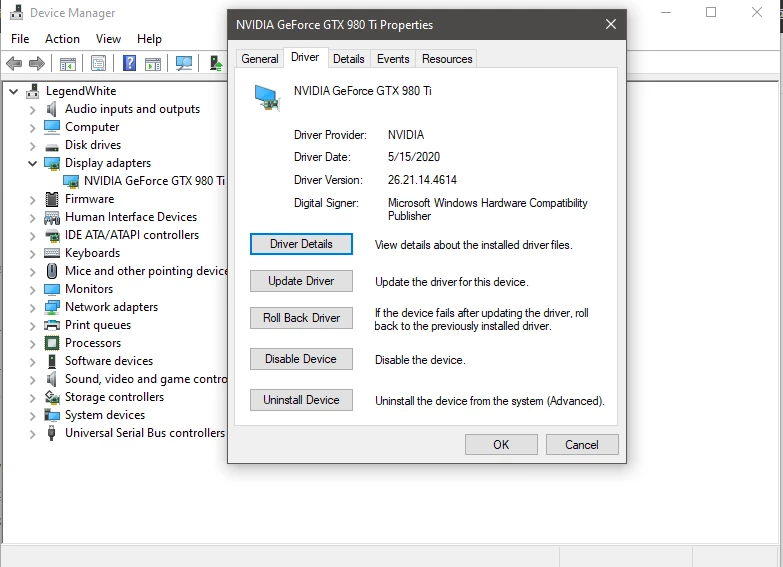
but pretty much to summarize what I did on the video, I uninstalled the GPU driver and reinstalled an older version of it. 

You can also try to rollback your GPU driver if it's not grayed-out for you 


It was grayed out on my side when I was trying to fix this issue so I had to do whatever's on the youtube link.

Hope this solves your isssue.

2 replies

NeiolyticCorrect answer
Participant
June 30, 2020

I made a video about it and how I resolved it.. for now.

Here's the video if you need a step by setp guide: https://youtu.be/PZDEOyxz-Vc

but pretty much to summarize what I did on the video, I uninstalled the GPU driver and reinstalled an older version of it. 

You can also try to rollback your GPU driver if it's not grayed-out for you 


It was grayed out on my side when I was trying to fix this issue so I had to do whatever's on the youtube link.

Hope this solves your isssue.

Pax93Author
Participant
July 1, 2020

Thank you for your video! It was working after the rollback of my GPU driver of Nvidia. This video will help many users (y)

R Neil Haugen
Legend
June 28, 2020

That's an issue with the latest Nvidia drivers for the GPU. Roll back a version or two of the driver until it works. Nvidia's latest drivers have been problematic across video applications.


Neil

Everyone's mileage always varies ...