Participant
June 23, 2020
Question

Markers not scaling with frame when I use Time remapping

  • June 23, 2020
  • 4 replies
  • 1958 views

I hope I can get a response because this problem is driving me insane and if there's no fix then that's very inconvenient for me.


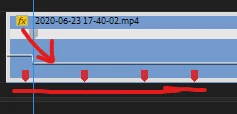
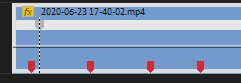
Basically, I have these markers on my videos (on the timeline) to match very specific frames.

However, when I try to time remap using the Time Remapping tool, my markers stay in the same location but my frames are moving elsewhere on the timeline as the video extends.

I will attach some screenshots to hopefully better describe it.
 

This topic has been closed for replies.

4 replies

Participant
June 15, 2022

same problem with me pls help

Graeme Bull
Community Expert
Community Expert
June 23, 2020

What you're seeing are markers on the sequence, those don't change as your sequence hasn't changed, just the clip in it. So, modifying the speed of the clip will not shift them at all I don't believe.

goguvarra
Known Participant
July 17, 2023

no, he is using clip markers. They should move with the speed change and they do, just not when using time remapping

You are correct that sequence markers would not move because those do not live on the clip itself but "above" on the timeline.

Ann Bens
Community Expert
Community Expert
June 23, 2020

That is correct. Timeremapping only affects a small portion of a clip.

If you were to change the duration of a clip then yes the markers would move as the speed change affects the entire clip.

goguvarra
Known Participant
July 17, 2023

So you are saying that if I use time remapping to speed up a clip to 200% the clip markers would not move. And I'm not talking about a portion of a clip, it does this even if only use one keyframe for the time remapping effect.

But if I use the "speed/duration" dialog box and put the same 200% speed they would move. 

How does this make sense? I would assume premiere would calculate the length change of the clip with the remapping effect and move the clip accordingly. Is this so hard?

It is very annoying

Ann Bens
Community Expert
Community Expert
June 23, 2020


Do NOT add images via the "attach files" box, as you are then forcing everyone to DOWNLOAD the file to view it outside their browser. Drag/drop the image files directly ONTO your reply box so other users can see them without needing to download unknown strange files.

Participant
June 23, 2020

done

Participant
June 15, 2022

bro did you get solution im also suffering from this problem